

 EDCD
EDCD
No longer shows nice icon on taskbar.
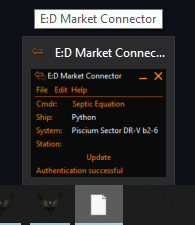

What your bug report doesn't do is provide any of the information asked for in the Bug Report Template.
This is working fine for me (literally just tested it) on Windows 10 Home 20H2, with all June 2021 updates. So what OS, version and updates are you running ?
I do wonder if it might be related to #387

The only fix is to make a shortcut to the exe on my desktop. Removing that shortcut reverts back to the start menu shortcut showing what I mentioned before.
This is the most weird interaction since while the shortcut is on my desktop the start menu one works fine with showing the correct icon.
I really dislike this fix due to liking a clean empty desktop :(
Update: Deleting and replacing the shortcut in the C:\ProgramData\Microsoft\Windows\Start Menu\Programs directory fixed the problem and my clean desktop :D
The only fix is to make a shortcut to the exe on my desktop. Removing that shortcut reverts back to the start menu shortcut showing what I mentioned before.
This is the most weird interaction since while the shortcut is on my desktop the start menu one works fine with showing the correct icon.
I really dislike this fix due to liking a clean empty desktop :(
Update: Deleting and replacing the shortcut in the C:\ProgramData\Microsoft\Windows\Start Menu\Programs directory fixed the problem and my clean desktop :D
Ah yes, I do have a shortcut for EDMarketConnector.exe on my desktop. I think it's a manually made user-specific one.
At some stage I'll entirely redo the installer from scratch to be sure I consider all the options, and it might address this. But that's low priority.
I get this after every EDMC upgrade. Its a minor annoyance. I usually just remove it and then re-add it

@NoFoolLikeOne Please let me know if this issue persists, as we've just handed over our installer logic to a new system.

Closing as fixed by the new installer logic. If this is not the case, please open a new ticket and I'll gladly look into it!