

 DotBow
Auto-Update and Auto-Delete options for Daily Builds
Is your feature request related to a problem? Please describe. So I often download daily blender builds and right now the launcher just stores them as a new blender every time.
Describe the solution you'd like Instead of 5 2.92 Alpha builds with different dates it would be much better to have a single daily 2.92 build with an auto-update option. Basically for daily builds I would like the launcher to auto-update the build and delete older daily builds for me.
Describe alternatives you've considered Deleting older daily builds by hand, which defeats the point of having a launcher

Hi! This is frequently asked feature, but no one proposing a design. How it should work? How to select which builds will be loaded (Alpha, Beta etc)? How it will be integrated into interface?

Hi! This is frequently asked feature, but no one proposing a design. How it should work? How to select which builds will be loaded (Alpha, Beta etc)? How it will be integrated into interface?
Perhaps just choosing which current version(2.9*) to update in auto mode.

Hi! This is frequently asked feature, but no one proposing a design. How it should work? How to select which builds will be loaded (Alpha, Beta etc)? How it will be integrated into interface?
Perhaps just choosing which current version(2.9*) to update in auto mode.
Anyway, I need to release 1.10 because I already put too much work into it. It got so many changes that I need to rewrite most of the documentation, hard times... Thanks for feedback by the way!
 For a first iteration, I am honestly fine with a checkbox in place of a "favorite" star. The way I see the logic of this is as follows:
- You download first build with the version you want manually - be it daily master or experimental branch
- You tick auto-update checkbox
- Now, every time you launch Blender Launcher, it checks for a fresh build and auto-downloads it in the place of the earlier one.
- This way, if you set BL to start with the system and tick auto-update, every morning you wake up to a fresh build of Blender I understand that this is not a well though out way of doing it, but for me that would be sufficient
Here is a mock-up image that I created that illustrates a possible GUI, that lets the user choose what "channel" to update the current build to. The user would be able to choose to update his/her current build:
- No (default behaviour)
- To the next Stable LTS
- To the next Stable
- To the next Daily
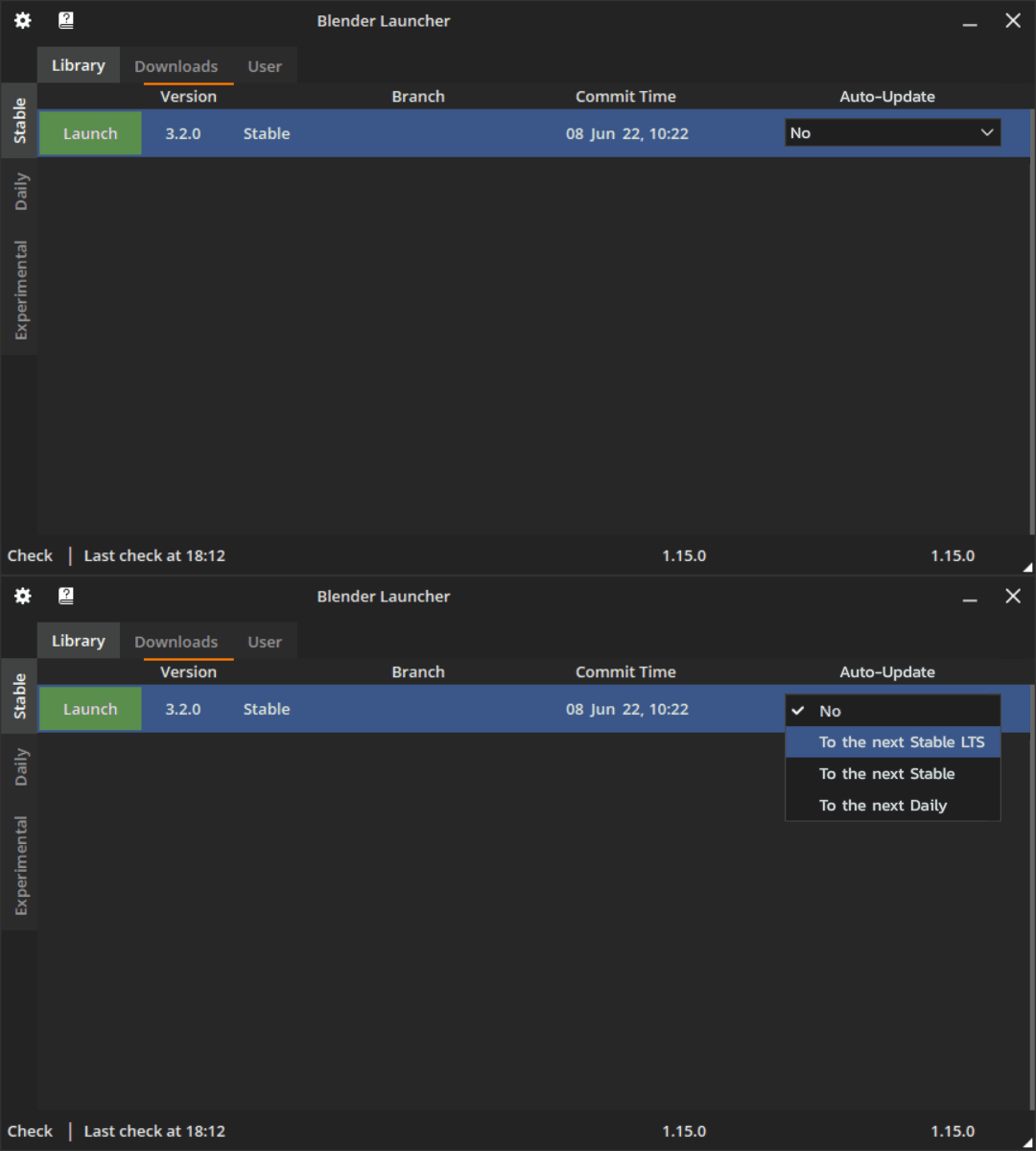
It would allow to update:
- a "Blender 2.93 LTS" version only to the next "Stable LTS version" (Blender 3.3 LTS) when it is released.
- a "Blender 3.2.0 stable" version only to the next "Stable LTS version" (Blender 3.3 LTS), if that's what the user wants.
- a "Daily build" to the next "Daily build"
- a "Blender 3.2.0 stable" version to the next "Daily build"
- etc
Of course, after choosing the targeted "channel", there would be a warning message, asking the user to confirm his/her choice.
