

 Demigiant
OnComplete is never called
On Unity 2019.1.0f2 I never get any OnComplete Callback executed at all - not in a Sequence or in any simple DoMove Tween. I tried this in an empty scene with the newest version of DoTween free on the asset store. It does not work with declared functions neither with anonymous ones using lambda expressions.

Hi,
I can't replicate this, here with Unity 2019.1 everything works correctly and OnComplete is called. Can I see the code you're using?
Cheers, Daniele

It's super weird... I just used a nearly empty scene with an UI Toggle and called toggle.transform.DOMove(transform.position, 0.1f).OnComplete(()=>{Debug.Log("foo");});
The project itself is XR enabled and contains VRTK 3.3.0 and the Oculus SDK.
I just tried doing the same on a UI Toggle and again everything works :O I'm thinking it might be related to the UI being randomly broken in Unity 2019.1 though (sometimes colors don't change at runtime even if you change them manually via the Inspector, so maybe the position change is somehow broken too).
On a secondary note, you should never use DOMove with a UI element's Transform, but DOAnchorPos on its RectTransform (this has nothing to do with the issue though: I just thought I'd mention it).
And on a third-iary(?) note, I don't have the Oculus SDK though. Is it possible that something else is blocking your tween? Is the tween actually working and the OnComplete is not, or nothing is working? Is it possible there's something else blocking the tween from running (like timeScale or things like that) due to the Oculus SDK?
I know, I just tried DOMove as the last resort, there was no particular reason why I did. The tween is working, only OnComplete is never called. TimeScale seems to be normal, and the weird thing is, tweens are definitely completed as in DOTween's runtime object they disappear after completing and it says 0 tweens again. Currently using a coroutine to wait for the tween to finish so at least for me, there is a workaround, but I thought if it may be reproducible, it would be important to report.
I'm noticing that a DOTweenAnimation onComplete is never called via scripting as well.
    public DOTweenAnimation initialCameraAnimation;

    void OnStart(){
        initialCameraAnimation.onComplete.AddListener(() => {
            Debug.Log("Animation complete...not called");
        });
    }

I'm noticing that a DOTweenAnimation onComplete is never called via scripting as well.
    public DOTweenAnimation initialCameraAnimation;

    void OnStart(){
        initialCameraAnimation.onComplete.AddListener(() => {
            Debug.Log("Animation complete...not called");
        });
    }
I can confirm. Unity 2019.1.3 DOTween v1.2.235 DOTweenPro v1.0.145
onStepComplete never call too

Additional info: I subscribe to the events before the animation even started. Possible if may help to investigate the issue
@Demigiant I found what happened. You should fix it. Event fires in C# only when in the inspector the event is green. If it is grey any C# subscriptions are ignored.
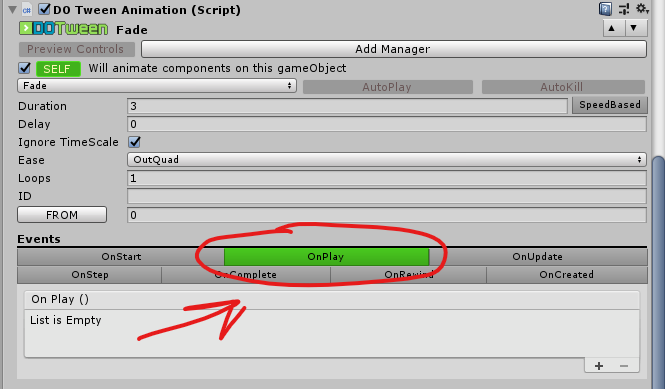
DOTweenAnimation initialCameraAnimation;
initialCameraAnimation.onPlay.AddListener(() => {
        Debug.Log("Animation onPlay ... not called");
});
Ahoy, and sorry for the delay. That is actually by design, and if you want to subscribe to a specific DOTweenAnimation/DOTweenPath events at runtime you should instead use the tween itself (via myDOTweenPath.GetTween().OnComplete(//myEvent). Working on a way to make that clearer in the Inspector itself.
@Demigiant I think there may be a case where if the distance to tween using something like DoAnchorPos is really small, OnStart is called, but OnComplete is never called. (in my test case, the value was 3.72529E-09 and OnComplete was never called.)

@RedHatJef OnComplete should be called even with 0 duration tweens. Can you write me the code so I can replicate it exactly?
Try to create sequence, it's works for me
DOTween.Sequence().Append(canvas.DOFade(0f,0.2f)).OnComplete(() => { //DoSomething });

@FelixGameNot Tried it, but still doesn't get called
DOTween.Sequence().Append
            (
                DOTween.To
                (
                    // Your code here
                )
                .SetUpdate(isIndependentUpdate: true)
            )
            .OnComplete
            (
                () =>
                {
                     Debug.Log("called");
                }
            );

Ahoy,
Sequences can't contain tweens with a custom SetUpdate (but you can add that to the main Sequence, since that's what controls the update of all nested tweens). If you still don't get OnComplete to fire after that write me the full code so I can check it out: OnComplete is pretty failsafe so the only reason it wouldn't be called is that the Sequence is not actually completing.
@Demigiant I think this one can be helpful.
I've spent the entire day dealing with similar error and here's what I came up with. For some reason Tween class contains this code for callbacks:
internal static bool OnTweenCallback(TweenCallback callback, Tween t) { if (DOTween.useSafeMode) { try { callback(); } catch (Exception ex) { if (Debugger.logPriority >= 1) Debugger.LogWarning((object) string.Format("An error inside a tween callback was silently taken care of ({0}) ► {1}\n\n{2}\n\n", (object) ex.TargetSite, (object) ex.Message, (object) ex.StackTrace), t); DOTween.safeModeReport.Add(SafeModeReport.SafeModeReportType.Callback); return false; } } else callback(); return true; }
My problem was that I had a Null Reference Exception being caught by try/catch while trying to resolve OnComplete() callback inside the Tween class. I didn't notice that my code has any errors because any callback exceptions are resolved silently and you can only see a warning message if any have been caught. I don't quite understand why exceptions are held silently and are not thrown, but if you, guys facing the same issue you probably should check your warning messages and your callback for any possible exceptions.
Hope this will save smbs time.

Ahoy,
By default safe mode catches are kept silent, but you can change the level of log reporting in DOTween Utility Panel's Preferences and set it to warnings too