django-DefectDojo
 django-DefectDojo copied to clipboard
 DefectDojo
Re-Import Scan Results API marks Dependency Check scan suppressed findings as Active
Bug description
As per the Defect Dojo documentation at https://defectdojo.github.io/django-DefectDojo/integrations/parsers/#dependency-check. The ideal behaviour while importing the dependency check scan suppressed findings is following.
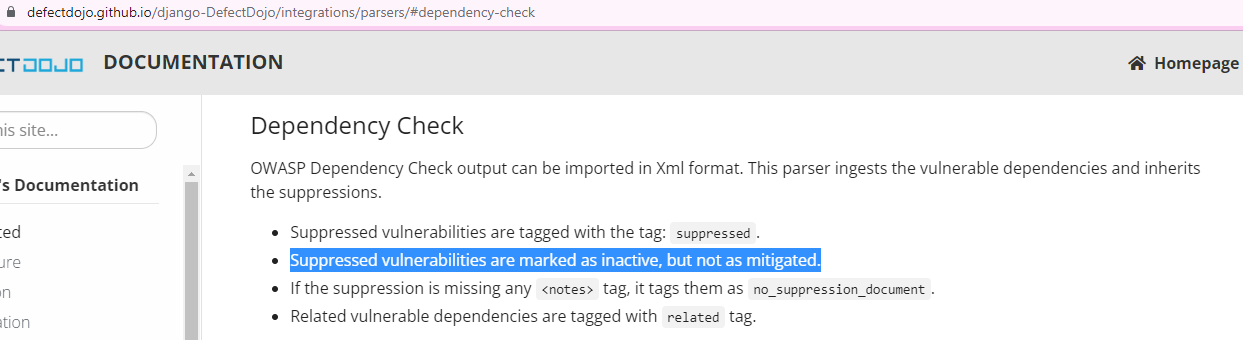
But this behaviour is true only for the dependency check scan report import via API /import-scan/ where the imported suppressed findings are automatically marked as Inactive. However, for the reimport dependency check scan report via API /reimport-scan/, the suppressed findings are marked as Active.
Dependency check scan suppressed findings should be marked as Inactive in case of API /reimport-scan/.
Steps to reproduce Steps to reproduce the behavior:
-
Go to 'Product Type-> Product -> Engagement -> Test section'

-
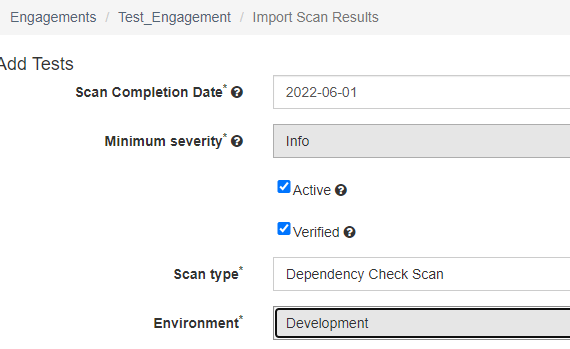
Click on 'Import Scan Results' to import a dependency check scan report with having suppressed findings.
-
After selecting the dependency check scan report with suppressed findings, click on Import
-
Verify that the Suppressed findings are Inactive. This is correct behaviour.
-
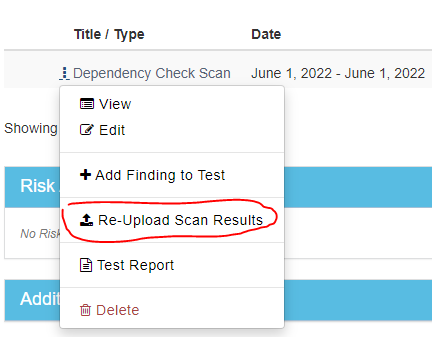
Under 'Product Type-> Product -> Engagement -> Test section', click on 3 dots before the created 'Dependency Check Scan' title.
-
Click on 'Re-Upload Scan Results' and import an updated dependency check scan report with having additional suppressed findings.
-
Verify that the newly added suppressed findings are marked as Active.
Expected behavior 'Re-Upload Scan Results' or API 'Re-Upload Scan Results' should mark the dependency check scan result suppressed findings as Inactive as per the documentation.
Deployment method (select with an X)
- [ x] Docker Compose
- [] Kubernetes
- [ ] GoDojo
Environment information
- Operating System: [e.g. Ubuntu 18.04]
- DefectDojo version - v. 2.10.0 and v. 2.4.1

I think this might be fixed by https://github.com/DefectDojo/django-DefectDojo/pull/6452

It's not fixed with #6452 . This fix was released with version 2.14.0. We have this issue with version 2.15.1.