

 DataDog
Datadog 2.6.0 doesn't have backward compatibility ?
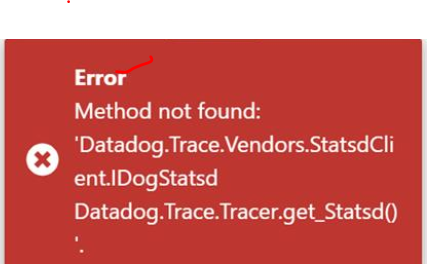
Describe the bug It throws an error after using latest version of Nuget package in our .Net core Application.
we are using .Net Core 3 WebAPI Angular 8
To Reproduce Steps to reproduce the behavior:
- Download latest version from Nuget
- Change the trace setting as per new syntax using Tracer.Configure method
- Build the application
- Deploy the application in IIS and browse the application.
- See error "Method not found Datadog.Trace.Vendors.Statsdclient.IDogstatsd"
Expected behavior No error.
Screenshots
If applicable, add screenshots to help explain your problem.
- Instrumentation mode: [manual with NuGet package]
- Tracer version: [e.g. 1.28.7]
- OS: [e.g. Windows Server 2019 ]
- CLR: [ .NET Core 3.1]

Hi @sravangontla,
This error is typically a symptom of when you are using both the installer and the NuGet, and you have used different version numbers in each. The fact you are seeing Method not found indicates a very old version of Datadog.Trace.
If you have updated both your installer and NuGet to 2.x versions, then it's technically possible to have mis-matched version numbers. However this has a small performance penalty, so we recommend always keeping your version numbers in-sync.

Closing as state since we got no reply or additional information from OP. If you need further assistance, please contact [email protected]. Thanks!
