

 DanielYKPan
Manual value entry doesnt take into account LOCALE
Hi,
We have the OWL_DATE_TIME_LOCALE set to 'gb' and when we use the date picker the date is displayed in the correct format, but if we manually type the date it parses it in US format. I've created a stackblitz to demonstrate.
https://stackblitz.com/edit/angular-qnoszc


That's odd, i've just recorded me doing it and it behaving incorrectly, I am using Chrome 64.0.3282.14 , MAC OS
Mozilla/5.0 (Macintosh; Intel Mac OS X 10_13_3) AppleWebKit/537.36 (KHTML, like Gecko) Chrome/64.0.3282.140 Safari/537.36

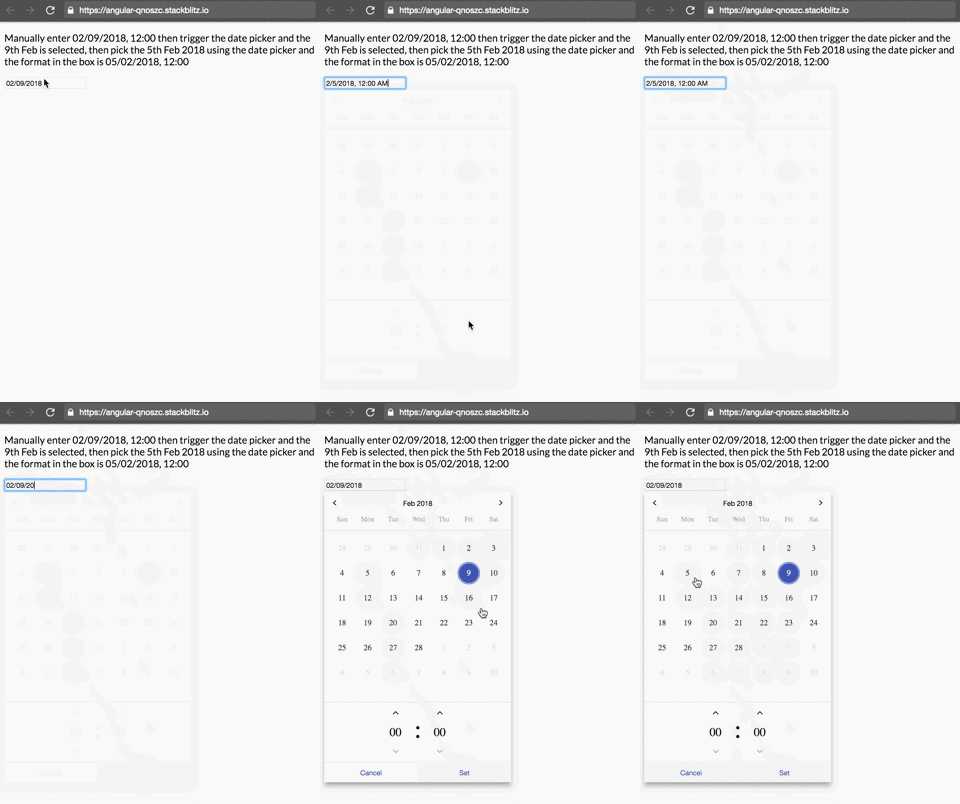
I am not sure why we are getting different results, I managed to work around by using the moment module, and setting the time formats, there's an issue somewhere but not sure how to fix if you cant recreate, i will take a look over the weekend
@JohnCashmore That's odd. I could not debug it as I could not reproduce the issue you described.
PS: what app you use to create your GIF? Your GIF is way better than mine
The app i use is http://recordit.co/ , i will try and take a look at some point, just didn't have time today to find a fix if needed.
Thanks man. I tested it in Chrome, Firefox and Safari.
I used your app, and here is a better version of the demo
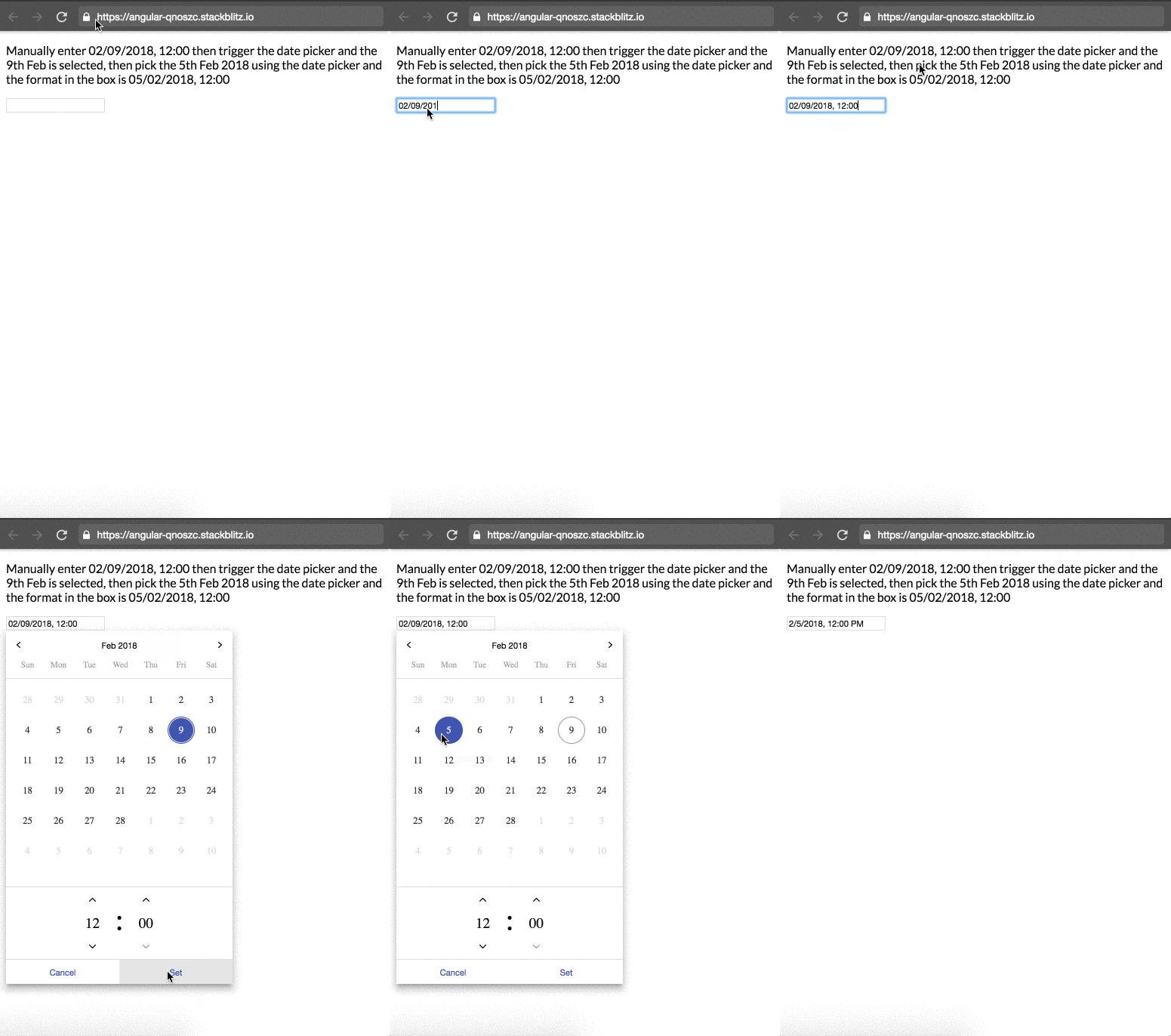
that's actually showing the bug, when you open the date picker the first time it should be the 2nd September, not 9th February.
@JohnCashmore Apparently not. It is MM/DD/YYYY, according to Javascript Intl.
Without the picker, if just use Javascript Intl to see the result:
const moment = new Date();
const dtf = new Intl.DateTimeFormat('gb');
console.log(dtf.format(moment));
you would see the result is MM/DD/YYYY.

I hate date times, I've got a workaround as i said, and will hopefully get a chance to dig in to why over the weekend
@JohnCashmore That's weird. I have a totally different result from yours.
I guess it might something relative to our own locale. I means I am testing this in Sydney, Australia. You might test it in different country.
You could use the OwlMomentDateTimeModule, and let the MomentJS do the locale work, it may be better than the native Javascript Date Object.
That's what I went with, I've had timezone nightmares before, I think this is just another one of those. Thanks for taking a look.
Where is the Github repository for ng-pick-datetime-moment? could not find it in your repository DanielYKPan. Also do you have an example of it's inclusion when using systemjs.config.js in visual studio? I have this repository working well but have the same issue with locale when using en-GB. it converts manual date from DD/MM/YYY to MM/DD/YYYY instead of using the Locale_id from angular core or when setting the Locale: dateTimeAdapter.setLocale('en-GB')
Great implementation otherwise.

Hi @DanielYKPan I have the same issue as @JohnCashmore mentioned. Here is the steps:
- Navigate to https://stackblitz.com/edit/angular-qnoszc
- app.module.ts, change the value 'gb' --> 'en-SG'
- Click on the picker textbox (which is empty), calendar shows 14 Mar 2018. Select 14 March 2018 and Set.
- The textbox value now is 14/03/2018, 3:20 PM
- Change the value of the text box to 01/11/2018, 3:20 PM
- Click on the text box again, the calendar now show 11 Jan 2018 which is wrong. It should show 1 Nov 2018.
My system info: var moment = new Date(); var dtf = new Intl.DateTimeFormat('gb'); console.log(dtf.format(moment)); ==> 3/14/2018
var moment = new Date(); var dtf = new Intl.DateTimeFormat('en-SG'); console.log(dtf.format(moment)); ==> 14/03/2018

@tomnguyen2017 In this case, you might consider to use OwlMomentDateTimeModule to let MomentJS to handle the locale.
I have the same problems as others reported. I have set the picker to use german (de) locale. When picking via UI i have DD.MM, but as soon as i start to input manually the positions are replaced as MM.DD
So I am trying a Moment implementation, as you adviced so in your last comment.
If I set
const MOMENT_FORMATS_GERMAN_LOCALE = {
    parseInput: 'D.M.Y LT',
    fullPickerInput: 'D.M.Y LT',
    datePickerInput: 'D.M.Y',
    timePickerInput: 'LT',
    monthYearLabel: 'MMM YYYY',
    dateA11yLabel: 'LL',
    monthYearA11yLabel: 'MMMM YYYY',
};
and use it as
providers: [
        { provide: OWL_DATE_TIME_LOCALE, useValue: 'de' },
        { provide: DateTimeAdapter, useClass: MomentDateTimeAdapter, deps: [OWL_DATE_TIME_LOCALE] },
        { provide: OWL_DATE_TIME_FORMATS, useValue: MOMENT_FORMATS_GERMAN_LOCALE }
    ],
it all works fine for german locale.
The question is, how can i introduce another locale effectively?
I would set for example MOMENT_FORMATS_FRENCH_LOCALE with different moment formats.
But how do i switch it in a runtime?
To switch locale in a runtime, you have provided dateTimeAdapter.setLocale(), but what about formats?
Thanks

Here is my solution for incorrect parsing of written dd/MM/yyyy dates. Used date-fns v2 instead of momentJS.
Demo: View/Edit on Stackblitz

1. Install latest date-fns v2 version
npm install date-fns@latest --save
2. Add a date-fns-date-time-adapter.class.ts.
View an earlier revision of this comment (last edit on 28 Dec) to learn how to make your own.
3. Setup your module.ts
a) Add date-fns formats. It is important to use supported formats. e.g. use dd/MM/yyyy for 28/11/2018 dates.
const DATEFNS_FORMATS_EN_LOCALE = {
    parseInput: 'dd/MM/yyyy HH:mm || dd/MM/yyyy', // multiple date input types separated by ||
    fullPickerInput: 'dd/MM/yyyy HH:mm',
    datePickerInput: 'dd/MM/yyyy',
    timePickerInput: 'HH:mm',
    monthYearLabel: 'MMM yyyy',
    dateA11yLabel: 'dd/MM/yyyy',
    monthYearA11yLabel: 'MMMM yyyy',
};
b) Simply import date-fns locale or build your own
import { enGB } from 'date-fns/locale';
c) Specify our resulting classes and objects in providers
providers: [
//  { provide: OWL_DATE_TIME_LOCALE, useValue: 'en-GB' }, // default: 'en-US'.
    { provide: DateTimeAdapter, useClass: DateFnsDateTimeAdapter },
    { provide: OWL_DATE_TIME_FORMATS, useValue: DATEFNS_FORMATS_EN_LOCALE },
//  { provide: OWL_DATEFNS_DATE_TIME_ADAPTER_OPTIONS, useValue: <OwlDateFnsDateTimeAdapterOptions>{ locale: enGB } } // default: enUS.
]
Since en-GB and en-US locales are practically identical and the date time formats are specified above, the two lines specifying any locale info were commented out.
You may view a full gist here.
Resource: https://github.com/DanielYKPan/date-time-picker/issues/544 Edit: Includes suggestion by @tomchinery

Just for reference (and if anyone else has this issue using @rovercoder ) solution, it seems the parse function in the new DateTimeAdapter class wouldn't accept ISO 8601 strings and would return an invalid date.
This meant whenever the model has an existing value as a ISO 8601 string (asynchronously loaded in perhaps?) it would attempt to deserialize and then set the input controls value to null.
I've added a comment to the Gist with a work-around solution: https://gist.github.com/rovercoder/d223ff977194bc8ca389d853ad1ac81c#gistcomment-2847734.

if en-SG getting this format 27/06/2019, 4:20 pm then DD/MMM/YYYY, hh:mm a which code will write

One more quirk (IMO, the simplest):
import { NgModule, Injectable } from '@angular/core';
import { DateTimeAdapter } from 'ng-pick-datetime';
import { NativeDateTimeAdapter } from 'ng-pick-datetime/date-time/adapter/native-date-time-adapter.class';

@Injectable()
export class CustomDateTimeAdapter extends NativeDateTimeAdapter {
  parse(value: any, format: any) {
    value = value.replace(/^(\d{1,2})\.(\d{1,2})\.(.*)/, '$2.$1.$3');
    return super.parse(value, format);
  }
}

@NgModule({
    providers: [
      {provide: DateTimeAdapter, useClass: CustomDateTimeAdapter},
    ],
    ......
})
......
EDIT: Added Injectable decorator

@newsash you do understand that any users that do not have the DD/MM/YYYY locale set up on their machine and try use your site will have same problem. Switching day and month is definitely not a solution.
@rovercoder Oh, I forgot to mention:
- I need to support only one locale in a project where I use this date-time-picker (and this will not change in at least five years).
- A locale could be injected into the CustomDateTimeAdapter, so day and month could be switched or not switched depending on the locale. And it is probably possible to analyze
(new Date(2013, 12, 11)).toLocaleString()to determine if day and mounth should be switched
I had to change the parse function in wonderful date-fns-date-time-adapter.class.ts class into this
	public parse(value: any, parseFormat: any): Date | null {
		if (value && typeof value === 'string' && parseFormat) {
			if (typeof parseFormat === 'string') {
				parseFormat = parseFormat.split('||');
			}
			if (!Array.isArray(parseFormat)) {
				throw Error('DateFnsDateTimeAdapter: Invalid date parse format string set: ' + JSON.stringify(parseFormat));
			}

			for (let i = 0; i < parseFormat.length; i++) {
				parseFormat[i] = parseFormat[i].trim();
				const parsedDate = parse(value, parseFormat[i], new Date(), this.options.getInstance());

				if (this.isValid(parsedDate)
						&& format(parsedDate, parseFormat[i]) == value)
				{
					return parsedDate;
				}
			}
		}
		//return value ? this.clone(value) : null;
		return null;
	}
as the date-fns.parse function has some unpleasant bugs https://github.com/date-fns/date-fns/issues/942
