
AspNetCoreDevJwts
 AspNetCoreDevJwts copied to clipboard
 DamianEdwards
Experimenting with development environment scenarios for JWT authentication.
AspNetCoreDevJwts
What is this?
I logged this issue in ASP.NET Core for .NET 7 to explore ways we can make working with JWT authentication during development easier. Going from "I have no protected APIs" to "I added my first protected API" involves a lot of new concepts and actions today in ASP.NET Core. The primary focus of this exploration is to make that journey much easier to achieve.
Video
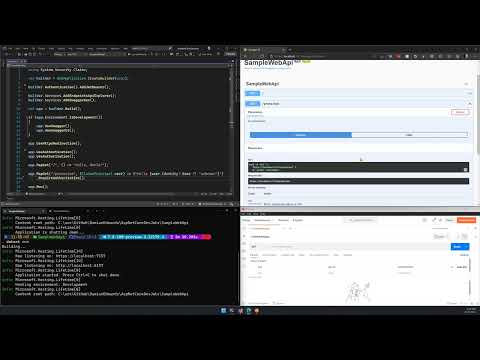
First Look at ASP NET Core dev JWTs
Install pre-requisites
-
Install the latest .NET 7 Preview SDK
On Windows you can optionally use winget:
winget install --id=Microsoft.dotnetPreview -e -
If using Visual Studio, install the latest Visual Studio 2022 Preview
On Windows you can optionally use winget:
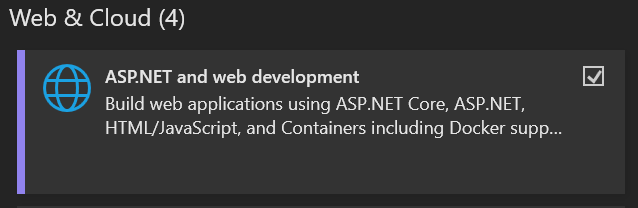
winget install --id=Microsoft.VisualStudio.2022.Community-Preview -eNOTE: The ASP.NET and web development workload must be installed even if you have a stable version of Visual Studio with the listed components:
Getting starting
-
After cloning this repo, build the solution in VS or at the command line:
AspNetCoreDevJwts> dotnet build -
Change to the
SampleWebApiproject directory:AspNetCoreDevJwts> cd SampleWebApi AspNetCoreDevJwts\SampleWebApi> -
Run the
dev-jwtsexe to print the CLI help:AspNetCoreDevJwts\SampleWebApi> .\DevJwts.Cli\bin\Debug\net7.0\dev-jwts.exe USAGE: dev-jwts [OPTIONS] <COMMAND> EXAMPLES: dev-jwts create dev-jwts create -n testuser --claim scope=myapi:read dev-jwts list dev-jwts delete caa676ee dev-jwts clear OPTIONS: -h, --help Prints help information -v, --version Prints version information COMMANDS: list Lists all JWTs for the specified project create Creates a JWT for the specified project print Prints the details of the specified JWT delete Deletes the JWT with the specified ID in the specified project clear Deletes all JWTs for the specified project key Prints the key used for signing JWTs for the specified project -
Execute
dev-jwts.exe createto create your first dev JWT for the project:AspNetCoreDevJwts\SampleWebApi> ..\DevJwts.Cli\bin\Debug\net7.0\dev-jwts.exe create JWT successfully created: Id: c8a6e1d6 Name: damia Audience: https://localhost:7157 Claims: [none] Expires: 2022-10-22T17:50:25.2075766+00:00 Issued: 2022-04-22T17:50:25.2443510+00:00 Compact Token: eyJhbGciOiJIUzI1NiIsInR5cCI6IkpXVCJ9.eyJ1bmlxdWVfbmFtZSI6ImRhbWlhIiwibmJmIjoxNjUwNjQ5ODI1LCJleHAiOjE2NjY0NjEwMjUsImlhdCI6MTY1MDY0OTgyNSwiaXNzIjoiQXNwTmV0Q29yZURldkp3dHMiLCJhdWQiOiJodHRwczovL2xvY2FsaG9zdDo3MTU3In0.oHulBChuI3h2hSiDAnDA7pRNT1fkl9jglNZoq64d0Qo -
Run the
SampleWebApiproject (if in Visual Studio, set it as the starting project then hit Ctrl+F5 to launch without debugging):AspNetCoreDevJwts\SampleWebApi> dotnet run Building... info: Microsoft.Hosting.Lifetime[14] Now listening on: https://localhost:7157 info: Microsoft.Hosting.Lifetime[14] Now listening on: http://localhost:5157 info: Microsoft.Hosting.Lifetime[0] Application started. Press Ctrl+C to shut down. info: Microsoft.Hosting.Lifetime[0] Hosting environment: Development info: Microsoft.Hosting.Lifetime[0] Content root path: ~\AspNetCoreDevJwts\SampleWebApi -
Open a browser and navigate to
https://localhost:7157/swaggerto bring up the Swagger UI for the app.
-
Use the Swagger UI to make a request to both endpoints. Note that you can successfully hit the first endpoint as it doesn't require any authorization, but the second endpoint responds with an
HTTP 401.

-
Make a GET request to
https://localhost:7157/protectedwith the JWT you created before in the authorization header:Using curl
~> curl https://localhost:7157/protected -H "Authorization: Bearer eyJhbGciOiJIUzI1NiIsInR5cCI6IkpXVCJ9.eyJ1bmlxdWVfbmFtZSI6ImRhbWlhIiwibmJmIjoxNjUwNjQ5ODI1LCJleHAiOjE2NjY0NjEwMjUsImlhdCI6MTY1MDY0OTgyNSwiaXNzIjoiQXNwTmV0Q29yZURldkp3dHMiLCJhdWQiOiJodHRwczovL2xvY2FsaG9zdDo3MTU3In0.oHulBChuI3h2hSiDAnDA7pRNT1fkl9jglNZoq64d0Qo"
Hello damia
~>
Using Postman
NOTE: You might have to configure Postman to allow the ASP.NET Core local development HTTPS certificate
Setting up the request

The successful response

What's next
Try exploring the CLI's commands and options to:
- Create JWTs for different users:
dev-jwts create -n TestUser - Create JWTs with roles and use it to access the
/rolesendpoint:dev-jwts create -n RoleUser -r SampleRole - List the JWTs created for the current project:
dev-jwts list - Reset the JWT signing key for the current project:
dev-jwts key --reset - Create JWTs with scopes:
dev-jwts create -n ScopedUser -s myapi:read -s myapi:write - Create JWTs with custom claims:
dev-jwts create -n CustomUser -c favoritecolor=blue - Try using the CLI on a new web project (not the one in this project) to see what the first-use experience is like
- Explore the code in this repo that makes this work at runtime
- Give feedback on the idea over on the original issue
Metadata
Owner
 DamianEdwards
Metadata
Experimenting with development environment scenarios for JWT authentication.