
SkyLive
 SkyLive copied to clipboard
 DaWe35
SkyLive is a non-custodial (serverless) streaming solution built on top of the decentralized Sia Skynet
Skylive-CLI
SkyLive provides non-custodial streaming solution, so you can broadcast live videos without a centralized server. This repo contains command line, however, we have some other user-friendly stuff here:
Host another SkyLive webportal
How to start stream
If you are NOT a programmer, SkyLive-GUI will be a better choise :)
-
Download & extract the latest binaries from releases
-
Register a SkyLive account and scheule a new stream.
-
Open command prompt and start the uploader with this command:
"C:\\path\to\stream_hls.exe" --record_folder "C:\\path\to\record_here". If you want to save the stream on your computer, use the--keep_files trueargument. -
Enter the generated stream token from https://SkyLive.coolhd.hu/studio
-
Setup OBS (below) and start recording into the 'record_here' folder!
How to finish the stream
-
Click Stop recording in OBS
-
Wait for every segment uploaded
-
Close stream_hls.exe
-
Open https://SkyLive.coolhd.hu/studio and
Finishthe stream (after this, the video will be seekable)
Setup OBS:
-
Download & config OBS
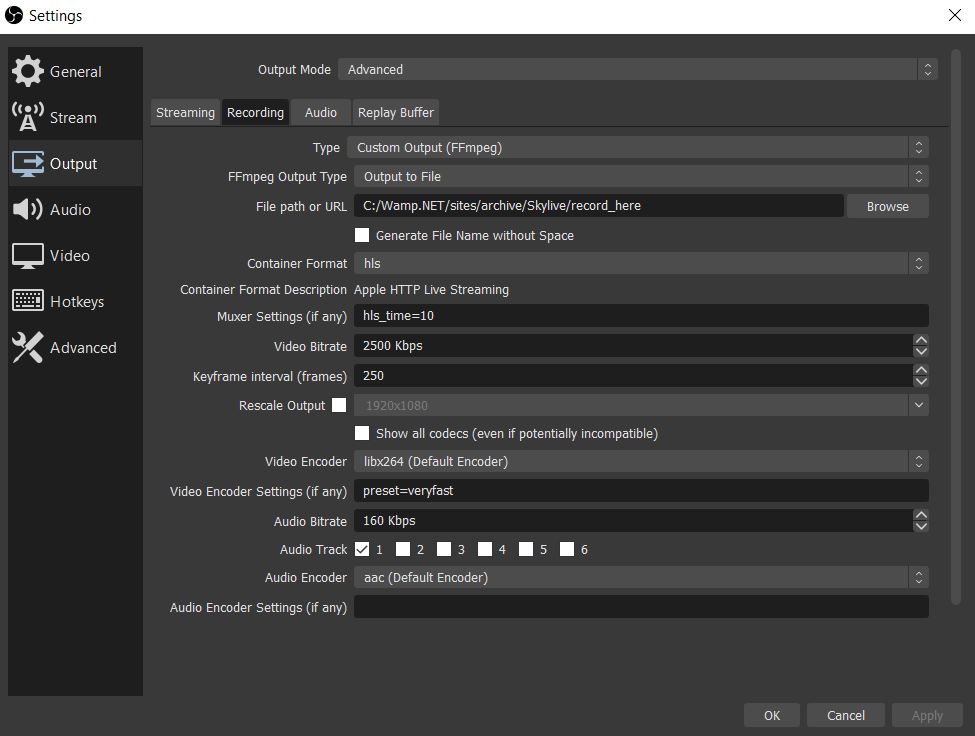
Currently, there is a bug in OBS, so you can't record more than 14 chunks into m3u8. While the issue is not fixed, we need to use the custom ffmpeg output, so please use the settings what you see below:
-
Output mode: Advanced
-
Type: Custom output (FFmpeg)
Without FFmpeg, the recording may be stuck after 14 or 33 chunks
-
File path: .../Skylive/record_here
You need to pass this folder in the
--record_folderparameter later. -
Container format: hls
It records small .ts chunks, compatible with HTTP Live Streaming
-
Muxer settings: hls_time=10
10 seconds chunks are acceptable - too large cause more delay, too small causes upload congestion.
-
Video Encoder Settings: preset=veryfast
Saves the CPU. Available presets: ultrafast, superfast, veryfast, faster, fast, medium, slow, slower, veryslow, placebo
Try out some, but be careful: if encoding is overloaded, viewers will experience buffering
-
Restream m3u8 from Youtube/Twitch
You can restream any public Youtube/Twitch stream to SkyLive without any transcoding or screen recording. The stream_downloader.py will download live stream on-demand, so you can re-upload it to SkyLive with stream_hls.py.
Start downloader:
stream_downloader.exe --record_folder "C:\\path\to" --url https://www.youtube.com/watch?v=kG5araSvvLI
Start uploader:
stream_hls.exe --record_folder "C:\\path\to"
Other tricks, notes
Build
pyinstaller --onefile stream_hls.py --hidden-import=pkg_resources.py2_warn
pyinstaller --onefile stream_downloader.py
pyinstaller --onefile benchmark_portals.py
Export HLS to mp4
After the stream, you can easily convert the .ts chunks into one mp4 file:
ffmpeg -i "http://host/folder/input.m3u8" -bsf:a aac_adtstoasc -vcodec copy -c copy output.mp4
 DaWe35