

 DVE2000
Selecting a face makes the software calculate immediately
I want to add a few dog bones to a body and it's running for over 30 minutes now and still checking for possible edges. I don't need the software to do this automatically because it's a complex model.
Can I bypass this function somehow?


Hi,,
I was just going through the issues for the Dogbone AddIn, and discovered that I hadn't been notified of this. Apologies. I know it's been over a year when the original issue was raised.
The way to do this is to select your top face. You will then see all the candidate edges, and the number of dogbone edges identified in the dogbone AddIn dialog. You can either clear all the selected edges by clicking the "X" next to the selection box, or you can individually select/deselect the edges. The AddIn will only allow you to select/deselect edges associated with a top face.
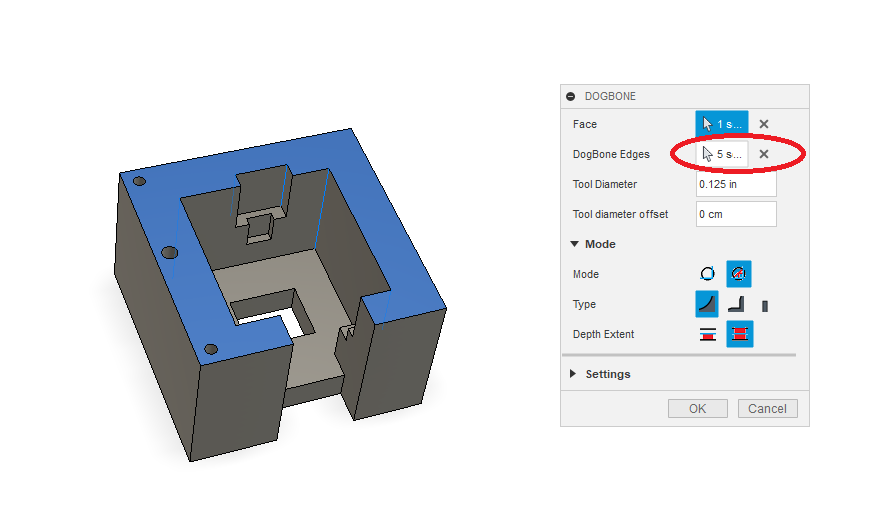
If you have multiple levels, see example, you will have to select the faces associated with those edges. If you don't have a face selected, you won't get the dogbones associated with that face.
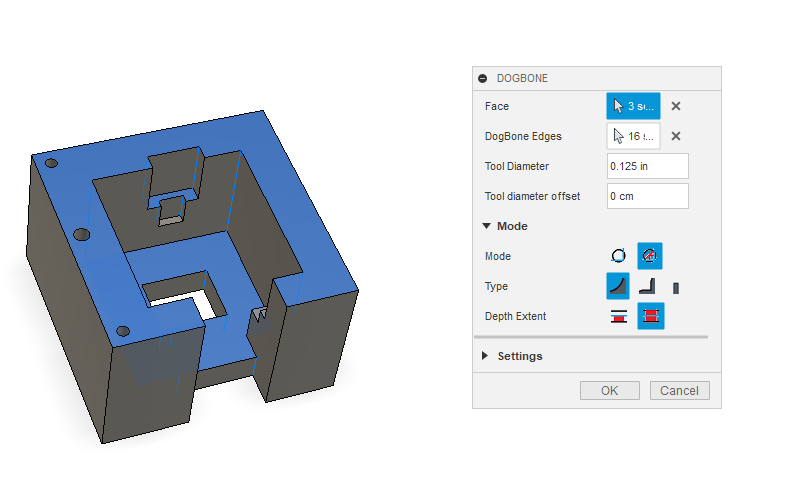
I'd also suggest you don't use Parametric mode, unless you know that you don't have any further tweaking to do on your design. Generating Parametric dogbones takes a huge amount of processing, but once processed any changes to the parameters generally takes little time. This mode is generally aimed at things like cabinets, where the basic design doesn't change, but the dimensions do. Until recently parametric mode was victim to a bug in F360 and wouldn't work consistently - it looks like it has been finally fixed, but I would still recommend using static mode - and, if you need to redo the dogbones because the design has changed delete the timeline event, and start again.
I'm working on a newer version, that will prove to be significantly faster, and I'm aiming to include a recalculation button, that will just update existing dogbones.
Peter
