

 DJtheRedstoner
freelook stays when forced to first person perspective
if you're forced to change to first person like if your head is stuck in a block then freelook will stay, a possible fix would be to check if perspective is first person and disable freelook

Are you using the noscroll mod? If so, remove it (featutre is present in patcher 1.6). If not, please show a screenshot of your mod folder.

i've patcher, no scroll is disabled, i don't have a seperate mod for it, here's my mod folder:
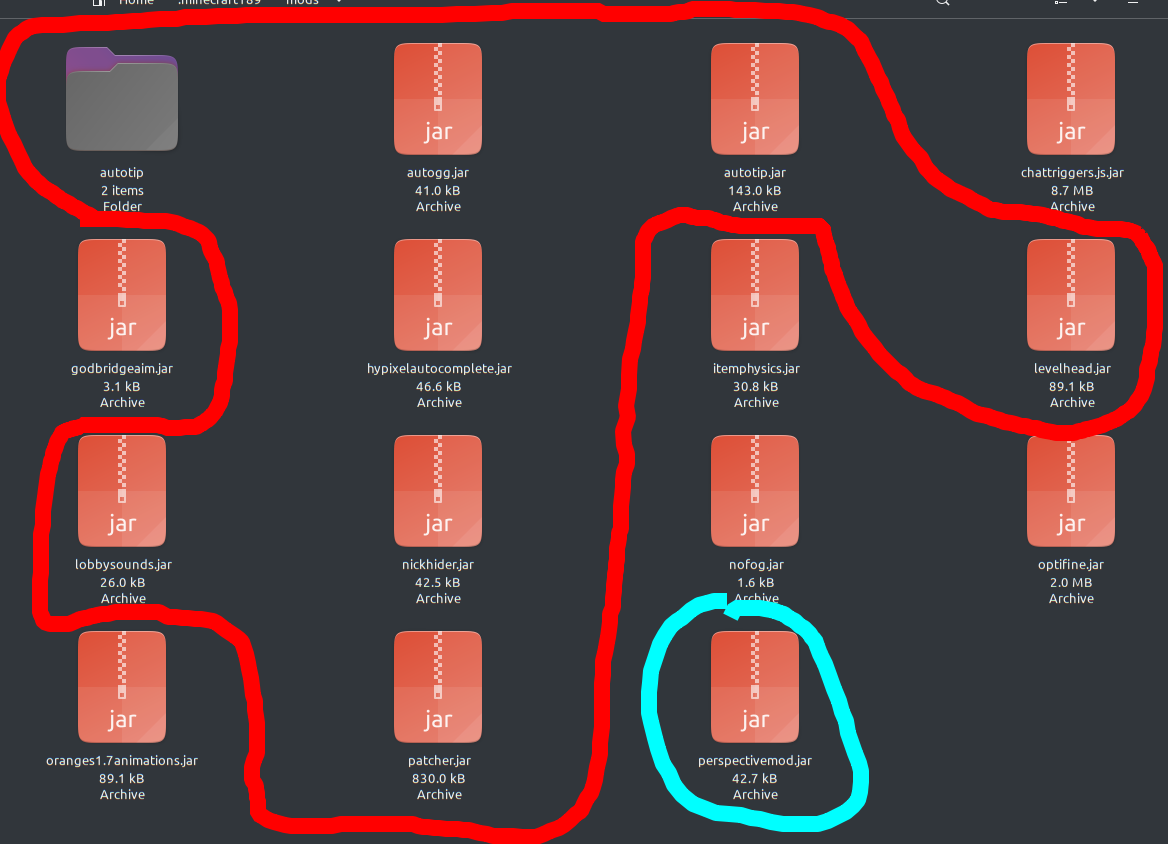 in red are sk1er's mods, in aqua is this mod,
godbridgeaim.jar, oranges1.7animations.jar, nofog.jar, optifine.jar, chattriggers.js.jar
in red are sk1er's mods, in aqua is this mod,
godbridgeaim.jar, oranges1.7animations.jar, nofog.jar, optifine.jar, chattriggers.js.jar
i've patcher, no scroll is disabled, i don't have a seperate mod for it, here's my mod folder:
doesnt really help as the version numbers dont show on the file names but... replace orange 1.7 animations with Sk1er old animations (https://sk1er.club/beta) remove godbridge aim, its just safewalk and might cause problems remove nofog, optifine already has it make sure all sk1er llc mods are updated

godbridge aim assist isn't really a cheat it just shows you the best yaw/pitch to godbridge at i don't see fog option in optifine already updated
godbridge aim assist isn't really a cheat it just shows you the best yaw/pitch to godbridge at
i don't see fog option in optifine
already updated
Fog option is in animations or details in video settings
ah okay, no fog removes some of the water and lava fog making it easier to see, optifine just removes normal fog which is from far away
ah okay, no fog removes some of the water and lava fog making it easier to see, optifine just removes normal fog which is from far away
patcher can remove water / lava 'fog'
ah okay, no fog removes some of the water and lava fog making it easier to see, optifine just removes normal fog which is from far away
patcher can remove water / lava 'fog'
what tab is it under?
By the way, here's how you reliably reproduce this issue:
(Yes I know hypixel has the mod blacklisted, but it's the only way I know)
- Join hypixel bedwars
- Use perspective mod, and don't release it
- Wait for game to start
- Perspective mod is now active in 1st person.

you could also
- Join a creative world
- Dig down 6-15 block 1x1 hole
- Drop all the way to the bottom of the hole
- Place 2 sand above you
- Activate perspective before the second sand falls on you
- Fly up after sand falls
- Perspctive mod is now active in first person
By the way, here's how you reliably reproduce this issue:
(Yes I know hypixel has the mod blacklisted, but it's the only way I know)
1. Join hypixel bedwars

2. Use perspective mod, and don't release it

3. Wait for game to start

4. Perspective mod is now active in 1st person.
i tried that before it was blacklisted, doesn't seem to work
if I recompile the mod with a new id (exclusively for testing, not used in gameplay), then I'm able to reproduce consistently.
if I recompile the mod with a new id (exclusively for testing, not used in gameplay), then I'm able to reproduce consistently.
Seeing as this seems to be consistent reproduction I will look into it. However I am currently taking a break from modding.
I don't entirely know which packets hypixel is sending to you, but they send some packet when games start that will cause you to exit out of opened inventories, etc.
So, I can try and find out which packets it is that cause this, and report back, to make it easier for you.
Actually, I can no longer seem to reproduce it, even though I was able to just two days ago...
Will look into this further a bit later, and report back with what I find.
The packet to close inventories is "Close Window".
It causes the client to call the following code (on Forge 1.8.9):
// net.minecraft.client.network.NetHandlerPlayClient
public void handleCloseWindow(S2EPacketCloseWindow packetIn) {
    PacketThreadUtil.checkThreadAndEnqueue(packetIn, this, this.gameController);
    this.gameController.thePlayer.closeScreenAndDropStack();
}

// net.minecraft.client.entity.EntityPlayerSP
public void closeScreenAndDropStack() {
    this.inventory.setItemStack(null);
    super.closeScreen();
    this.mc.displayGuiScreen(null);
}
Edit: See comment below.

I was not wrong in my last comment, but it didn't help either.
The perspective is set to first person on the client side, when the player is inside an opaque block. It is nothing to do with the Close Window packet.
This is the code causing the issue (Forge 1.8.9):
// net.minecraft.client.Minecraft

private void runGameLoop() throws IOException {

    // ...
    // Line 1097

    if(this.thePlayer != null && this.thePlayer.isEntityInsideOpaqueBlock()) {
        this.gameSettings.thirdPersonView = 0;
    }

    // ...

}
A simple fix would be adding this:
PerspectiveMod.instance.perspectiveToggled = false;
You cannot use resetPerspective, as that will reset to the previous perspective, before the key was pressed.