
files_external_dropbox
 files_external_dropbox copied to clipboard
 DJaeger
plans for NC v 21
Hello,
at the moment, NC v21 RC1 was released, so in the near future, NC21 get stable. Have you any plans for supporting NC21 with you NC-App?
at the moment, the app cannot be used in NC21 --> Server-Error thanks


As a proof-of-concept I cloned this repo and the following two dependencies:
kunalvarma05/dropbox-php-sdkHemant-Mann/flysystem-dropbox
In dropbox-php-sdk I changed the depended version of guzzlehttp/guzzle to ~7.0 in composer.json.
In flysystem-dropbox I added the repository of my cloned dropbox-php-sdk to composer.json and changed the depended version to dev-master.
In the clone of this repo, I added the repos of my cloned dropbox-php-sdk and flysystem-dropbox to composer.json and changed both of their versions to dev-master.
I then ran make dist and copied the resulting folder to my Nextcloud 21 installation.
I can confirm that the server errors are gone and the app works as expected. So, in order to get this app working with NC21, we "just" need to convince kunalvarma05/dropbox-php-sdk to change their depended on version of guzzle to ~7.0 and then wait for Hemant-Mann/flysystem-dropbox to release an updated version.
I have no idea if that's ever going to happen.

hi everyone, I am distracted and I have not disabled the integration so after the update I am in server error. is there a quick way to temporarily disable the extension and get everything working again? Thanks for your help!

You could try renaming the folder /apps/files_external_dropbox to something else. I assume, Nextcloud would then no longer load the extension.
Hey @fritteli, thanks for looking into this. I have tried out your external app and unfortunately I'm not having luck with it yet.
Since Dropbox now seems to default use scoped apps, I have also gone to the permissions tab and enabled following scopes:
files.metadata.read, files.metadata.write, files.content.read, files.content.write
I get all files but when I try to for example open or download a PDF from Dropbox I get this exception:
[webdav] Fatal: TypeError: Argument 1 passed to League\MimeTypeDetection\FinfoMimeTypeDetector::detectMimeTypeFromPath() must be of the type string, null given, called in /var/www/html/custom_apps/files_external_dropbox/vendor/league/flysystem/src/Util/MimeType.php on line 70 at <<closure>>

 0. /var/www/html/custom_apps/files_external_dropbox/vendor/league/flysystem/src/Util/MimeType.php line 70
    League\MimeTypeDetection\FinfoMimeTypeDetector->detectMimeTypeFromPath(null)
 1. /var/www/html/custom_apps/files_external_dropbox/vendor/hemant-mann/flysystem-dropbox/src/Adapter.php line 271
    League\Flysystem\Util\MimeType::detectByFilename(null)
 2. /var/www/html/custom_apps/files_external_dropbox/lib/Storage/Adapter.php line 29
    HemantMann\Flysystem\Dropbox\Adapter->normalizeResponse(Kunnu\Dropbox\Models\FileMetadata {})
 3. /var/www/html/custom_apps/files_external_dropbox/vendor/hemant-mann/flysystem-dropbox/src/Adapter.php line 96
    OCA\Files_external_dropbox\Storage\Adapter->normalizeResponse(Kunnu\Dropbox\Models\FileMetadata {})
 4. /var/www/html/custom_apps/files_external_dropbox/vendor/league/flysystem/src/Filesystem.php line 197
    HemantMann\Flysystem\Dropbox\Adapter->readStream("Apps/onyx-knote ... f")
 5. /var/www/html/lib/private/Files/Storage/Flysystem.php line 189
    League\Flysystem\Filesystem->readStream("Apps/onyx-knote ... f")
 6. /var/www/html/custom_apps/files_external_dropbox/lib/Storage/CacheableFlysystemAdapter.php line 129
    OC\Files\Storage\Flysystem->fopen("Apps/onyx-knote ... f", "r")
 7. /var/www/html/lib/private/Files/Storage/Wrapper/Wrapper.php line 302
    OCA\Files_external_dropbox\Storage\CacheableFlysystemAdapter->fopen("Apps/onyx-knote ... f", "r")
 8. /var/www/html/lib/private/Files/Storage/Wrapper/PermissionsMask.php line 118
    OC\Files\Storage\Wrapper\Wrapper->fopen("Apps/onyx-knote ... f", "r")
 9. /var/www/html/lib/private/Files/Storage/Wrapper/Wrapper.php line 302
    OC\Files\Storage\Wrapper\PermissionsMask->fopen("Apps/onyx-knote ... f", "r")
10. /var/www/html/lib/private/Files/Storage/Wrapper/Availability.php line 315
    OC\Files\Storage\Wrapper\Wrapper->fopen("Apps/onyx-knote ... f", "r")
11. /var/www/html/lib/private/Files/Storage/Wrapper/Wrapper.php line 302
    OC\Files\Storage\Wrapper\Availability->fopen("Apps/onyx-knote ... f", "r")
12. /var/www/html/lib/private/Files/View.php line 1166
    OC\Files\Storage\Wrapper\Wrapper->fopen("Apps/onyx-knote ... f", "r")
13. /var/www/html/lib/private/Files/View.php line 1002
    OC\Files\View->basicOperation("fopen", "/Dropbox/Apps/o ... f", ["read"], "r")
14. /var/www/html/apps/dav/lib/Connector/Sabre/File.php line 434
    OC\Files\View->fopen("Dropbox/Apps/on ... f", "r")
15. /var/www/html/3rdparty/sabre/dav/lib/DAV/CorePlugin.php line 85
    OCA\DAV\Connector\Sabre\File->get()
16. /var/www/html/3rdparty/sabre/event/lib/WildcardEmitterTrait.php line 89
    Sabre\DAV\CorePlugin->httpGet(Sabre\HTTP\Request {}, Sabre\HTTP\Response {})
17. /var/www/html/3rdparty/sabre/dav/lib/DAV/Server.php line 472
    Sabre\DAV\Server->emit("method:GET", [Sabre\HTTP\Requ ... }])
18. /var/www/html/3rdparty/sabre/dav/lib/DAV/Server.php line 253
    Sabre\DAV\Server->invokeMethod(Sabre\HTTP\Request {}, Sabre\HTTP\Response {})
19. /var/www/html/3rdparty/sabre/dav/lib/DAV/Server.php line 321
    Sabre\DAV\Server->start()
20. /var/www/html/apps/dav/lib/Server.php line 332
    Sabre\DAV\Server->exec()
21. /var/www/html/apps/dav/appinfo/v2/remote.php line 35
    OCA\DAV\Server->exec()
22. /var/www/html/remote.php line 167
    require_once("/var/www/html/a ... p")

GET /remote.php/dav/files/[my-name]/notepads/Notepad1.pdf
from 188.60.193.25 by [my-name] at 2021-08-22T21:19:01+00:00
Is your instance still working fine? Have I missed a specific permission? It looks like the app is failing to fetch the metadata from the path.

Hi @TheTimeWalker , you're right, I'm getting the same error as you are ... :(
Hey @TheTimeWalker, I may have good news for you, as I was able to access files stored in my external dropbox storage. GIve me some time to further test it, and I'll post an updated guide for getting the external dropbox storage backend to work. Wish me luck :)
Note: These instructions are outdated. See https://github.com/DJaeger/files_external_dropbox/issues/32#issuecomment-989827346 The pullrequest kunalvarma05/dropbox-php-sdk#185 has been merged. Therefore, building the extension becomes a little bit easier. Here's an updated guide.
- Clone this repository:
git clone [email protected]:DJaeger/files_external_dropbox.git - In
composer.json, remove the custom repository section forHemant-Mann/dropbox-php-sdkand change the URL forflysystem-dropboxtohttps://github.com/fritteli/flysystem-dropbox. Also, change the version forkunalvarma05/dropbox-sdk-binfromv0.2.1todev-master. Here's a complete patch that shows all required changes:
diff --git a/composer.json b/composer.json
index b9b41d5..339dc2c 100644
--- a/composer.json
+++ b/composer.json
@@ -2,15 +2,11 @@
     "repositories": [
         {
             "type": "vcs",
-            "url": "https://github.com/Hemant-Mann/dropbox-php-sdk"
-        },
-        {
-            "type": "vcs",
-            "url": "https://github.com/Hemant-Mann/flysystem-dropbox"
+            "url": "https://github.com/fritteli/flysystem-dropbox"
         }
     ],
     "require": {
-        "kunalvarma05/dropbox-php-sdk": "v0.2.1",
+        "kunalvarma05/dropbox-php-sdk": "dev-master",
         "hemant-mann/flysystem-dropbox": "dev-master",
         "tightenco/collect": "v5.4.33"
     },
- Delete
composer.lock - Run
make dist. It will (probably) fail, saying it can't find the filecomposer.lock(which you just deleted). - Run
php build/composer.phar install - Run
make distagain - You should now find the file
build/dist/files_external_dropbox.tar.gz, which you can copy to your Nextcloud'sappsdirectory and unpack there.
For me, this seems to create a working installation of the external dropbox storage backend.
For the curious among you: The only thing I changed in my fork of fritteli/flysystem-dropbox is the following:
diff -u -r --color flysystem-dropbox-original/composer.json flysystem-dropbox/composer.json
--- a/composer.json	2021-11-26 13:17:02.717465080 +0100
+++ b/composer.json	2021-11-26 13:15:45.101942623 +0100
@@ -12,7 +12,7 @@
     "require": {
         "php": ">=5.6.0",
     	"league/flysystem": "^1.0",
-        "kunalvarma05/dropbox-php-sdk": "^0.2.0"
+        "kunalvarma05/dropbox-php-sdk": "dev-master"
     },
     "require-dev": {
         "phpunit/phpunit": "^5.7"
👍
On Fri, 26 Nov 2021 at 13:27 fritteli @.***> wrote:
I should probably mention that in the mean time I'm on Nextcloud 22.2.3.
— You are receiving this because you are subscribed to this thread. Reply to this email directly, view it on GitHub https://github.com/DJaeger/files_external_dropbox/issues/32#issuecomment-979943101, or unsubscribe https://github.com/notifications/unsubscribe-auth/ARLP6GQLCQUELRWHSC2BH73UN54MFANCNFSM4XE5OEZQ .
-- Maciej Żmudzki

We're one step further: kunalvarma05/dropbox-php-sdk was tagged version 0.2.2; I created the pull request Hemant-Mann/flysystem-dropbox#1. If that gets merged (and subsequently a release is made of flysystem-dropbox), we could lift the dependency in this repo (files_external_dropbox), and we'd be done!
Thanks for your work on this @fritteli I have seen that this issue was caused within the deps, but had no time to go deeper After testing your build I will merge and deploy it asap Feedback for your merge by other people would be appreciated
BTW: You can replace your steps 3 to 6 by simply running make without dist, but the README needs an update anyway

Tried to follow @fritteli 's instructions above, but ran in to a few issues which I tried to fix along the way but ultimately my Dropbox integration isn't working afterwards (NC v22.2.3)
- git clone command gives a permission denied. Downloaded the master.zip instead
- editted the file as necessary
- ok
- ok
- Returns an problem: " - hemant-mann/flysystem-dropbox dev-master requires kunalvarma05/dropbox-php-sdk ^0.2.2 -> found kunalvarma05/dropbox-php-sdk[v0.2.2] but it conflicts with your root composer.json require (dev-master). "
Changed this to v0.2.2 instead - think this the comment/fix from 27th Nov above
- Gives a "Skipping signing" message - this ok?
- Added to apps, configured with Dropbox dev console, etc. etc (I've done this before with other apps, so know the process)
Get a red exclamation and a long error "Creating \OCA\Files_external_dropbox\Storage\Dropbox storage failed" in the logs. (can provide)
Thanks for your hard work on this, it's been the main blocker for me moving from OwnCloud > NextCloud and I'm now so close!

Hi @bertieuk, the instructions are outdated. Can you try the following steps based on the branch from my repository (the one that's used in the pullrequest #35 and then running through the following steps?
- Check out https://github.com/fritteli/files_external_dropbox.git; alternatively you can download the ZIP file: https://github.com/fritteli/files_external_dropbox/archive/refs/heads/master.zip
- In the created directory, run
make. - Run
build/composer.phar update. - Run
make dist. - You'll find the generated zip file at
build/dist/files_external_dropbox.tar.gz.
Could you try that?
@fritteli Thanks for the reply
Fully removed the previous app version and followed your new post, no errors building it but still get "Creating \OCA\Files_external_dropbox\Storage\Dropbox storage failed" in the logs and red exclamation. Tried setting it up both global and user.
I do now get the redirect to dropbox.com when clicking Grant Access, which I wasn't before - but this could be because I deleted the app in dropbox console and re-created just to be sure.
p.s Dropbox redirect URIs in the readme need to be: https://mynextcloud.example.com/index.php/settings/user/externalstorages https://mynextcloud.example.com/index.php/settings/admin/externalstorages (but I'm sure you know that)
Hm, I don't get any errors, but I did not re-setup the connection. I'll try and see what happens if I set up a completely new connection to dropbox on my test instance of nextcloud. Perhaps I'll be able to reproduce your problem.
😞 I can reproduce your problem when trying to create a new dropbox share on my test instance of nextcloud.
Using the existing dropbox connection on my production instance works, though.
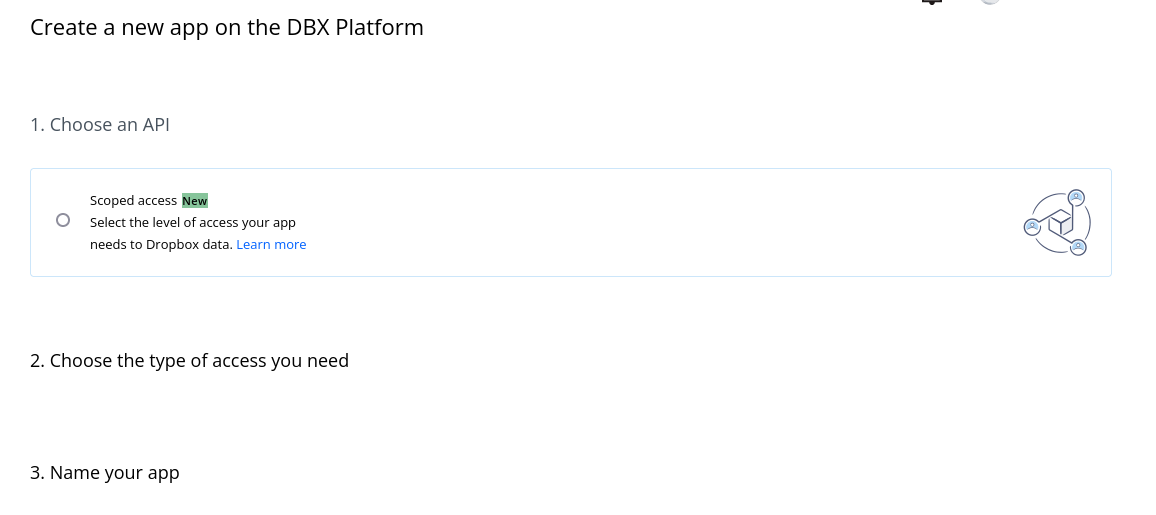
I'm not at all sure, but ... when I set up the test connection (which fails), I was presented with this screen:
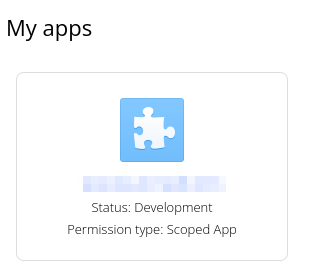
 The app that was created is labelled "Permission type: Scoped App":
 The app that I created years ago for my production instance (the connection that is working) is labelled "Permission type: Full Dropbox":
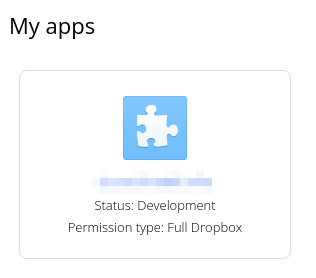
Perhaps it has got something to do with this?