

 DISTRHO
[X11] The menu item 'Save As/Export' doesn't do anything

Yes. This requires dbus with a desktop-portal implementation on the desktop environment. This is not the case for you?
The open file still works, correct?

A better behavior here is to determine that desktop-portal isn't running and tell this to the user is a pop-up box.
open works.
I am putting this in the FAQ, but it is expected that eventually all desktop environments are going to support it. https://github.com/flatpak/xdg-desktop-portal lists several backends already made. I have checked with some people and it works on Linux with Gnome, KDE and LXDE.
But if it doesn't work for some reason - it's better to explain to the user why the action can't be completed.
I can show an error, but knowing exactly why would break the API which I am not very keen on doing. A generic warning is pointless, so I guess it is best for us to try to figure this out then.
Do you have qdbusviewer ?
It should help to debug this, as it can nicely traverse/introspect all the active DBus paths and methods.
It doesn't show org.freedesktop.portal.Desktop. I am on XFCE4.
So it would seem like you could try to look up this name in DBus and if not found tell something like this to the user:
Desktop-portal doesn't seem to be running on your system. The requested action can't be completed.
It doesn't show
org.freedesktop.portal.Desktop. I am on XFCE4.
Are you able to install some package to get the gtk implementation?
On our Devuan machine at the hackerspace I have to run /usr/libexec/xdg-desktop-portal manually, which is quite annoying.
However programs like Evince are able to either trigger the start of xdg-desktop-portal (on my debian machines) or access the file dialog themselves without the portal running (devuan), so it might be good to check the Evince source to see how they are doing this. [edit: they use GtkFileChooser that probably has some fallbacks for this]
For the user it is certainly quite annoying to have to debug and dig for work-arounds like this, just to get basic save functions to work.

My Windows username has non-ascii characters. The save as dialog points to the wrong user directory. (Win7, Reaper, LV2).

My Windows username has non-ascii characters. The save as dialog points to the wrong user directory. (Win7, Reaper, LV2).
that has nothing to do with this, please open a separate ticket
My Windows username has non-ascii characters. The save as dialog points to the wrong user directory. (Win7, Reaper, LV2).
that has nothing to do with this, please open a separate ticket
Sorry. Opened #137
Same thing for me, save as does nothing in standalone or in the vst2. I have qdbusviewer but I'm not sure what I should be looking for? I cannot see org.freedesktop.portal.Desktop listed.

This is explained on the FAQ. https://github.com/DISTRHO/Cardinal/blob/main/docs/FAQ.md#on-bsdlinuxx11-the-menu-item-save-asexport-does-nothing Basically you need a xdg-freedesktop-portal implementation, be it for Gnome, KDE, LXDE or whatever applies to your system
I have that installed and works elsewhere (I can change the implementation in firefox and Rack for example).
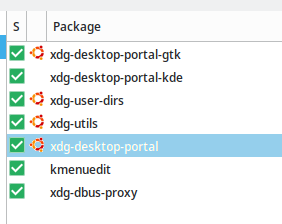
Rack doesnt use desktop portal. And even while installed, doesn't mean it is active. As you stated:
I cannot see
org.freedesktop.portal.Desktoplisted
I dont know why this is the case, but it is the cause of the issue.
For me Rack uses the KDE file dialog and changes to the GTK one if I don't have GTK_USE_PORTAL=1 in /etc/environment, just like firefox.
Strangely the save as is working now. I disabled GTK_USE_PORTAL=1, rebooted and it made no difference so I reverted, logged out and logged back in and now it is working and I can see the org.freedesktop.portal.Desktop entry.
FYI: The Nuklear single-header library allows to show the file dialog using only OpenGL. There's no need to use DBus.
DPF can do it too with sofd, but only for opening not for saving. text input is not an easy thing to do.
Yes I know. but works quite differently, I cant simply copy&paste that code, it is not how it works.
No, we dont have such native dialogs on linux, we always need custom code. This is clearly not simple https://github.com/DISTRHO/DPF/blob/develop/distrho/extra/sofd/libsofd.c
Portentially fixed in 05cac6e738e5c4811aa7131fff99f9c08fef8e41, testing is welcome. Still requires a desktop portal thing, but now it will try to automatically start it if not available.
Works for me on debian bullseye!
Should take care of the majority of cases at least (I expect this to still fail on devuan which has a broken xdg-desktop-portal package).
The "Save as/Export..." dialogue doesn't appear for me in Cardinal 22.04 (standalone or as a plugin inside Carla). The "Open/Import..." dialogue works, though.
I'm running Arch Linux with i3, so without a full-fledged desktop environment. I've tried installing xdg-desktop-portal-gtk and xdg-desktop-portal-gnome, but I get the same results. Do I need to install anything else?

I think those are the ones to install, but you need to be running xdg-desktop-portal in order for the dbus service to be available.
I've found that there are systemd service files for both xdg-desktop-portal-gtk and xdg-desktop-portal-gnome. I can run them with systemctl (e.g. systemctl xdg-desktop-portal-gtk --user), but no change.
Running systemctl enable shows a message that these unit files are not meant to be enabled manually.
I've even tried running /usr/lib/xdg-desktop-portal-gtk, what the unit file points to, from a terminal. Still no dialogue for saving.
Edit: With some help, I managed to figure it out. I also needed xdg-desktop-portal itself in addition to xdg-desktop-portal-gtk. With both installed, It's working now.
I think the right command for the start is
systemctl --user --start xdg-desktop-portal-gtk
but well, quite a few things are moving into the desktop portal direction, special sandboxed applications like snap and flathub. this ends up being a system problem.
if you have suggestions on how to make this better, I am all ears, but the approach to the file dialogs is not really changing in meaningful ways.
After some more testing, here's what else I've found:
- Running Firefox automatically triggers the portal service, so after that no manual action is required.
- If the service is not running (i.e. Firefox hasn't been run at least once during a login session), I need to select File > Save/Export... inside Cardinal twice. (The service is started the first time, and the dialogue appears the second time.)
systemctl enable xdg-desktop-portal --usercan be used to run the service manually.- At least under Arch Linux and i3, having
xdg-desktop-portal-gnomeinstalled in addition toxdg-desktop-portalandxdg-desktop-portal-gtkseems to introduce some issues: The dialogue doesn't follow the system theme and typing every other character in the filename field shifts focus to the search field, which makes it borderline unusable. Uninstallingxdg-desktop-portal-gnomesolved it all for me.
Running Firefox automatically triggers the portal service, so after that no manual action is required.
If the service is not running (i.e. Firefox hasn't been run at least once during a login session), I need to select File > Save/Export... inside Cardinal twice. (The service is started the first time, and the dialogue appears the second time.)
This sounds very much like a bug we had before and that was fixed. You sure you are running 22.04?
systemctl enable xdg-desktop-portal --usercan be used to run the service manually.
Will add this info to the FAQ, thanks
- At least under Arch Linux and i3, having
xdg-desktop-portal-gnomeinstalled in addition toxdg-desktop-portalandxdg-desktop-portal-gtkseems to introduce some issues: The dialogue doesn't follow the system theme and typing every other character in the filename field shifts focus to the search field, which makes it borderline unusable. Uninstallingxdg-desktop-portal-gnomesolved it all for me.
Something to report upstream.