

 DDMAL
DDMAL
Make empty text bboxes outlined.

When using the syllable highlight, bounding boxes are already 7 different colours and the colour of each bounding box matches the syllable it's associated to. I like the idea of empty text boxes being visually different, but making them a different colour would remove the information of what's associated with what and that might end up being more confusing. @annamorphism, what do you think?

Agree with @JoyfulGen that this would be too many colours. What about having them outlined?

Outlined makes sense, but I was just thinking about the point of indicating empty text bboxes:
Wouldn't the purpose of indicating empty text bboxes to the user be so that they can add some text to all of them? Then wouldn't it be most convenient if there was an option to ONLY see empty bboxes, so you can use the arrow keys and enter shortcuts to breeze through adding text?
So instead of some visual indicator like this (I didn't have time to make them outlined, it's just proof of concept that they're green):
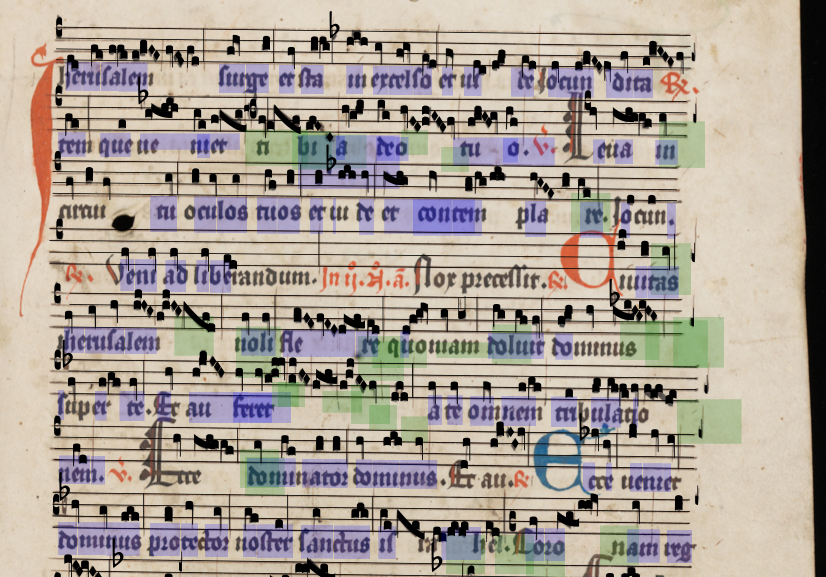
There would be an option where you only see empty bounding boxes:

I don't know--in your second example, we don't know whether the box on the fifth line is empty because it needs a "lem", or empty because it needs to be merged with the one next to it (as is in fact the case). Or whether the one after that belongs to "no" or "li." So I'm not sure it makes sense to think of the empty BBoxes without knowing what their neighbours look like. @JoyfulGen what do you think?
I'm also not sure. I agree with Anna that it's hard to tell what's assigned to what, because new bounding boxes are always input below and to the right of their syllable, so we generally have to move them. Also, more often than not, if we have to input new text we also have to adjust the text of the surrounding boxes. Singling out the empty boxes might just be more confusing, because then the user would have to go through the text again to correct mistakes within text boxes. I think outlining the empty boxes is a great idea, but it would be best to always see all bounding boxes. With the enter key shortcut and the edited bounding box remaining selected, text correction will be much easier!