
game-compatibility
 game-compatibility copied to clipboard
 Cxbx-Reloaded
BLiNX: the time sweeper [MS-019] [1.05]
Description
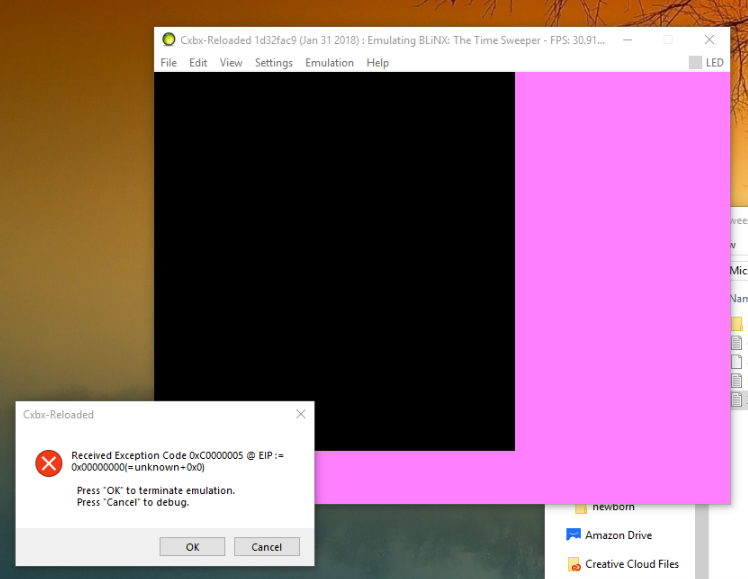
Previously the game displayed intro screens, but on the current build that is not the case and instead the loading screen will flash briefly before crashing.
Also if you have no controllers plugged in you can hear the menu music (needs confirmation? see this video)
---------------------------
Cxbx-Reloaded
---------------------------
Received Exception Code 0xC0000005 @ EIP := 0x58149F6A

  Press "OK" to terminate emulation.
  Press "Cancel" to debug.
---------------------------
OK   Cancel
---------------------------
Dumps
KrnlDebug.txt CxbxDebug.txt BlinxXbe.txt
Status
Previous behavior: Showed intro videos, albeit laggy and with incorrect sound.
Current behavior: Flashes loading screen briefly before crashing
Screenshots
Current Behavior:

 Video
Video
Previous Behavior:


Additional Information
Tested on version 6a798ad5 (Oct 8 2017)
Copied from original issue: Cxbx-Reloaded/Cxbx-Reloaded#235 Xbe.txt

From @furrya on March 17, 2017 6:47
Now the game has regression - black screen with an exception code

And here two KrnlDebug files First with graphic progress, from earlier build and 2 - from a latest build 1) KrnlDebug — graphics.txt 2) KrnlDebug - no graphics.txt
The first real difference between those two logs is that EmuD3DDevice_SetRenderState_YuvEnable is present in build Cxbx-Reloaded/Cxbx-Reloaded@a7ad4921 and absent in Cxbx-Reloaded/Cxbx-Reloaded@64aac86d.
Alas, the older log doesn't contain the HLE log, so it can't be compared, but the newer log mentions HLE: 0x00134BB0 -> D3DDevice_SetRenderState_YuvEnable_4134. It's possible this is the wrong location.
From @furrya on March 30, 2017 13:41
It's fixed with Cxbx-Reloaded/Cxbx-Reloaded@3eb9b7d5, intro videos returned ^^

From @furrya on April 18, 2017 11:50
Cxbx-Reloaded/Cxbx-Reloaded@77933ad8
Video in the game is broken now in Cxbx-Reloaded/Cxbx-Reloaded@77933ad8. Just black screen with laggy sounds in the background.
 KrnlDebug.txt
Updated - Cxbx-Reloaded/Cxbx-Reloaded@42e87e7b
The video has appeared, but not stretched normally. Controller emulation does not seem to work now, I am not able to skip the intros.


From @furrya on May 4, 2017 7:46
Blinx - the time sweeper doesn't show videos anymore, instead the game shows a loading screen and crashes. Cxbx-Reloaded/Cxbx-Reloaded@9173d4ab


Update on this one, just tested it out! Looks like it's back to flashing the loading screen for a second and then crashing. The log says that it couldn't assemble a recompiled pixel shader.

For all regressions, we're most interested in hearing about which commit broke it (using a git bisect), so we can quickly zoom into the issue
Oh, also make sure to clean the HLE cache when switching to another build, because function detection was and is still very much in flux.
Whoops, just saw this! Did a clean of the HLE cache, posted logs over in the main blinx issue, but I'll also pop them over here for ease of access. Not sure which build broke it as I'm pretty new to the CXBX project but if there's any way I could help to figure out which commit it was I'd love to help with that. :)
Whoops, just saw this! Did a clean of the HLE cache, posted logs over in the main blinx issue, but I'll also pop them over here for ease of access. Not sure which build broke it as I'm pretty new to the CXBX project but if there's any way I could help to figure out which commit it was I'd love to help with that. :)
KrnlDebug.txt CxbxDebug.txt
I've done a test with this title and get a flashing loading screen before it crashing, did you get the same results with these logs? Also an xbe dump (Edit>Dump Xbe Info To...) would be helpful in verifying that we have the same version of the game.

Yes, that's correct, currently getting a flashing loading screen. Attached is the dump! 1.05: BlinxXbe.txt
Yes, that's correct, currently getting a flashing loading screen. Attached is the dump!
Updated, and to be clear this issue originally was for the PAL version while the attached dump appears to be NTSC - though I don't know if it warrants separation into two issues because as far as I know the end result is the same on either version. This and one other issue regarding menu music will need to be confirmed. I added some info about the latter in the issue.
Awesome! Yeah- so far I've tested both regions and they seem to be about the same in terms of issues at the moment. If there's anything else I can do to help provide additional info, let me know^ Would be awesome to see the game get to the menus. :D
@CakeLancelot If both PAL and NTSC has the same library version. It should be acceptable to have both PAL and NTSC in same issue. Unless both have a different failure says otherwise.
In the dump of NTSC build is 4831 library version.

Crashing before video again I guess from reading this post.
CxbxDebug.txt KrnlDebug.txt 1.05: Xbe.txt
My Specs: CPU: AMD FX8150 3.6ghz, boost to 4.2ghz GPU: AMD R9 290 4gb, driver Crimson 18.1.1 RAM: 8gb ddr3 Windows 10 Pro 64bit

Description
Booting, but when playback FMV has crash with CreateTexture Failed!.
[1670] WARN: CreateTexture Failed!

Error: 8876086C
Format: 844715353
Dimensions: 1024x512
Dumps
Status
Previous behavior: Crashes before videos.
Current behavior: Crash with CreateTexture Failed!
Screenshots
Additional Information
Tested with Cxbx-Reloaded/Cxbx-Reloaded@735a4bcf

https://www.youtube.com/watch?v=SoeDh6kObz4
New video from John GodGames showing Blinx now gets in-game, though it seems you need wire-frame in order to see what you're doing. Game looks like it is extremely slow right now as well, but nice progress nontheless!
EDIT: This actually seems to be footage from a WIP branch from Luke; just thought I should make that clear.

Cxbx-Reloaded/Cxbx-Reloaded@d784ce1f: tested using HLE mode, Windows 10, Nvidia GPU
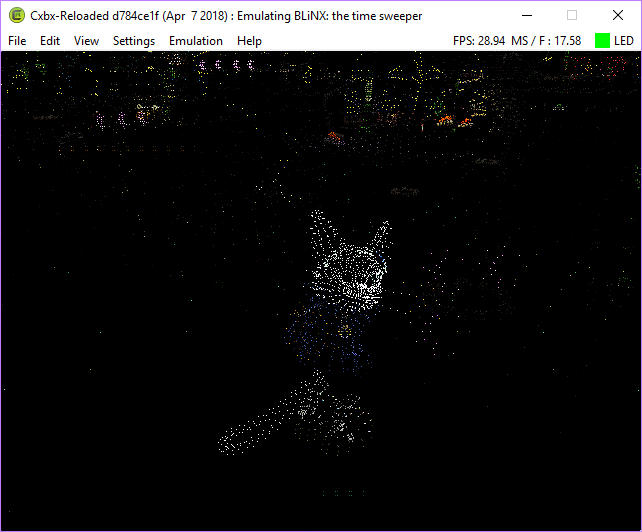

 HLE mode


NTSC version has videos not playing for me, but menu works nicely.
When starting a game, frames take roughly 20 seconds to render what seems to be a solid color.
Cxbx-Reloaded/Cxbx-Reloaded@65a1f10a

The game displays the first two loading screens then shows a blackscreen. Audio is working perfectly. Pressing the A button on the controller gets you to the main menu. The main menu (and all sub-menus) are fully functional but only partially load. The animated backgrounds are just a black screen. When attempting to start a new game the audio for the intro video plays perfectly, but again, it just displays a black screen. Skipping the intro video makes the game attempt to load, the FPS drops to around one and the game never actually renders anything, but again, the sound plays perfectly. Note: If you wait long enough you can see behind the loading screen, but like I said, nothing renders.

1.05, tampered with: Xbe.txt
If anyone wants me to log anything specific, please let me know.

Getting pretty much the same here. I have a feeling it's rendering this slow in-game because it's supposed to run at 30fps, or some unoptimal code in the DirectX stuff. But what happens if I hack the game to run at 60fps...?

It'll probably run even slower seeing as it'd have to produce more frames (and at a faster rate) than 30fps. As you say, it's likely just unoptimal code at the moment.
The reason it renders so slowly is probably because the game renders the models (they aren't visible, but are still there) in around 600 chunks each due to what I'm guessing is an emulation bug. Just try using a graphics debugger or model ripper (like NinjaRipper) and you will get hundreds to thousands of meshes, each being around 3-6 tris.

There IS indeed a situation that results in that last described behaviour, I'll look it up and link it here.
EDIT : See this comment in code : https://github.com/Cxbx-Reloaded/Cxbx-Reloaded/blob/develop/src/core/hle/D3D8/Direct3D9/Direct3D9.cpp#L7528
// Indexed quadlist can be drawn using unpatched indexes via multiple draws of 2 'strip' triangles :
// 4 vertices are just enough for two triangles (a fan starts with 3 vertices for 1 triangle,
// and adds 1 triangle via 1 additional vertex)
// This is slower (because of call-overhead) but doesn't require any index buffer patching.
// Draw 1 quad as a 2 triangles in a fan (which both have the same winding order) :
// Test-cases : XDK samples reaching this case are : DisplacementMap, Ripple
// Test-case : XDK Samples (Billboard, BumpLens, DebugKeyboard, Gamepad, Lensflare, PerfTest?VolumeLight, PointSprites, Tiling, VolumeFog, VolumeSprites, etc)
So I guess we can add this title to the list of test cases
The reason I chose for that approach, is to avoid yet another resource conversion (in this case index buffers), which would also require a cache and a costly modification check, all requiring additional complexity and code to maintain.
~~However, now that I think of it, I may have a solution that will also work, but doesn't require a call per quad nor conversion of the index buffer. I'll document this in an issue~~ Nope, I thought maybe index buffers have a stride after each primitive, so that the same index buffer could be drawn twice, first with a stride of one after each triangle, the second draw starting at one index aside the first draw, with also a stride of one after each triangle. But alas, there is no such thing as a per primitive stride when using index buffers.
So there's no other way than to keep doing it like this, or to convert index buffers. (The conversion is quite simple though: each set of four indices, A,B,C,D must be expanded into a set of six indices A,B,C,A,C,D so that's 50% more entries to render twice the number of quads as triangles)
Converting is the best idea because that results in less draw calls, and the number of draw calls made is one of the largest impacts to performance in graphics programing.
The vertex caches should negate the need for multiple conversions per-draw.


Slowness due to repeated indexed quadlist draws will be addressed in issue https://github.com/Cxbx-Reloaded/Cxbx-Reloaded/issues/1749 (pending PR : https://github.com/Cxbx-Reloaded/Cxbx-Reloaded/pull/1757)