
vertical-tabs-reloaded
 vertical-tabs-reloaded copied to clipboard
 Croydon
Mark pinned tabs as pinned
Right now (using 0.4.0 and the light theme) i can't really see if a tab is pinned or not.
I guess it might be useful to use some kind of non-disturbing small element / ui-change to have a clear difference between normal tabs & pinned tabs.
Ideas: a) display a pin-icon instead of the the close icon on pinned tabs b) use a small left border similar to the active-tab but with a light color which isn't that eye-catchy

Small progress on this issue with v0.5.0: Dark&Light themes are having now a blue left border for pinned tabs.

Just installed 0.5.0 - the blue left border on pinned tabs in the light theme is helpful ...Thanks.
To be honest - the current blue border is perfect for me - i don't see a need for more. Feel free to close the issue if you feel similar ;)
I leave the issue open till I have a visual highlighting for all themes. Right now it is just for the Dark&Light theme. Also there is an issue that sometimes the close button is displayed on pinned tabs.
The close button should be always hidden on pinned tabs starting with v0.7.0. 7ce08b2430f0f27a61c2e990079bdd2bc112e9e8
Still missing: Pinned tabs should always be visible. That is the most important aspect of pinned tabs and it is getting lost currently.
I'm not sure if this belongs in this bug or elsewhere, but I would like to see pinned tabs as just a row of favicons, similar to Tree Style Tab.

Sorry, this wasn't even true. Displaying pinned tabs as favicon-only is #20.
Issue #135 is displaying all tabs as favicon only.
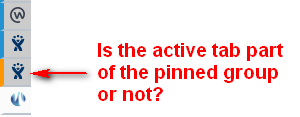
Just to add another point of view to this, I think the current styling of the blue left border and grey background is great, except when you're on either the last pinned tab or the first non-pinned tab: the active tab has the same background and the orange left border overrides the blue one for the pinned tab, which means it's impossible to see if the current tab is part of the pinned group or not.
