
flawhud
 flawhud copied to clipboard
 CriticalFlaw
Custom HUD for Team Fortress 2

Custom HUD for Team Fortress 2, with the focus on minimalistic design and dark themed colors.
Issue Tracker
·
Discord
·
Screenshots
·
Editor
Table of Contents
- Installation
- Official Editor
- Support
- CastingEssentials
- Customizations
- Crosshair
- Code Pro Fonts
- Favorite Server
- Transparent Viewmodels
- Streamer Mode
- Competitive Closed Captions
- Acknowledgements
- Sponsors
- Localizers
Installation
- Download the latest version of flawhud on GitHub or HUDS.tf.
- Extract the downloaded file contents into your
steamapps\common\Team Fortress 2\tf\customdirectory.
Official Editor
For easier installation and customization, download the TF2HUD Editor. This tool handles all below customization options as well as other custom HUDs. For additional information, read the project documentation at https://www.editor.criticalflaw.ca/
Support
If you need help, found a bug or have a suggestion, open a support ticket on GitHub or join our Discord server.
CastingEssentials
CastingEssentials features like the score panel, animated health bars and weapon icons will work with FlawHUD when enabled in the console. For more information, refer to the HUD Mods section of the CastingEssentials Wiki.
Customizations
Crosshair
Custom crosshairs are disabled by default. To enable them, open flawhud\scripts\hudlayout.res and under CustomCrosshair change the values of visible and enabled from 0 to 1.
To change the style, under CustomCrosshair change the value of labelText to the corresponding letter below.
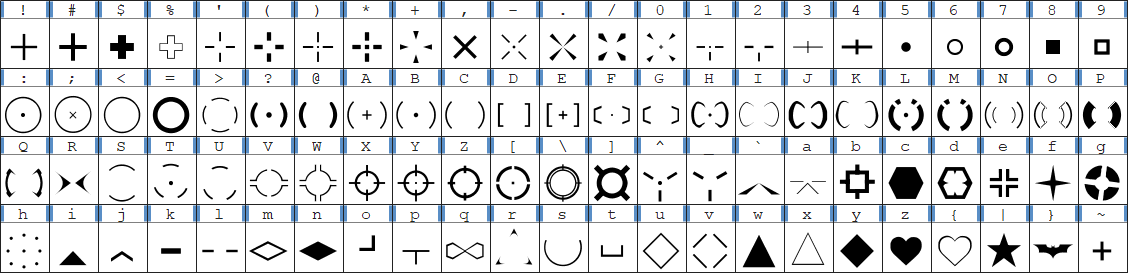
To change the color of crosshair or hitmarker, open flawhud\resource\scheme\clientscheme_colors.res and change the values of Crosshair or CrosshairDamage respectively.
To disable the hitmarker, open flawhud\scripts\hudanimations_manifest.txt and comment out the line containing scripts/hudanimations_hitmarker.txt.
Code Pro Fonts
To enable the Code Pro fonts, open flawhud\resource\clientscheme.res in a text editor and add _pro as instructed in the file.
Favorite Server
To setup a shortcut to your favorite server, open flawhud\resource\gamemenu.res and under HomeServerButton enter the connection string to your preferred server as instructed.
Transparent Viewmodels
To enable transparent viewmodels, you must first install the mastercomfig's Transparent Viewmodels addon or update your graphics configs to work with this feature. Then open flawhud\scripts\hudlayout.res and under TransparentViewmodels change the values of visible and enabled from 0 to 1. For more information, read the the TeamFortress.TV thread.
Streamer Mode
For extra protection against stream snipers and DDoS attacks while live streaming, enable Streamer Mode in the HUD Options. This feature hides player names and other information that could let the viewers know where and who you are playing with.
Competitive Closed Captions
Currently, there are only two supported languages for closed captions. These are English and Brazilian Portuguese. To enable competitive captions for other languages, type either cc_lang english or cc_lang brazilian in the developer console.
Acknowledgements
- HUD Development Help: N0kk and Wiethoofd
- Playtesting: Yotts, Cat, SleepingBear and Strife
- Main Menu Backgrounds: sevin
- Crosshairs and Icons: Hypnootize
- CastingEssentials: pazer and dalegaard
- Competitive Closed Captions: clovervidia
- Soldier Tribute Image: uberchain
- Updated Team Fortress Logo: Metisz
Sponsors
Thank you to everyone who supported this project through GitHub Sponsors or PayPal.
- Admiral Bread Crumbs
- berry-jordan
- DrummingFish
- Kybrid96
- Owlgod
- LazarusDemitri
- pazer
- Revan
- saturncaine
- TemmieKaz
- Zeesastrous
Localizers
- Brazilian: Tiagoquix
- French: DimitriDR
 CriticalFlaw