
TF2HUD.Editor
 TF2HUD.Editor copied to clipboard
 CriticalFlaw
Conflict installing HUD files due to a system hang
Issue 1: "Extracting budhud to: D:\SteamLibrary\steamapps\common\Team Fortress 2\tf\custom". tf\custom\ is empty and HUD.Editor is making budhud-master folder, i have tf\custom open and it is empty, I can see a folder made, then the program hangs and produces this error. "An error occurred while installing budhud. Cannot create 'D:\SteamLibrary\steamapps\common\Team Fortress 2\tf\custom\budhud' because a file or directory with the same name already exists." HUD.Editor makes a folder and then fails to install because it conflicts with the folder it just made.
Issue 2: Changes tf\custom\ location to C: after specifying location on D:. There's no button or settings file to manually set it.
Issue 3: tf\custom directory not set! "error occurred while installing rayshud. Could not find part of the path" This path doesn't exist and wont let me change it. Please and an option to not use the registry or let me set it manually.
Issue 4: tf2-hud-editor-x64.zip contains two copies of the program tf2-hud-editor-x64.zip\ and tf2-hud-editor-x64.zip\win-x64. Only tf2-hud-editor-x64.zip\win-x64 seemed to work
Steps to reproduce Open and try to install rays hud.
- OS: Win 10
- App Version: 2.5
- Selected HUD: rayshud & budhud

Issue 1: "Extracting budhud to: D:\SteamLibrary\steamapps\common\Team Fortress 2\tf\custom". tf\custom\ is empty and HUD.Editor is making budhud-master folder, i have tf\custom open and it is empty, I can see a folder made, then the program hangs and produces this error. "An error occurred while installing budhud. Cannot create 'D:\SteamLibrary\steamapps\common\Team Fortress 2\tf\custom\budhud' because a file or directory with the same name already exists." HUD.Editor makes a folder and then fails to install because it conflicts with the folder it just made.
Does this happen consistently? I don't recall encountering this during testing because the editor performs the installation near-instantly. Will need to monitor it because I think this is a timing issue, not a bug in the logic.
Issue 2: Changes tf\custom\ location to C: after specifying location on D:. There's no button or settings file to manually set it.
The option to change the path to tf/custom is in the dropdown menu at the top right corner of the screen. There is another ticket open to make that dropdown more visible and better communicate the option to the user.
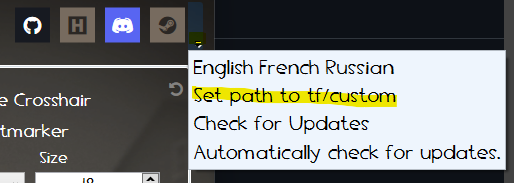
Issue 3: tf\custom directory not set! "error occurred while installing rayshud. Could not find part of the path" This path doesn't exist and wont let me change it. Please and an option to not use the registry or let me set it manually.
See above.
Issue 4: tf2-hud-editor-x64.zip contains two copies of the program tf2-hud-editor-x64.zip\ and tf2-hud-editor-x64.zip\win-x64. Only tf2-hud-editor-x64.zip\win-x64 seemed to work.
Thank you for letting me know. I've updated the releases to exclude the extraneous files.

Updated the story to focus on the first issue. System hang causes the editor to conflict with the files itself had installed.

No, I tested installing and reinstalling on C: drive and an external drive with no errors.
I can't remember why it installed wrong, I had fixed it at some point and have not been able to replicate the error since. I was confused enough where I wrote these issues down and thought I had pin pointed them. Probably an issue of rtfm or iue. My bad