

 CrackyStudio
RE: Server status stays on 'Starting' #6
Hi, sorry to dig up closed bugs, but i am also getting the issues outlined in closed bug number 6 on v5.1, it will load the server and users can connect without issue, firewall open, antivirus exceptions and ports forwarded correctly. a simple nmap scan of the ports show they respond externally.
It will show as "starting" for a long period but then will switch to "Offline" despite showing no issues to end users.

Thanks for this information. I'll investigate more deeper about this bug.

Chiming in to say I also have this issue. Windows 10, latest version of ARK. Only difference is mine stays on 'Starting' forever, and doesn't eventually go back to 'Offline'. Server works fine though.

I am having a similar issue but the server won't even start. I just downloaded the files via SteamCMD, correctly forwarded all ports and allowed the ShooterGame.exe in the Windows firewall. ARKSO just remains in the "Starting" phase and never moves past that point. A console opens up and once it shows the number of CPU cores it no longer continues. The server doesn't appear to be joinable on Steam or Epic games (-crossplay is added in the options section).

I am also having this issue. I just downloaded the files via SteamCMD, correctly forwarded all ports and allowed the ShooterGame.exe in the Windows firewall. ARKSO just remains in the "Starting" phase and never moves past that point. A console opens up and once it shows the number of CPU cores it no longer continues. The server doesn't appear to be joinable on Steam or Epic games (-crossplay is added in the options section).
Your issue is a little bit different because your server isn't up. Something in your config should not be ok. If you use an other antivirus, allow ShooterGame.exe inside of it too.
Do you see your server in local tab ?
The server is not shown what so ever. And what do you mean by Config? I didn't change anything I just downloaded the files via SteamCMD and launched this.
After I kid you not, 3 days of waiting. The server finally closed without warning. So I have zero clue as to what is going on.
If you don't see the server in the local tab, the server isn't up because something failed. Do not check "Hide Server Console" in the GUI of ARKSO and read the console. Something should be explicit about what is the problem. If not, put the console output here to have some help.
In the "Config" I mean the properties filled in the GUI of ARKSO, and also the installation steps. I can't help you if I have no clue from here the problem comes.
Sorry for the help delay.
If you don't see the server in the local tab, the server isn't up because something failed. Do not check "Hide Server Console" in the GUI of ARKSO and read the console. Something should be explicit about what is the problem. If not, put the console output here to have some help.
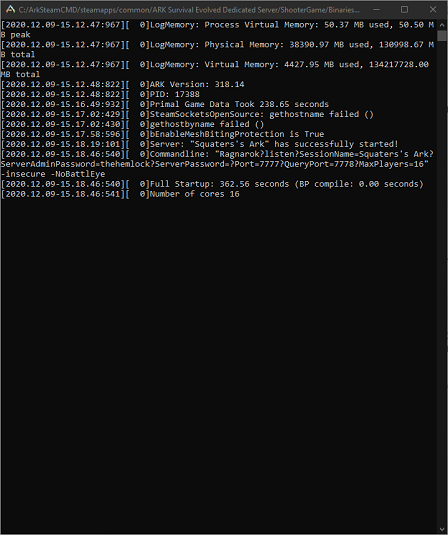
Here is a snapshot of the console window. That is as far as it goes and it remains like that forever or until it randomly closes after a long period of time. In the case of last time, it was about 3 days.
In the "Config" I mean the properties filled in the GUI of ARKSO, and also the installation steps.
Here is a snapshot of the ARKSO itself:

To add further insult to injury, the "ShooterGame.log" file is empty. Even during the long 3 day wait. Nothing is logged what so ever.
If it helps a bit, I followed these instructions. This tool is listed at the bottom of the instructions as a recommendation. The server is installed via SteamCMD, Ports and firewall rules are correctly forwarded and I'm simply using this tool to start the server.
I can't help you if I have no clue from here the problem comes.
That's why I'm here in this issue thread...
Sorry for the help delay.
No worries.
I can say that it's not an ARKSO error but something with Steam. Have a look in the console at
SteamSocketsOpenSource: gethostname failed ()
I don't really know how to fix it, but this is probably the problem. (Your configuration seems good)
@aking4125 your issue is the same as described here (with solution).
The "STARTING" label staying forever is fixed in v5.2.
Sorry for the lack of updates,
Turns out the server was in fact working. Just that we assumed adding the port was required. But it isn't for the default 7777 Port. So adding the IP and then the default port for some reason wasn't working at all. The server was playable and usable with ARKSO for about a week.
So the server in fact works. It still just read "Starting".
Regardless, we swapped to ASM sadly as it provides more powerful management. Though at the very least, this does work for a quick and basic setup. Thank you for your continued support. I'll perform a test server with 5.2 when we can.