
Windows

Windows copied to clipboard
 CommunityToolkit
Surface Dial Extension Bugs
Describe the bug
Found a few issues with the Surface Dial TextBox Extensions:
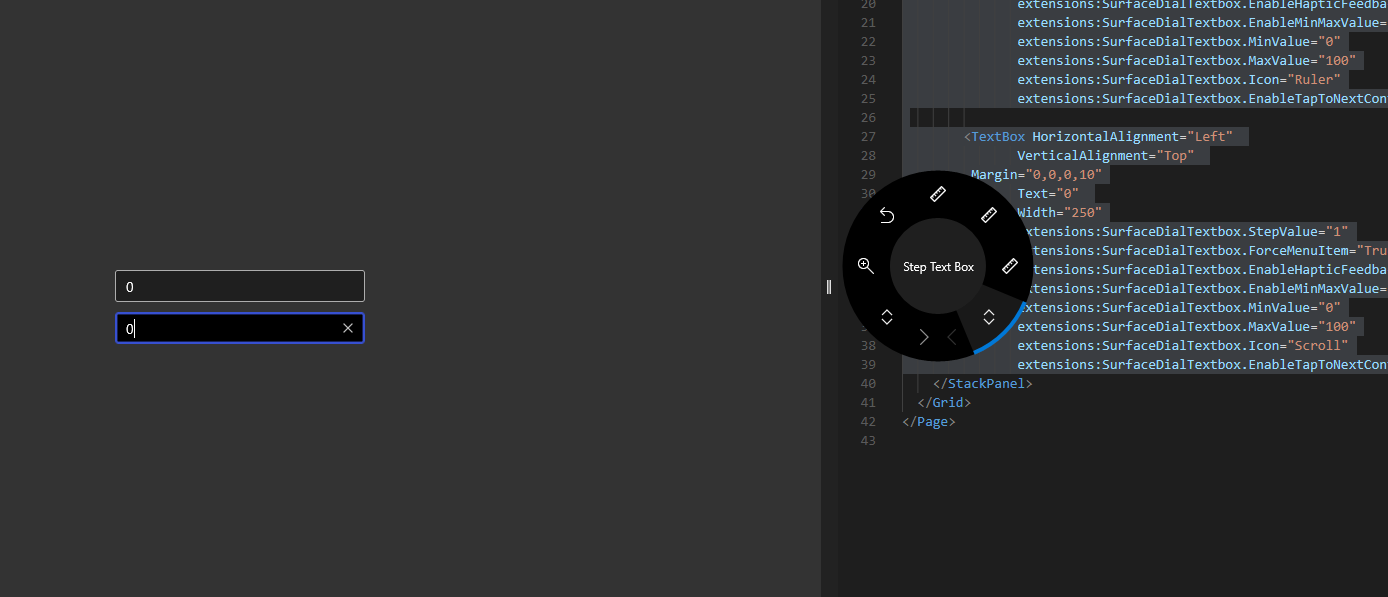
- [ ] Tapping doesn't go to the next control (if you have focus on first box below, tap dial, then it doesn't go to next textbox)
- [x] ~Default Icon should be
ScrollnotRuleras it is shown in menu (unlike the comment says) and...~ (didn't notice we're going to have scroll already by default, so I guess ruler is a good compromise unless we added a custom icon... - [ ] Is
ForceMenuItemrequired for this to work? It seems to be which is odd... - [ ] Copy the TextBox in the sample and you'll see there's two (or more!) menu items in the Surface Menu... (there should only ever be a single one).
Steps to Reproduce
Sample App:
      <TextBox HorizontalAlignment="Left"
               VerticalAlignment="Top"
			   Margin="0,0,0,10"
               Text="0"
               Width="250"
               extensions:SurfaceDialTextbox.StepValue="5"
               extensions:SurfaceDialTextbox.ForceMenuItem="True"
               extensions:SurfaceDialTextbox.EnableHapticFeedback="False"
               extensions:SurfaceDialTextbox.EnableMinMaxValue="True"
               extensions:SurfaceDialTextbox.MinValue="0"
               extensions:SurfaceDialTextbox.MaxValue="100"
               extensions:SurfaceDialTextbox.Icon="Ruler"
               extensions:SurfaceDialTextbox.EnableTapToNextControl="True"/>

        <TextBox HorizontalAlignment="Left"
               VerticalAlignment="Top"
			   Margin="0,0,0,10"
               Text="0"
               Width="250"
               extensions:SurfaceDialTextbox.StepValue="1"
               extensions:SurfaceDialTextbox.ForceMenuItem="True"
               extensions:SurfaceDialTextbox.EnableHapticFeedback="False"
               extensions:SurfaceDialTextbox.EnableMinMaxValue="True"
               extensions:SurfaceDialTextbox.MinValue="0"
               extensions:SurfaceDialTextbox.MaxValue="100"
               extensions:SurfaceDialTextbox.Icon="Scroll"
               extensions:SurfaceDialTextbox.EnableTapToNextControl="True"/>
Expected behavior
Tapping should go to the next tab order control. Menu item should only appear a single time ever when the textbox has focus. If it can work without the ForceMenuItem property it should, otherwise this property seems useless, should it just be ShowMenuItem?
Environment
Existing 6.1 Sample App.

We may want to make a new issue for adding a SurfaceDial extension to the NumberBox control in the WinUI 3 branch?