

 CommunityToolkit
[Bug] Popup text width problems
Description
There are some problems with the popup, in this case related to texts rendered inside it. If you use a text that is long enough it does not wrap automatically and overrides the width of the popup, completely breaking the visualization.
Reproduction Sample
Steps to Reproduce
- Remove the comment I inserted for the horizontal text width bug;
- Start the project.
Expected Behavior
The text goes new line every time it's needed.
Actual Behavior
The text doesn't go new lines.
Basic Information
- Version with issue:
1.0.0 - Last known good version:
1.0.0rc3 - IDE: VS
- Platform Target Frameworks:
- Android:
11.0
- Android:
Workaround
None
Reproduction imagery


From my tests something is happening with ScrollView, I saw a PR on MAUI side to fix measurement on ScrollView, I'll wait until the code is in the public channel to try this again.
If in our sample app we wrap the Popup.Content in a ScrollView we can see the issue

There is a similar problem with the Popup height if the line is wrapped by two or more

@pictos Any news on this? I have the same problem with popups which are way to wide because the text will not wrap over multiple lines in the popup.

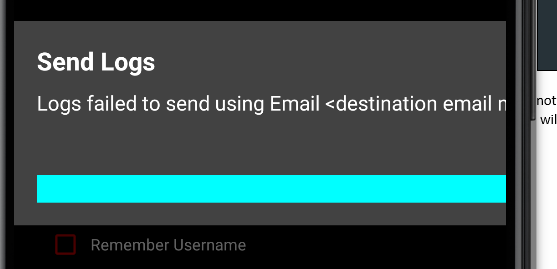

I have removed all my scrollviews from the parent pages and it still behaves the same here is my popup code
<?xml version="1.0" encoding="utf-8" ?>
<toolkit:Popup xmlns="http://schemas.microsoft.com/dotnet/2021/maui"
               xmlns:x="http://schemas.microsoft.com/winfx/2009/xaml"
               xmlns:toolkit="http://schemas.microsoft.com/dotnet/2022/maui/toolkit"
               xmlns:viewmodels="clr-namespace:WiFiMessenger.UI.Controls.Popup.ViewModels"
               x:DataType="viewmodels:AlertPopupViewModel"
               x:Class="WiFiMessenger.UI.Controls.Popup.Views.AlertPopupView"
               HorizontalOptions="Center"
               VerticalOptions="Center"
               Color="#424242">
  <Grid RowDefinitions="Auto, Auto, Auto"
        ColumnDefinitions="*"
        RowSpacing="10"
        Padding="20">
    <Label Grid.Row="0"
           Grid.Column="0"
           Text="{Binding Title}"
           FontAttributes="Bold"
           FontSize="Large"
           TextColor="White"/>

    <Label Grid.Row="1"
           Grid.Column="0"
           Text="{Binding Message}"
           LineBreakMode="WordWrap"
           FontSize="Medium"
           TextColor="White"/>

    <Grid Grid.Row="2"
          Grid.Column="0"
          Margin="0,20,0,0"
          ColumnSpacing="50"
          ColumnDefinitions="*,Auto,Auto"
          BackgroundColor="Aqua">
      <Label Grid.Column="1"
             Text="{Binding Cancel}"
             FontAttributes="Bold"
             FontSize="Medium"
             TextColor="#C10100">
        <Label.GestureRecognizers>
          <TapGestureRecognizer Tapped="OnNoButtonClicked"/>
        </Label.GestureRecognizers>
      </Label>
      <Label Grid.Column="2"
             Text="{Binding Accept}"
             FontAttributes="Bold"
             FontSize="Medium"
             TextColor="#C10100">
        <Label.GestureRecognizers>
          <TapGestureRecognizer Tapped="OnYesButtonClicked"/>
        </Label.GestureRecognizers>
      </Label>
    </Grid>
  </Grid>
</toolkit:Popup>
So I manage to find a workaround for it that works in my usage scenario. This is a very hacky solution, but it basically restricts the controls contained in the popup to a max size calculated from the display size.
EDIT: I have modified the code behind to automatically set all children of the MainLayout to have the MaxWidth binding and added the margin calculation
public double ControlMaxWidth
    {
      get
      {
        return   (    DeviceDisplay.MainDisplayInfo.Width
                       - (    MainLayoutPadding.HorizontalThickness
                            * DeviceDisplay.MainDisplayInfo.Density )
                       - (    MainLayoutMargin.HorizontalThickness
                            * DeviceDisplay.MainDisplayInfo.Density ) )
               / DeviceDisplay.MainDisplayInfo.Density;
      }
    }

You need a viewmodel that the popup consumes
public sealed class AlertPopupViewModel : SQLiteSafeBindableBase
{
  private string _title = string.Empty;
  public string Title
  {
    get { return _title; }
    set { SetProperty( ref _title, value ); }
  }

  private string _message = string.Empty;
  public string Message
  {
    get { return _message; }
    set { SetProperty( ref _message, value ); }
  }

  private string _accept = string.Empty;
  public string Accept
  {
    get { return _accept; }
    set { SetProperty( ref _accept, value ); }
  }

  private string _cancel = string.Empty;
  public string Cancel
  {
    get { return _cancel; }
    set { SetProperty( ref _cancel, value ); }
  }

  public double MessageMaxWidth
  {
    get
    {
      return   (    DeviceDisplay.MainDisplayInfo.Width
                     - (    MainLayoutPadding.HorizontalThickness
                          * DeviceDisplay.MainDisplayInfo.Density )
                     - (    MainLayoutMargin.HorizontalThickness
                          * DeviceDisplay.MainDisplayInfo.Density ) )
                 / DeviceDisplay.MainDisplayInfo.Density;
    }
  }

  private Thickness _mainLayoutPadding = 0;
  public Thickness MainLayoutPadding
  {
    get { return _mainLayoutPadding; }
    set
    {
      SetProperty( ref _mainLayoutPadding, value );
      OnPropertyChanged( nameof( ControlMaxWidth ) );
    }
  }
}
My alert popup class
public sealed class AlertPopup
{
  readonly AlertPopupView popup = new ();
  readonly AlertPopupViewModel viewmodel = new ();
  readonly Thickness popupPadding = 20;

  public AlertPopup()
  {
    viewmodel.MainLayoutPadding = popupPadding;
    popup.BindingContext = viewmodel;
    popup.CanBeDismissedByTappingOutsideOfPopup = true;
  }

  public Task Display( string title,
                                  string message,
                                  string cancel )
  {
    viewmodel.Title = title;
    viewmodel.Message = message;
    viewmodel.Accept = cancel;

    return Shell.Current.ShowPopupAsync( popup );
  }

  public Task<bool> Display( string title,
                                               string message,
                                               string accept,
                                               string cancel )
  {
    viewmodel.Title = title;
    viewmodel.Message = message;
    viewmodel.Accept = accept;
    viewmodel.Cancel = cancel;

    //This may be unsafe but with the way this popup is generated it is garaunteed to return a non null boolean
    return Unsafe.As<Task<bool>>( Shell.Current.ShowPopupAsync( popup ) );

    //if( await Shell.Current.ShowPopupAsync( popup ) is bool boolResult )
    //{
    //  return boolResult;
    //}

    //return false;
  }
}
my alertpopup view code behind
public sealed partial class AlertPopupView : CommunityToolkit.Maui.Views.Popup
{
  public AlertPopupView()
  {
    InitializeComponent();
    ResultWhenUserTapsOutsideOfPopup = false;

    //Hack to make all children abide by sizing rules
    foreach( View child in MainLayout.Children.Cast<View>() )
    {
      child.SetBinding( VisualElement.MaximumWidthRequestProperty, "ControlMaxWidth" );
    }
   }
  }

  private void OnYesButtonClicked( object? sender, TappedEventArgs e ) => Close( true );

  private void OnNoButtonClicked( object? sender, TappedEventArgs e ) => Close( false );
}
my alert popup view xaml
<?xml version="1.0" encoding="utf-8" ?>
<toolkit:Popup xmlns="http://schemas.microsoft.com/dotnet/2021/maui"
               xmlns:x="http://schemas.microsoft.com/winfx/2009/xaml"
               xmlns:toolkit="http://schemas.microsoft.com/dotnet/2022/maui/toolkit"
               xmlns:viewmodels="clr-namespace:WiFiMessenger.UI.Controls.Popup.ViewModels"
               x:DataType="viewmodels:AlertPopupViewModel"
               x:Class="WiFiMessenger.UI.Controls.Popup.Views.AlertPopupView"
               Color="#424242">
  <Grid x:Name="MainLayout"
        RowDefinitions="Auto, Auto, Auto"
        ColumnDefinitions="*"
        RowSpacing="10"
        Padding="{Binding MainLayoutPadding}"
        Margin="{Binding MainLayoutMargin}">
    <Label Grid.Row="0"
           Grid.Column="0"
           Text="{Binding Title}"
           FontAttributes="Bold"
           FontSize="Large"
           TextColor="White"/>

    <Label Grid.Row="1"
           Grid.Column="0"
           Text="{Binding Message}"
           LineBreakMode="WordWrap"
           FontSize="Medium"
           TextColor="White"/>

    <Grid Grid.Row="2"
          Grid.Column="0"
          Margin="0,20,0,0"
          ColumnSpacing="50"
          ColumnDefinitions="*,Auto,Auto">
      <Label Grid.Column="1"
             Text="{Binding Cancel}"
             FontAttributes="Bold"
             FontSize="Medium"
             TextColor="#C10100">
        <Label.GestureRecognizers>
          <TapGestureRecognizer Tapped="OnNoButtonClicked"/>
        </Label.GestureRecognizers>
      </Label>
      <Label Grid.Column="2"
             Text="{Binding Accept}"
             FontAttributes="Bold"
             FontSize="Medium"
             TextColor="#C10100">
        <Label.GestureRecognizers>
          <TapGestureRecognizer Tapped="OnYesButtonClicked"/>
        </Label.GestureRecognizers>
      </Label>
    </Grid>
  </Grid>
</toolkit:Popup>
