

 CollaboraOnline
Copy and Paste not working in Collabora
Describe the bug I copy something on my PC, a Link or Text, but i cant paste it in a Document or Sheet.
To Reproduce Steps to reproduce the behavior:
- Open Document
- Copy Link from Browser or other Text
- Paste it in Document
Expected behavior The Text is in the Document now
Screenshots
If i try to use "Paste" in the Menu, i get this Message:
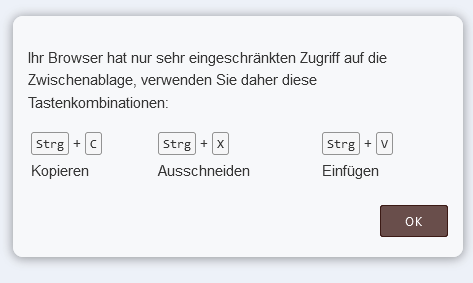
Client details:
- OS: Windows 10, Windows 11, Linux Mint tested
- Browser Firefox and Chrome
- Version Firefox: 103.0.2
Server details
Operating system: Debian Bullseye
Web server: Apache2 with Nginx Reverse Proxy
Database: MariaDB 10.5.15
PHP version: 7.4.30
Nextcloud version: 24.0.3
Version of the richdocuments app 6.2.0
Version of Collabora Online 22.5.502 (Code App)
Logs
Nextcloud log (data/nextcloud.log)
No Log
Link: https://github.com/nextcloud/richdocuments/issues/2373#issue-1334162043

@corincorvus, does the copied text get pasted when you use CTRL+V as the instruction from the dialog suggests?

@Ezinnem no, keyboard commands not work. Cause this Problem i open this issue
This may be very similar to the report on https://github.com/CollaboraOnline/online/issues/3928
Since they are similar, I will close this report.
@corincorvus, the issue will be tracked on https://github.com/CollaboraOnline/online/issues/3928