

 Codeusa
BG won't run on startup
For some reason it just suddenly stopped working I've already tried reinstalling it as well Completely deleting it from the directory It's gone missing from the list of startup apps too! There's one app in there just named "Program" with no way to interact with it, that' I've never seen b4 Could that be BG?? Has anyone run into this problem?

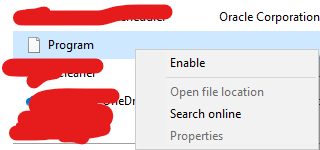 "Search online" just opens a bing page with the work "Program Program" in the search engine
I looked into tracking it down, and it was not BG It was some other program that I uninstalled awhile ago So I'm back to not know why BG won't startup with PC :/

@JayBoom I never got a response so I started digging into it myself I never added it to the startup folder But I did go into the registry and added it to the task manager startup myself (also how I got rid of the "Program" file)
So umm, I was about to say "no was not able to find a fix" Because adding it to the startup didn't do anything Which meant I would just have to start it manually myself Buuuttttt, I just looked rn n its on!!! (haven't started it up myself)
Could of been the disk image repair or system file scan I did yesterday or something You should give that a go 1st b4 going through the registry (it's not recommended to mess with that stuff)
Edit: OH, there was also a windows update But I'm pretty sure that it didn't fix it since I already had a windows update that didn't help (also could have been an update that messed everything up) So check for updates just in case! Doesn't hurt to do so!