

 CodeEditApp
✨ Bottom Drawer Navigation
We will have tabs or some form of navigation within the bottom drawer. We need to answer the following questions before we begin development.
- How will we display tabs? Just like the above tabs?
- Will we be able to split this drawer into multiple panes with their own set of tabs?
- Are drawer tabs allowed to be dragged to the top editor or are they restricted down in the drawer?
- Is drawer able to toggle to take up full window temporarily?
- Is drawer tab able to toggle to take up full window temporarily?
- What besides terminals can be opened in the bottom drawer?

I think over time we have some answers to these questions. Please refer to the following screenshot
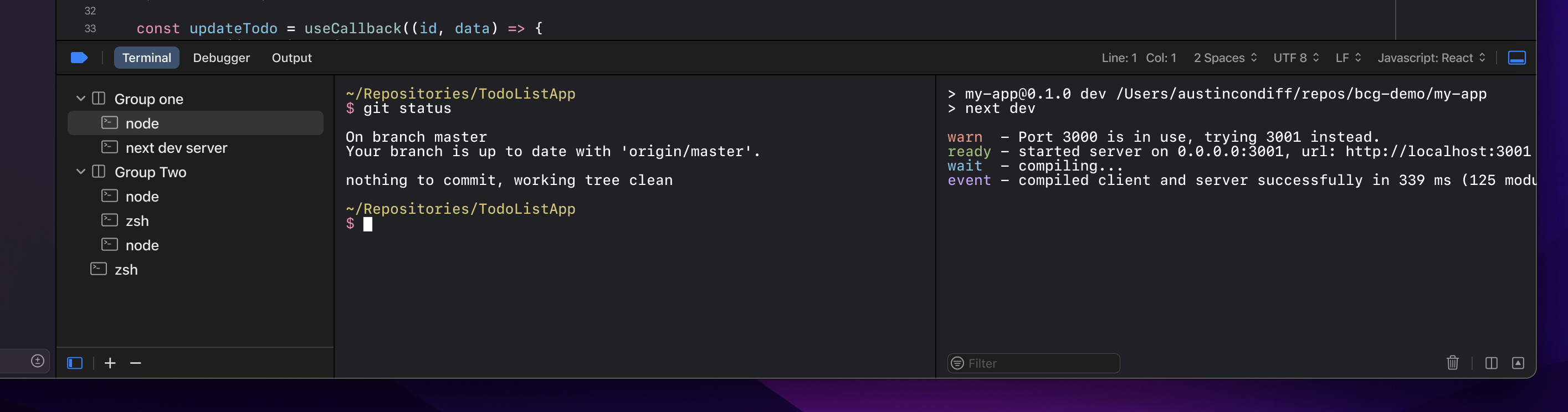
How will we display tabs? Just like the above tabs?
We will have a fixed set of mini-tabs for each type of debug panel in the bottom debug area.
Will we be able to split this drawer into multiple panes with their own set of tabs?
No. This complicates the UI, however we will allow terminals to be split in the terminal tab as shown. Possibly other debug panels to follow this pattern.
Are drawer tabs allowed to be dragged to the top editor or are they restricted down in the drawer?
No. Again this complicates the UI.
Is drawer able to toggle to take up full window temporarily?
Yes, via the bottom right expand icon.
Is drawer tab able to toggle to take up full window temporarily?
No, but the drawer (debug area) itself can.
What besides terminals can be opened in the bottom drawer?
According to the mockup we have Terminal, Debugger, and Output. Other panel ideas area welcome.