

 Code52
Request: handle all keys, including "Shift", "CTRL", "ALT"


Hi, you can try my Fork while the pull request is not merged https://github.com/bfritscher/carnac/releases

@bfritscher Seems much better. Some notes:
- It doesn't seem to differentiate between some keys. For example left-shift vs right-shift. Or numpad keys vs arrow keys.
- Pressing the "5" numpad key shows "Clear" for some reason.
- Pressing Caps-Lock shows "Capital". I wonder if it's possible to write "Caps-lock on" and "Caps-lock off". Same for Num-Lock and Scroll-Lock.
- Pressing Shift+5 shows "shift" and then "%" . Not sure what could be done about this, and if it should. Maybe show as "Shift+5 (%)" ? Maybe have an option for this.
- Pressing spacebar shows an empty space. Maybe it's better to have "␣" or an option to have it instead?
- Something weird when switching languages (Hebrew<->English in my case). Sometimes it shows well, sometimes it sticks to show one of the languages. A bit hard to explain. Here:
- I suggest to have a higher opacity. Also, the mouse buttons are very hard to notice. Especially the side buttons.
Wow, thank you!
On Mon, Apr 20, 2020 at 1:43 PM AndroidDeveloperLB [email protected] wrote:
@bfritscher https://github.com/bfritscher Seems much better. Some notes:
- It doesn't seem to differentiate between some keys. For example left-shift vs right-shift. Or numpad keys vs arrow keys.
- Pressing the "5" numpad key shows "Clear" for some reason.
- Pressing Caps-Lock shows "Capital". I wonder if it's possible to write "Caps-lock on" and "Caps-lock off". Same for Num-Lock and Scroll-Lock.
- Pressing Shift+5 shows "shift" and then "%" . Not sure what could be done about this, and if it should. Maybe show as "Shift+5 (%)" ? Maybe have an option for this.
- Pressing spacebar shows an empty space. Maybe it's better to have "␣" or an option to have it instead?
- Something weird when switching languages (Hebrew<->English in my case). Sometimes it shows well, sometimes it sticks to show one of the languages. A bit hard to explain. Here:
2020-04-20_20-42-34.zip https://github.com/Code52/carnac/files/4505172/2020-04-20_20-42-34.zip
— You are receiving this because you commented. Reply to this email directly, view it on GitHub https://github.com/Code52/carnac/issues/226#issuecomment-616708983, or unsubscribe https://github.com/notifications/unsubscribe-auth/AB2BMNHUKZAAL7RTD2BQVJLRNSCTJANCNFSM4JO7VM5Q .
-- Gillian Blekkenhorst Comics & Games http://blekkenhorst.ca
Thank me ? Thank you for this awesome PC app! All I did is write some comments about it.
Opps, I thought I was writing to the developer, I did not write it. :P Thank you too, though!
On Mon, Apr 20, 2020 at 5:26 PM AndroidDeveloperLB [email protected] wrote:
Thank me ? Thank you for this awesome PC app! All I did is write some comments about it.
— You are receiving this because you commented. Reply to this email directly, view it on GitHub https://github.com/Code52/carnac/issues/226#issuecomment-616818405, or unsubscribe https://github.com/notifications/unsubscribe-auth/AB2BMNEA2NEEEH2KX4WV7V3RNS4WRANCNFSM4JO7VM5Q .
-- Gillian Blekkenhorst Comics & Games http://blekkenhorst.ca
Hi, thanks for the feedback. Some comments on your proposition for anyone interested as I do not have the time to change the keyboard tracking part.
- It doesn't seem to differentiate between some keys. For example left-shift vs right-shift. Or numpad keys vs arrow keys.
- Pressing Caps-Lock shows "Capital". I wonder if it's possible to write "Caps-lock on" and "Caps-lock off". Same for Num-Lock and Scroll-Lock.
- Something weird when switching languages (Hebrew<->English in my case). Sometimes it shows well, sometimes it sticks to show one of the languages. A bit hard to explain. Here:
Most of these are linked to how the keys are captured which is quite a high level api so not everything is possible.
- Pressing the "5" numpad key shows "Clear" for some reason. This might be linked to a keymap file or the api
- Pressing Shift+5 shows "shift" and then "%" . Not sure what could be done about this, and if it should. Maybe show as "Shift+5 (%)" ? Maybe have an option for this.
For modifier keys shift is shown, but not for basic alphabet, the question is which rule to use when to show shift and when not, because Shift + a is not disired in text, but as a shortcut yes.
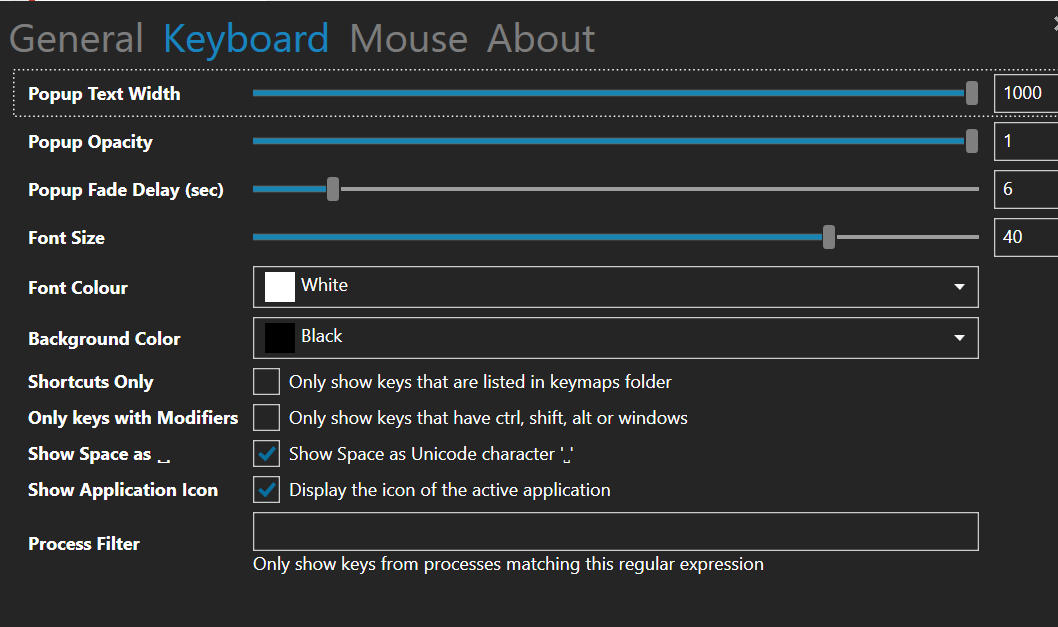
- Pressing spacebar shows an empty space. Maybe it's better to have "␣" or an option to have it instead?
This is implemented in carnac under keyboard options.
- I suggest to have a higher opacity. Also, the mouse buttons are very hard to notice. Especially the side buttons.
Yes, depending on the chosen color, now that it uses the same as the highlight color. If you switch Xbutton color back to RED, the button should be visible.
@bfritscher
- I see.
- Numpad 5 is "clear"?
- Caps lock state is possible. Check this app (sadly not freeware and not open sourced) : https://keypressosd.com/
- Doesn't matter much.
- I don't understand. You mean it's possible via the settings somewhere?
- Keyboard switching works fine on the app I've mentioned on #3. Please try it.
- Can you please set a more visible color by default? Especially for the mouse buttons? The side buttons are almost not visible because of this. Maybe even make them a bit larger?
- When Numpad is off key 5 is not 5 but clear as 9 is page up, and so on You could create a keymap file and add the text 5 to the clear key if you need 5 when numpad is off
click on the icon in the taskbar to open settings and click on the title keyboard or mouse
5. 
- Suggest any of the colors in the dropdown
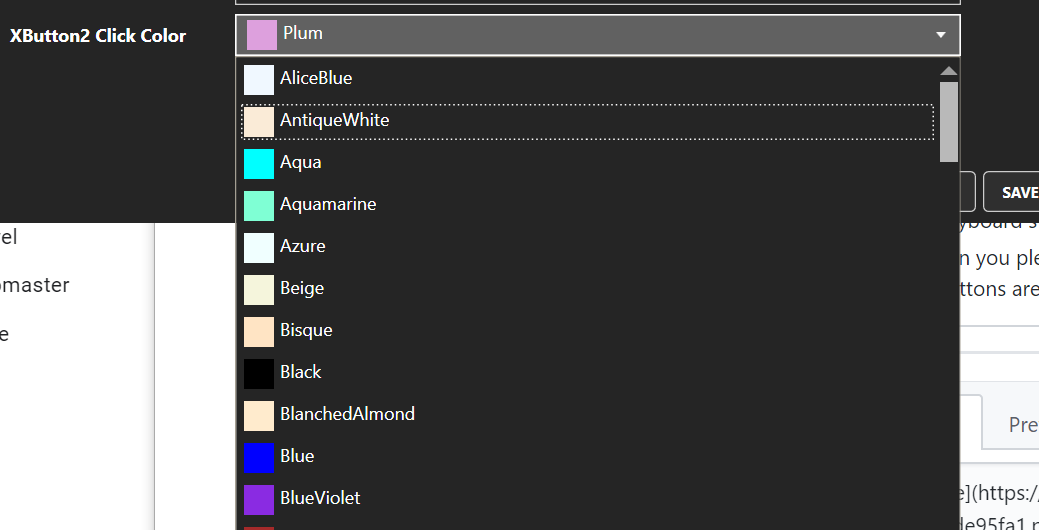
As the suggested app is not open source it is not possible to see how they implemented the features.
@bfritscher
-
I don't understand about numpad-5. Why is it named "clear" ? Does it have a functionality of clearing? I never saw it, and there is nothing written on the keyboard itself that gives this clue.
-
Oh. I don't remember seeing this setting of the spacebar. Thank you. Any reason it's not enabled by default?
-
I suggest red color
Sorry about the suggested app. It only shows it's possible. :(