

 ClosedXML
XLWorkbook.SaveAs - Workbook with ActiveX button generated with incorrect data
Read and complete the full issue template
Do not randomly delete sections. They are here for a reason.
Do you want to request a feature or report a bug?
- [x] Bug
- [ ] Feature
- [ ] Question
Did you test against the latest CI build?
- [x] Yes
- [ ] No
If you answered No, please test with the latest development build first.
Version of ClosedXML 0.100.3 and latest develop 8dc0e70eb727b26e45da904fd5cd960853e0f3da built from source
What is the current behavior?
When creating a copy of an existing xlsx using SaveAs that includes a ActiveX button the resulting workbook is not the same as the original. I've crafted a slim test case/example that shows the workbook is different when opened.
What is the expected behavior or new feature? That the workbook is duplicated correctly. It doesn't have to be a perfect match in terms of the generated xml but it should be functionally the same.
Is this a regression from the previous version? I think this impacts all 0.100.x versions but haven't fully tested them all. Have confirmed it is working correctly in 0.97.0. If you'd like me to run further tests against specific versions let me know and I will run them as best I can
Reproducibility
This is an important section. Read it carefully. Failure to do so will cause a 'RTFM' comment.
The original workbook (SheetWithButton.xlsx)
Sheet1 has bbbbbbbbbbbbbbbbbbbbbb
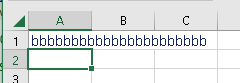 Sheet2 has aaaaaaaaaaaaaaaaaaaaaaaaaaaaaaa with a button

Run the code below using a plain SaveAs under a new name. Compare the resulting workbooks visually.
Sheet1 has bbbbbbbbbbbbbbbbbbbbbb
 but Sheet2 now also has bbbbbbbbbbbbbbbbbbbbbb in the A1 cell with the button
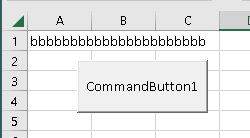
Code to reproduce problem:
public void Main()
{
    using var book = new XLWorkbook(@"SheetWithButton.xlsx");
    book.SaveAs(@"SheetWithButtonCopy.xlsx");
}
- [x] I attached a sample spreadsheet. (You can drag files on to this issue) input workbook needed SheetWithButton.xlsx for repro and an example of what I am getting when I generate the content on my side SheetWithButtonCopy.xlsx

Based on my browsing of the code as of https://github.com/ClosedXML/ClosedXML/commit/8dc0e70eb727b26e45da904fd5cd960853e0f3da I think there is an issue inside of WorksheetPartWriter GetWorksheetDom
The comment makes reference that worksheetPart.Worksheet creates an attached DOM
https://github.com/ClosedXML/ClosedXML/blob/8dc0e70eb727b26e45da904fd5cd960853e0f3da/ClosedXML/Excel/IO/WorksheetPartWriter.cs#L58-L61
When I followed the SaveAs code path in the debugger it access worksheetPart.Worksheet here when it is trying to remove an empty Drawings.xml file (?)
https://github.com/ClosedXML/ClosedXML/blob/8dc0e70eb727b26e45da904fd5cd960853e0f3da/ClosedXML/Excel/IO/WorksheetPartWriter.cs#L1197
I think this is attaching the WorkbookPart to the DOM such that when the XLWorkbook is Disposed the DocumentFormat.OpenXml internals AutoSave is detecting that the Worksheet part has changed and then overwrites the sheet xml with what was there previously.
I'm not sure I've followed it fully as it isn't clear if the shared strings are impacted in some way (does the shared strings order matter?) and as far as I can tell the sheet is being loaded correctly in the first place.
If there is anything more I can do to help diagnose this do reach out.
I am having the same issue. I have a 'normal' button in my worksheet (from the control section not the active-x section) that triggers a method in a macro. After saving all the strings in that worksheet get thrashed. I am using version 0.101.0
