

 CleverRaven
Nested crafting categories
Summary
Interface "allow recipes to be nested in folders"
Purpose of change
Too many recipes, I'm sure there are issues for this.
Describe the solution
Adds a new type of recipe "nested_category" A recipe with this is similar to a normal recipe in def, but it can specify "nested_category_data" which is a list of recipe_ids
Adds a new category to * in crafting "NESTED"
when you select a nested_category recipe it populates NESTED with all of it's recipes and moves you to the NESTED tab.
To test this I nested all the steel arms, legs and chests. I also hid them.
Added documentation to explain all of this.
Describe alternatives you've considered
Testing
Load up the game, give yourself skills and recipes. Check that they work
Additional context
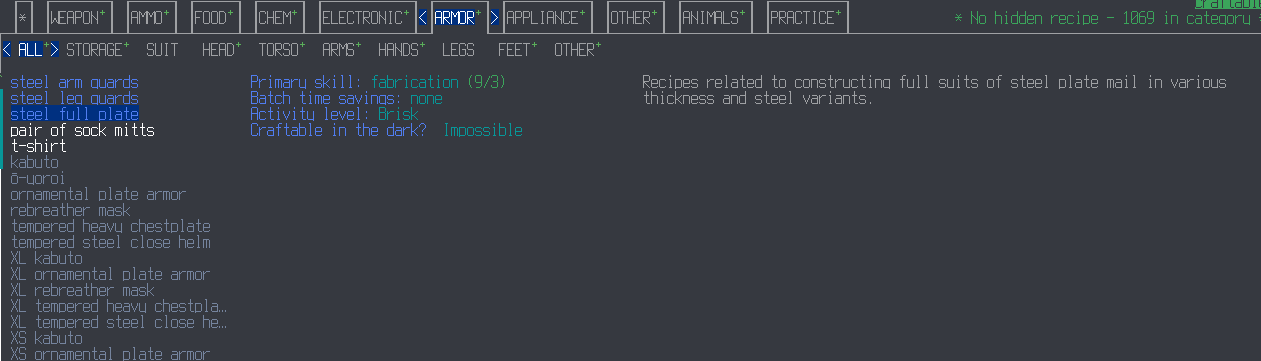

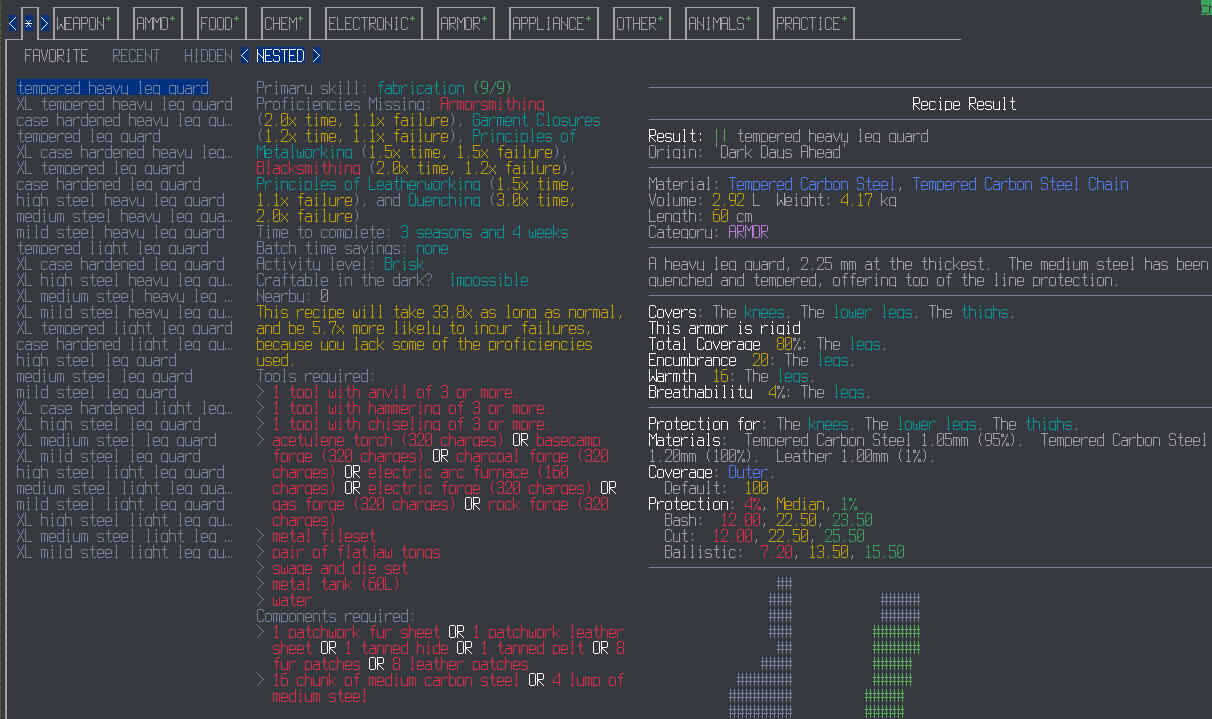


Hm, I'd probably call it sub category, and might consider allowing something to either belong to multiple sub categories, or allow them to be nested (you may want torso armor/steel armor/XL size) that you could expand which would give you a sub category indication specifying what the sub category is, so you might get Sub category XL size/torso armor/steel armor if you expanded along that route. You could either have the Armor tab still marked, or have the sub category indicator include the category as well. Apart from expanding, you'd also be able to contract to back up a level., and I might want a "show all in category" choice that doesn't suppress items in sub categories from the category for the case where you're looking for something you're neither sure about the name of, nor which sub categories it belongs to (and you may be unsure of whether you've got the skills for it to be displayed).
Allowing you to narrow things down to sub categories you care about at the moment rather than having to deal with dozens of pages of things of no (current) interest should help a lot with the recipe bloat, so this is definitely an interesting PR.

sub category
Sub category already means something in the context of the crafting UI. (It's the subheaders bellow PRACTICE, *, ARMOR, APPLIANCE)
I also wanna be really clear that I have 0 interest in doing a full crafting rework. People moaned and complained about recipe bloat and this is a simple non intrusive way to solve it that doesn't overy complicate the crafting gui C++ code which desperately needs a full refactor before anyone starts stapling complex systems to it.
If someone wants to rework the crafting UI it would be welcome but I'm not increasing this PR in scope in any way so any comments on the UI proper might get lost here.
This pull request introduces 1 alert when merging bebe779bcbe6f32c536308b95fc6406c3d58950c into 86f75252f9c7cd57500d4b32d90d920706a1bc4b - view on LGTM.com
new alerts:
- 1 for Empty branch of conditional
![lgtm-com[bot] avatar](https://avatars.githubusercontent.com/in/17324?v=4 "Published by a pub.dev verified publisher")
How hard would it be to have it look something like this?
steel full plate ▶
pair of sock mitts
then it expands to
steel full plate ▼
- tempered heavy leg guard
- XL tempered heavy leg guard
...
pair of sock mitts

Afaik Very,
It also would mean when someone gets around to refactoring this it's got a bunch of additional code spaghetti since it would have to manually fuck with sorting order.
It also leads to weird unintuitive UI pitfalls. If some of the nested recipes you can't craft they are greyed out, do they go on bottom of the nest or the bottom of the list? do players miss recipes cause they have recipes they can make now bellow a bunch of greyed out recipes. Is each portion alphabetized amongst itself? Does it remember the active state of each between closing? Do we then need buttons to collapse and expand all in case someone opens to many (non trivial the way it's laid out). What do you do with recipes in the nest that don't fit the category it is nested in do you keep them hidden or display them? If you search a nested entry and hit enter on it, what happens? Does it expand in the search bar? Is there non trivial code to pull you back into the correct category, subcategory, location in the list, expand it with the items in it's category bellow. For that last case what happens if the nest itself is hidden? You find it with search you open it up, does it pull you to hidden subcategory and expand there? Maybe it doesn't show up in search at all since all it's nested recipes do, but then that's confusing too if someone wants to search the nested.
I don't need answers to those questions, but the point is each answer is more code, and more edge cases (bug reports) while we are in feature freeze.
This pull request introduces 1 alert when merging 900c4a0784b2617cdf3ea6646418a9c77bb8fd9e into bb34fdb766260a5d65632e53e6f1603dbaae8d07 - view on LGTM.com
new alerts:
- 1 for Empty branch of conditional
When adding nesting I'm noticing that the items are not disappearing properly on my end. Can you check and see if it is something I'm doing wrong or an issue with the PR? https://github.com/CleverRaven/Cataclysm-DDA/pull/60160

Is there any way (or are there any plans to implement) a way to, after selecting a nested group and being taken to the "NESTED" subtab of "*", go back to the where the nested group was selected? For example, if I select the "crossbows" nested group, is there a way to go back to the originating "WEAPONS" subtab (either "ALL" or "RANGED" as appropriate)?
Also, any consideration for a way to switch between this new nesting method and the old way of just showing all recipes at once?

Is there any way (or are there any plans to implement) a way to, after selecting a nested group and being taken to the "NESTED" subtab of "*", go back to the where the nested group was selected? For example, if I select the "crossbows" nested group, is there a way to go back to the originating "WEAPONS" subtab (either "ALL" or "RANGED" as appropriate)?
yes to this one, it's just a bit of work to get working
Another thing: it doesn't seem like the "NESTED" tabs respect whether or not individual recipes are hidden. For example, I always hide the XS and XL "ARMOR" recipes. Those XS/XL recipes are properly shown under the "HIDDEN" subtab of the "*" tab and used to be properly hidden under the "ARMOR" tab. However, now, all XS/XL recipes are shown (even if hidden) when the "NESTED" categories are viewed.
(Edit: please let me know if, instead of commenting about these issues here, I should be creating separate issue bug reports.)
In the future you should make issues. However I've already got a fix PRd for the hidden recipe thing.