

 CleverCloud
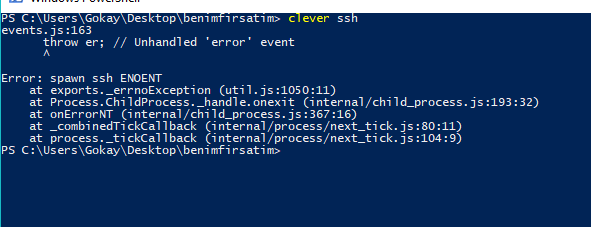
`clever ssh` returns unhandled error on windows powershell and cmd.exe
Clever ssh returns an unhandled error message on windows. The problem occurs because on default environment paths, there is no ssh executable can be found.
This issue can be solved in many different ways, but the most straightforward approach i think is just running the clever-tools from git-bash. This solution both uses the same ssh keys used for deployment for common setup and requires no extra installation.
To resolve this problem, instead of throwing the unhandled exception, clever-tools ssh command should check if it is running on windows environment, then it should check if there is an ssh executable in path, and if not, it should just promt user to use git-bash or a similar terminal.

Yeah, my idea was to catch the exception and display a message advising to run it from git-bash or to use putty (I'm not sure it's doable to use putty for this, I'll check today)
