

 Cigaras
BubbleUPnP does not work after server update
I had updated my Plex server over the past months, and now I just noticed, the IPTV folder isn't listed anymore under libraries. Isn't it supported anymore? Do I have to re-enable it somehow? Server is Linux.

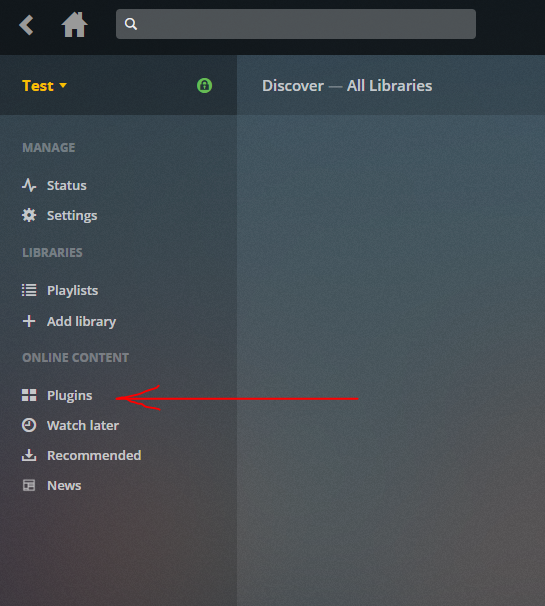

I have updated the plugin and it is listed again, but it is not working anymore. Did they change anything on Plex so the IPTV plugin doesnt work anymore? I have a playlist in this format and it worked before with no problems:
#EXTM3U
#EXTINF:0 tvg-name="Das Erste" tvg-logo="http://upload.wikimedia.org/wikipedia/commons/thumb/4/4a/Das_Erste_HD_Logo.svg/200px-Das_Erste_HD_Logo.svg.png" group-title="Oeffis",(1) Das Erste
http://192.168.1.201:4022/udp/239.35.10.4:10000
#EXTINF:0 tvg-name="ZDF" tvg-logo="http://upload.wikimedia.org/wikipedia/commons/thumb/0/02/ZDF.svg/200px-ZDF.svg.png" group-title="Oeffis",(2) ZDF
http://192.168.1.201:4022/udp/239.35.10.5:10000
#EXTINF:0 tvg-name="WDR" tvg-logo="http://upload.wikimedia.org/wikipedia/commons/thumb/9/9b/WDR_Dachmarke.svg/200px-WDR_Dachmarke.svg.png" group-title="Oeffis",(3) WDR
http://192.168.1.201:4022/udp/239.35.10.18:10000
But since I updated plex and the plugin... it doesnt work anymore. I cant play any entries via BubbleUPNP, it just says cant play this link (local tether to MX Player) or just goes to play and stop again in a few seconds.
I connect via BubbleUPNP remote to a server, and then tether actually the IPTV content locally or via network for example Windows Media Player. This worked for years... but not anymore.
The line is:
BubbleUPnP Clients->internet->BubbleUPnP+Plex+your IPTV plugin->http://192.168.1.201:4022 (udpxy multicast proxy)
I asked the dev of BubbleUPnP, and he said it is a problem of your plugin or Plex. Here is what he said:
The Plex HLS stream URL is:
http://192.168.1.212:32469/object/bb5dff5fe467689830e1/start.m3u8
And ffmpeg fails on it.
Can you check if you can play it in VLC ? If not, these stream is probably invalid or obsolete.
//////////
[qtp767814888-149 (149)      ] INFO     - 0:08:37.331    - q                           : nat loopback: http://xxxxxxx.duckdns.org:58050/stream/video/c212d2879c06e87b60d49977068a7d16.m3u8 => http://192.168.1.212:58050/stream/video/c212d2879c06e87b60d49977068a7d16.m3u8
[qtp767814888-149 (149)      ] INFO     - 0:08:37.333    - FFMpegUtils                 : ffprobe process started, timeout: 30000 ms: ffprobe -show_format -show_streams -seekable 0 http://192.168.1.212:58050/stream/video/c212d2879c06e87b60d49977068a7d16.m3u8
[qtp767814888-168 (168)      ] INFO     - 0:08:37.344    - r                           : proxy stream request /stream/video/c212d2879c06e87b60d49977068a7d16.m3u8 => http://192.168.1.212:32469/object/bb5dff5fe467689830e1/start.m3u8
[com.bubblesoft.bubbleupnpser] INFO     - 0:08:37.356    - o$b                         : proxy: onResponseComplete: total response bytes: 1088
[qtp767814888-149 (149)      ] WARNING  - 0:08:37.361    - FFMpegUtils                 : ffprobe error exit code=1
[qtp767814888-149 (149)      ] WARNING  - 0:08:37.361    - FFMpegUtils                 : ffmpeg output:

ffprobe version N-86343-g3385989 Copyright (c) 2007-2017 the FFmpeg developers
  built with gcc 4.6 (Ubuntu/Linaro 4.6.3-1ubuntu5)
  configuration: --prefix=/home/bobbie/ffmpeg-static/target --pkg-config-flags=--static --extra-cflags=-I/home/bobbie/ffmpeg-static/target/include --extra-ldexeflags='-Wl,-Bstatic' --extra-ldflags=-L/home/bobbie/ffmpeg-static/target/lib --extra-libs='-Wl,-Bdynamic -lm -ldl' --bindir=/home/bobbie/ffmpeg-static/bin --enable-pic --disable-doc --disable-debug --disable-ffplay --disable-ffserver --disable-fontconfig --enable-gpl --enable-version3 --disable-frei0r --disable-libass --disable-libfribidi --disable-libfreetype --disable-libfdk-aac --enable-libmp3lame --enable-libopencore-amrnb --enable-libopencore-amrwb --enable-libopenjpeg --enable-libopus --disable-librtmp --enable-libsoxr --enable-libspeex --enable-libtheora --disable-libvidstab --disable-libvo-amrwbenc --enable-libvorbis --enable-libvpx --disable-libwebp --enable-libx264 --enable-libx265 --enable-libxvid --disable-libzimg --enable-gnutls --enable-libmfx
  libavutil      55. 63.100 / 55. 63.100
  libavcodec     57. 96.101 / 57. 96.101
  libavformat    57. 72.101 / 57. 72.101
  libavdevice    57.  7.100 / 57.  7.100
  libavfilter     6. 91.100 /  6. 91.100
  libswscale      4.  7.101 /  4.  7.101
  libswresample   2.  8.100 /  2.  8.100
  libpostproc    54.  6.100 / 54.  6.100
http://192.168.1.212:58050/stream/video/c212d2879c06e87b60d49977068a7d16.m3u8: Invalid data found when processing input
When I open the http://192.168.1.212:32469/object/bb5dff5fe467689830e1/start.m3u8 locally via VLC, VLC seems to crash in a loop somehow. I looked into the file via chrome and it doesnt look like a m3u8 file to me the content is:
https://i.imgur.com/T0XuhOI.png
Why is it in this xml format? It is obviously not a m3u8 file. Why is your plugin not generating a proper m3u8 file? m3u8 files cant be in xml format as I see it.
Not plug-ins fault.
As mentioned multiple times before, this plug-in does not playback the streams, it only reads the link from m3u file and passes it to Plex Media Server in a format understandable to it. Plex Media Server then does its magic and passes the stream to some kind of Plex Player. In this particular case servers magic might work in a way that breaks the ffmpeg 😄
Only thing I can modify in this plug-in is metadata, according to it server does assumptions and chooses right (or wrong) tools for stream processing.
@Cigaras did you even READ what I said? OF COURSE IT IS YOUR PLUGINS FAUL or Plex fault. What are you even talking about, go please up and re-read and understand. I am not talking about "playback", of course the plugin doesnt play it back, LOL!! ... ...
The issue is your plugin generates a XML file and states it be a m3u8 file WHICH IT IS NOT.
Go up... reread... understand the issue. PLEASE. LOOK AT THE SCREENSHOT, I cant post the content here it wont be parsed. The ffmpeg stuff is REDUNDANT for you, it just caused by it wants to open the """m3u8""" file, which it cant, BECAUSE IT IS NOT A m3u8 FILE.
https://i.imgur.com/T0XuhOI.png <------------- NOT A m3u8 FILE. But it is advertise by plex as one ( http://192.168.1.212:32469/object/bb5dff5fe467689830e1/start.m3u8 )
Playing via Plex app and web browser doesnt work too btw.
Plug-in does not generate an xml file, xml is generated by Plex API/Framework.
@Cigaras Ok, fine, even worse, so Plex is broken. Can you please get in contact with Plex devs about this. It obviously broke your plugin, it is not working anymore. It worked before the last years. I updated plex about 2 months ago, and it is broken since then. So it seems Plex changed their API or whatever. This "start.m3u8" file is not a m3u8 file, so it cant be parsed by players or stuff like BubbleUPnP.
Why do other direct media files work though I can access them via BubblUPnp... the only thing not working anymore is your IPTV plugin.
By the looks of it, file start.m3u8 is not meant to be parsed by BubbleUPnP or other third party software, it is meant for Plex Players...
@Cigaras Yes I agree. ... BUT... it is STILL NOT A m3u8 file. m3u8 files arent allowed to be in XML format.
Other media on the Plex server works still fine though, not your IPTV plugin anymore though. It seems to me, the moron devs at Plex maybe changed their plugin API, so direct media on the Plex server isnt affected by this change, and still works fine via BubbleUPnP.
I need to set up an BubbleUPnP setup for myself to investigate this further and figure out how to obtain that start.m3u8 url before reaching out to Plex developers, and I am very short on time for this project, so I am very sorry but I doubt I will be able to help You anytime soon 🙁
@Cigaras Thank you very much. I really appreciate that, I really do. Mostly devs are ignorant to help, so this totally made me happy, you are not, and willing to investigate into this.
This question is off-topic, but maybe you can help on this too, because I cant play your IPTV plugin too over Android Plex app nor over locally Plex web browser. Do you have any idea why, this should work, right?
Opening IPTV content on Android Plex says: "playback not possible" and via web browser: https://i.imgur.com/nq75edq.png
I am using SSH tunneling so far as a workaround, and access the playlist.m3u directly.