

 ChurchCRM
System Users
There is no field to set the password of a new created user. This causes all new created system users can't login the CRM. We've tried to activate the "Reset Password" function in the login window, but it didn't work.
| Collected Value Title | Data |
|---|---|
| Page Name | /nhfc/SystemSettings.php?saved=true |
| Screen Size | 1080x1920 |
| Window Size | 938x1920 |
| Page Size | 938x1920 |
| Platform Information | Linux sg1-ss3.a2hosting.com 3.10.0-962.3.2.lve1.5.26.5.el7.x86_64 #1 SMP Wed Sep 18 07:37:02 EDT 2019 x86_64 |
| PHP Version | 7.3.27 |
| SQL Version | 10.3.22-MariaDB-cll-lve |
| ChurchCRM Version | 4.4.2 |
| Reporting Browser | Mozilla/5.0 (Windows NT 10.0; Win64; x64; rv:88.0) Gecko/20100101 Firefox/88.0 |
| Prerequisite Status | All Prerequisites met |
| Integrity check status | {"status":"success"} |
| Apache Modules | mod_rewrite,mod_mime,mod_headers,mod_expires,mod_auth_basic |

The assumed workflow is that new system users will be emailed to access the system and set their own passwords. However, if you want to set an initial password for new users, create the system user as normal then:
- Access the "System Users" menu
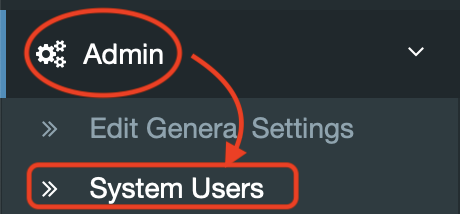
- Then click the spanner icon next to their name to set a password


Also, the "reset password" feature requires the system's email configuration to be working and able to send email too (or at least, last time I used it that was the case). If the reset password isn't working, check your email setup.

As per the last comment, I'm going to close this.
If this is still an issue, feel free to look through the Github Issues to see if a new issue has been filed and file a new issue if one does not exist
