

 Chocobozzz
Low CPU usage when transcoding lower resolutions
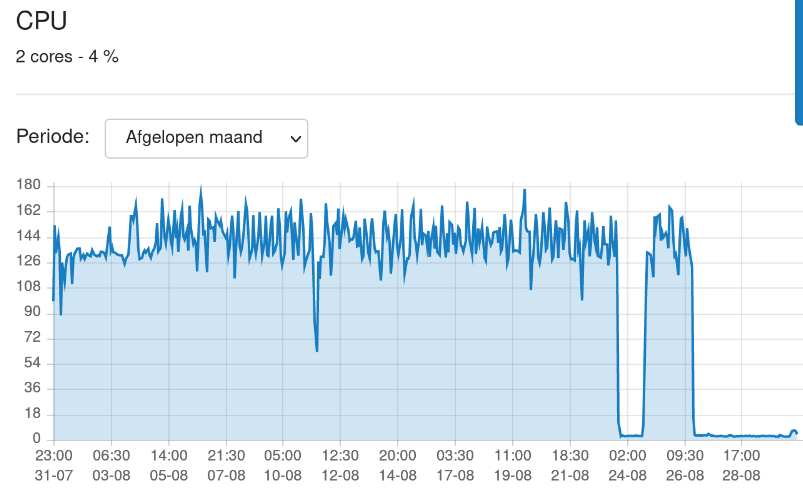
Peertube uses 100% of the CPU when transcoding the original resolution but only 30%-50% of the CPU when it starts to transcode lower resolutions.
This is not version specific like I originally thought.
Additional information
- PeerTube instance:
- URL: vidbin.org
- Version: 4.3.0-rc.1
- NodeJS version: 18
- Ffmpeg version: master

I think what's going on here is the original video is only used for the first transcode. Then it uses the peertube produced HLS file for lower resolution transcodes. And for some reason it's just slower with the fragmented/HLS video.
I observed similar behavior in my instance of PeerTube. Anything but highest resolution only maxes out at 60% CPU utilization, possibly leading to slower transcode times.

https://www.youtube.com/watch?v=bR8De0woh0s
https://vidbin.org/w/4MsoK5aQdTxVkdqNFJDgfo
Using the below as the test:
https://vidbin.org/download/streaming-playlists/hls/videos/1ea4267d-37e3-4d40-bb92-124dd8faf1a6-1440-fragmented.mp4
Command:
ffmpeg -i /root/1ea4267d-37e3-4d40-bb92-124dd8faf1a6-1440-fragmented.mp4 -y -acodec aac -vcodec libsvtav1 -threads 24 -f mp4 -movflags faststart -max_muxing_queue_size 1024 -map_metadata -1 -pix_fmt yuv420p -b:a 192k -ac 2 -vf scale=w=-2:h=1080 -crf 42 -preset 7 -g 999 -hls_time 4 -hls_list_size 0 -hls_playlist_type vod -hls_segment_filename /root/1080-fragmented.mp4 -hls_segment_type fmp4 -f hls -hls_flags single_file /root/1080.m3u8
The resulting CPU is only 700% max.
Using 308+251 (1440p+opus) and converting to 1080p.
ffmpeg -i /root/1440p.mkv -y -acodec aac -vcodec libsvtav1 -threads 24 -f mp4 -movflags faststart -max_muxing_queue_size 1024 -map_metadata -1 -pix_fmt yuv420p -b:a 192k -ac 2 -vf scale=w=-2:h=1080 -crf 42 -preset 7 -g 999 /root/output-1080p-fragmented.mp4
CPU usage is consistent at 2000%
Recently discovered ffmpeg also supports transcoding to multiple resolutions at once, this would possibly yield the lowest transcoding time and most effective CPU utilization possible.
ffmpeg's "trasncode to multiple resolutions at once" is actually just multiple outputs (i've encountered it before). however, it is not guaranteed to reduce transcoding time and could be potentially worse with it (see "Parallel Encoding" in the linked page).

Hello,
Is it a peertube bug? I think we always specify the appropriate thread option. Can you check the ffmpeg command ran by peertube?

Hello,
Is it a peertube bug? I think we always specify the appropriate thread option. Can you check the ffmpeg command ran by peertube?
These are the commands run by peertube. I just don't understand why the first transcode doesn't have the hls options and subsequent transcodes with the lower resolutions do.
After further testing the CPU usage is only limited to 700% when using the peertube-created 1440-fragmented.mp4 to encode lower resolutions.
Purposed solution: Use the original video for all resolutions. Currently peertube does the following:
original video (1440p) -> encoded/hls video (1440p) -> lower resolution/video/hls
Change to:
original video (1440p) -> encoded video/hls (1440p) && original video (1440p) -> lower resolution video/hls (1080p, 720p, etc)
It's not limited to 1440p. It does the same thing if 1080p is the max resolution. It always encodes the highest first, then uses the encoded video for lower resolutions.
Isn't related to your encoder? Why ffmpeg consumes less CPU depending on the input file?
Isn't related to your encoder? Why ffmpeg consumes less CPU depending on the input file?
@emansom Are you seeing the same thing on your end? You don't use svtav1 right?
@emansom Are you seeing the same thing on your end? You don't use svtav1 right?
Yes, during channel import of 200+ videos it was 100% for the initial video and then 60-70% cycles of CPU usage after. Default settings. x264.
@vid-bin Why don't you consider that transcoding from fragmented mp4 file with a scale filter resulting in low CPU usage is not a bug? https://trac.ffmpeg.org/ticket/9923