

 Chocobozzz
Prevent too high video resolution upload
Describe the current behavior
One of our users tried to upload a big video (2160p HEVC+AAC @ 25Mbit/s) to our small-ish server (2G of RAM).
The video ends up playable, but audio-only (we use HLS). The user did not notice the yellow banner that says "The video is being transcoded, it may not work properly." (probably b/c the video was sort-of playable.)
I checked peertube's logs & the journal; ffmpeg was oom-killed after processing ~40 frames:
error: Error in transcoding job. {
 "stdout": "",
 "stderr": "ffmpeg version 4.1.6-1~deb10u1 Copyright (c) 2000-2020 the FFmpeg developers\n  built with gcc 8 (Debian 8.3.0-6)\n
...
error: Cannot execute job 6600 in queue video-transcoding. {
  "payload": {
    "type": "optimize",
    "videoUUID": "c80b1fb9-f00-.........",
    "isNewVideo": true
  },
  "err": {
    "stack": "Error: ffmpeg was killed with signal SIGKILL\n    at ChildProcess.<anonymous> (/app/node_modules/fluent-ffmpeg/lib/processor.js:180:22)\n    at ChildProcess.emit (events.js:198:13)\n    at Process.ChildProcess._handle.onexit (internal/child_process.js:248:12)",
    "message": "ffmpeg was killed with signal SIGKILL"
  }
}
journal:
peertube kernel: sshd invoked oom-killer: gfp_mask=0x15080c0(GFP_KERNEL_ACCOUNT|__GFP_ZERO), nodemask=(null), orde
peertube kernel: sshd cpuset=/ mems_allowed=0
peertube kernel: CPU: 0 PID: 967 Comm: sshd Not tainted 4.15.0-91-generic #92-Ubuntu
....
peertube kernel: Out of memory: Kill process 30815 (ffmpeg) score 655 or sacrifice child
peertube kernel: Killed process 30815 (ffmpeg) total-vm:2728596kB, anon-rss:1300740kB, file-rss:0kB, shmem-rss:0kB
peertube kernel: oom_reaper: reaped process 30815 (ffmpeg), now anon-rss:16kB, file-rss:0kB, shmem-rss:0kB
Steps to reproduce:
I tried to reproduce it and got into a similar (?) situation:
- create a big video:
ffmpeg -f lavfi -i 'testsrc=3840x2160' -t 10 -c:v hevc -b:v 25M test.mp4(the bitrate doesn't go into effect withtestsrc, but I played around with noise to drive it up) - upload it
- notice job doesn't finish; stuck at "being transcoded"
error only in peertube log, nothing in journal:
x264 [error]: malloc of size 52496576 failed
Video encoding failed
Conversion failed!

    at ChildProcess.<anonymous> (/app/node_modules/fluent-ffmpeg/lib/processor.js:182:22)
    at ChildProcess.emit (events.js:198:13)
    at Process.ChildProcess._handle.onexit (internal/child_process.js:248:12)
Describe the expected behavior
- I assume it's hard-to-impossible to anticipate if a video might fail due to memory limitations
- at least, the transcode wouldn't be left "dangling" but properly declared "failed" (related: #3162, but there for different reasons)
- I wish the user would be informed what might have caused the error
- Maybe there might be a way to limit the resolution of uploads (do a ffprobe first, check if it exceeds resolution or bitrate set by admin?)
- I don't know if it's sane to rely on OOM killing ffmpeg and not something else?
Additional information
- PeerTube instance:
- version: 3.0.1
- NodeJS version: 10.23.1 (your docker setup)
- Ffmpeg version: 4.1.6-1~deb10u1 (again, your docker setup)

Hello,
You can limit video upload size using user daily quota limit or nginx: https://github.com/Chocobozzz/PeerTube/blob/develop/support/nginx/peertube#L88

Hi! Sorry to bother you, but I explicitly didn't mean absolute file size, but "big" in terms of resolution. I can create a 4K 25Mbps video which is, say 10MB in total (arbitrarily small in terms of absolute file size), which ffmpeg will still choke on. No upload_size limit or quota will prevent that.
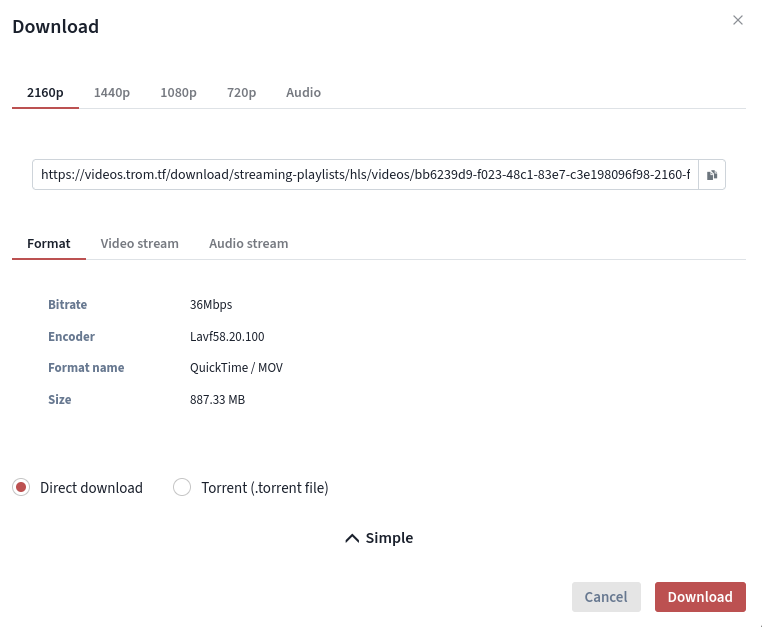
Please please allow us to limit the video resolutions for an instance. For example I would like to only allow HD or FullHD videos. So if anyone uploads anything that is bigger than that in terms of resolution, to be converted ONLY to these resolutions. Look at this example from my instance https://videos.trom.tf/w/p94oocVwJ9gFcXkZWXiKQm a 4k video 60fps of only 3 minutes, and the 4k video is already almost 1GB in size. This is insanity squared and I cannot afford to allow people to upload such extreme, and arguably useless resolutions.
I thought that using these options will limit the conversion to only certain resolutions:
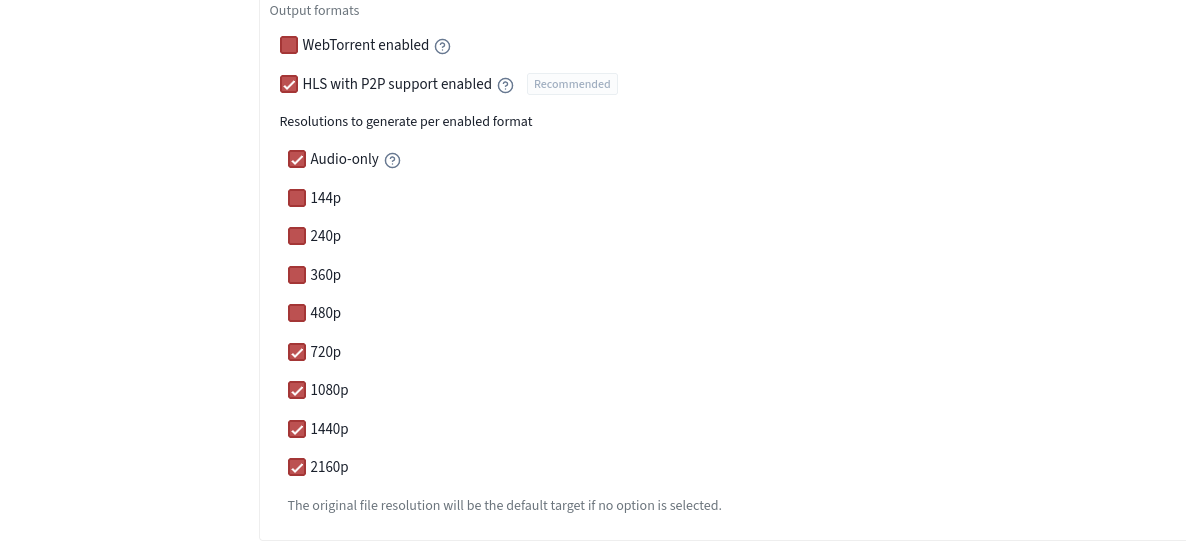
But it won't.
