

 CesiumGS
scene.pick get wrong result at same position
I‘m trying to get entity by scene.pick。 I found that sometimes it get wrong result.
i use code like:
setInputAction(function(event) { console.log(event.position) let model = viewer.scene.pick(event.position); if (model && model.id) { console.log(model.id.id) } }, ScreenSpaceEventType.LEFT_DOWN)
In the map, i clicked green position three times
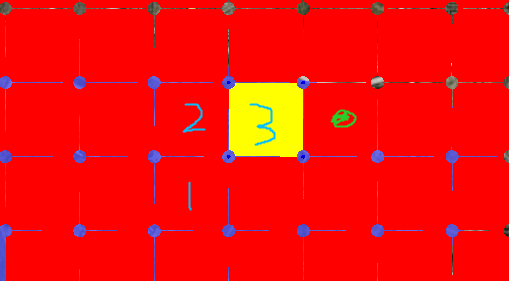
then i got three different entity:
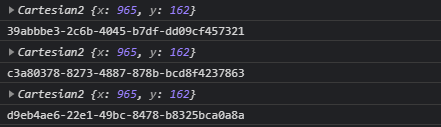
Is there something I did wrong?


Hi @QianWu184 - are you able to share a Sandcastle that reproduces this issue?
Thanks your attention,but i'm afraid i can't provid Sandcastle to you(It's too long. Basically, it's building 100 entities, arranging them like a grid, and trying to get one of them by LEFT_DOWN).And is there any possible reason for this problem?
@QianWu184 This doesn't seem like correct behavior but it's tough to diagnose the issue.. I was unable to reproduce the behavior in this Sandcastle with multiple models arranged in a line.
Are you able to identify which entities are being picked when you are clicking?
@QianWu184 This doesn't seem like correct behavior but it's tough to diagnose the issue.. I was unable to reproduce the behavior in this Sandcastle with multiple models arranged in a line.
Are you able to identify which entities are being picked when you are clicking?
In fact, each Entity is just a polygon geometry. I just want to click and drag the Entity where the green dot is located. But the results obtained through viewer.scene.pick the previous few times are always wrong. For example, in the image above, I want to get the corresponding Entity by clicking on the green position. But these three numbers indicate the three different results when I clicked on the green dot.The yellow background is just the effect I made to confirm the current actual selected result。
@QianWu184 This doesn't seem like correct behavior but it's tough to diagnose the issue.. I was unable to reproduce the behavior in this Sandcastle with multiple models arranged in a line.
Are you able to identify which entities are being picked when you are clicking?
This problem does not seem to exist when the Entity has only one row or I click on the edge of the Entity. But if you arrange them into multiple rows and click on the Entity in the middle, this problem seems to occur.
Here's a different Sandcastle that has 100 entities in a 10 x 10 grid. What are you doing differently? I'm testing on Windows 10 using Chrome.

Here's a different Sandcastle that has 100 entities in a 10 x 10 grid. What are you doing differently? I'm testing on Windows 10 using Chrome.
This can also run successfully here. Maybe I should check if my code has offset the coordinates
Hi @QianWu184. In my work, i encounter the same problem which you stated. Have you solved this problem yet?
