

 Canop
Canop
Alt-Enter does not work on Windows
alt-enter is the Windows Console / Terminal shortcut to maximize/restore the console/terminal window. Therefore, it is not possible to execute :open_leave or :cd with this shortcut. Changing the shortcut works for :open_leave only. When trying to set
{
  key: shift-enter
  execution: ":cd"
}
you get Bad configuration: not a known internal: cd
this stand in the way of a br function in powershell, where you can change dir with a shortcut:
function br() {
	$tmp = [System.IO.Path]::GetTempFileName()
	c:\OwnApp\Tools\broot.exe --outcmd "$tmp" $args
	$cd = Get-Content "$tmp"
	Remove-Item -Force "$tmp"
	$dir = $cd.substring(3)
	if (Test-Path -PathType Container "$dir") {
		if ("$dir" -ne "$pwd") {
			Push-Location "$dir"
		}
	}
}
(selecting the path and then :cd is working, but a shortcut would be nice)
This problem occurs with broot running locally on Windows, but also with broot running on a remote host, when connected over ssh in the Windows Console / Terminal

In Windows Terminal it is possible to remove the Alt-Enter shortcut in Settings, but for the Console the problem still exists.
new to broot.
On a related note, the help page within broot references open_leave and the shortcut ol, as working on directories. That's not the case even on linux.
Because open_leave so thoroughly caught my eye and had a visible sister command open_stay, I managed to overlook the existence of :cd for several hours and therefore thought the dropping back into tho shell could be invoked /only/ by alt+enter.
Seems like the command should be open_leave and cd should be the shortcut, rather than having two commands which do the same thing according to :help (but they don't) 🤪

On a related note, the help page within broot references open_leave and the shortcut ol, as working on directories. That's not the case even on linux.
Hum... I'll investigate this

Ok, found what happens.

The "ol" shortcut is mapped to :open_leave but only for files (i.e. not directories):
    // those two operations are mapped on ALT-ENTER, one
    // for directories and the other one for the other files
    internal(open_leave) // calls the system open
        .with_stype(SelectionType::File)
        .with_key(key!(alt-enter))
        .with_shortcut("ol"),
    external("cd", "cd {directory}", FromParentShell)
        .with_stype(SelectionType::Directory)
        .with_key(key!(alt-enter))
        .with_description("change directory and quit"),
The text description of open_leave is taken from the :open_leave description.
To make it less confusing, I'll just add the "ol" shortcut for directories too:
    // those two operations are mapped on ALT-ENTER, one
    // for directories and the other one for the other files
    internal(open_leave) // calls the system open
        .with_stype(SelectionType::File)
        .with_key(key!(alt-enter))
        .with_shortcut("ol"),
    external("cd", "cd {directory}", FromParentShell)
        .with_stype(SelectionType::Directory)
        .with_key(key!(alt-enter))
        .with_shortcut("ol")
        .with_description("change directory and quit"),
which gives
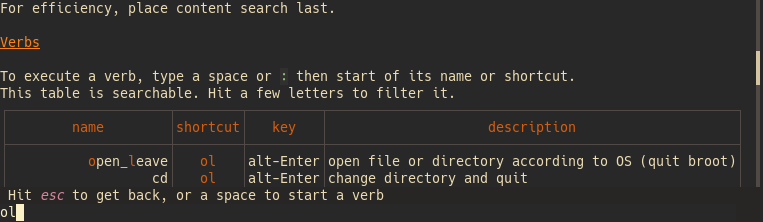
Also, for those of us using git-bash on Windows.
Would it be possible to fix/escape the path that's being returned when invoking :cd ?

So hitting enter does not result in an error message, like:
bash: cd: C:Windowssystem32: No such file or directory

Git-bash on Windows uses a derivative of cygwin called msys2, you should have a cygpath.exe in there.

You can modify the br function to use cygpath by doing something like this.
function br {
  local cmd cmd_file code
  cmd_file=$(mktemp)
  if broot --outcmd "$cmd_file" "$@"; then
    if grep -e '^cd' "$cmd_file" &>/dev/null; then
      cd "$(sed 's/cd\s\"\(.*\)\"/\1/' "$cmd_file" | cygpath.exe -u -f -)"
    else
      cmd=$(<"$cmd_file")
      eval "$cmd"
    fi
    command rm -f "$cmd_file"
  else
    code=$?
    command rm -f "$cmd_file"
    return "$code"
  fi
}
Thanks much to both of you!
@AeliusSaionji Your code fixed the slashes issue just fine. But it also generated:

& the error: bash: cd: cd C:/Windows/system32: No such file or directory
@Canop That would be great if you do the replacement in Broot itself.
Also, could the source statement that broot --install writes to .bashrc and .bash_profile be modified to use forward slashes?
i.e.: source C:/Users/Windows/AppData/Roaming/dystroy/broot/data/launcher/bash/1
@Canop
It should be possible to do this replacement in broot itself
I way overcomplicated this and the fix is likely trivial. msys bash already supports cd-ing to Windows paths (even relative paths), so long as they are quoted.
The problem can be fixed if broot wraps paths in double quotes. Which it already does if the path has a character that needs quoting. Should be harmless to always add the quotes.
See the following:
aelius@BOOK-II MSYS ~
$ set -x

aelius@BOOK-II MSYS ~
$ br
+ br
+ local cmd cmd_file code
++ mktemp
+ cmd_file=/tmp/tmp.8MAiOsKjXy
+ broot --outcmd /tmp/tmp.8MAiOsKjXy
+ cmd='cd "C:\Users\aelius\br works here"'  #<--- path double quoted
+ command rm -f /tmp/tmp.8MAiOsKjXy
+ eval 'cd "C:\Users\aelius\br works here"' #<--- eval processes quoted path
++ cd 'C:\Users\aelius\br works here'       #<--- success

aelius@BOOK-II MSYS ~/br works here
$ br
+ br
+ local cmd cmd_file code
++ mktemp
+ cmd_file=/tmp/tmp.H8TI5doyFk
+ broot --outcmd /tmp/tmp.H8TI5doyFk
+ cmd='cd C:\Users\aelius\br-fails-here'  #<--- path unquoted
+ command rm -f /tmp/tmp.H8TI5doyFk
+ eval 'cd C:\Users\aelius\br-fails-here' #<--- eval mangles unquoted path
++ cd C:Usersaeliusbr-fails-here          #<--- fail
bash: cd: C:Usersaeliusbr-fails-here: No such file or directory

aelius@BOOK-II MSYS ~/br works here
$ eval 'cd "C:\Users\aelius\br-fails-here"' #<--- try again with quoted path
+ eval 'cd "C:\Users\aelius\br-fails-here"'
++ cd 'C:\Users\aelius\br-fails-here'       #<--- success
Is there a fix for
Bad configuration: not a known internal: cd
?
My terminal uses (hijacks) alt-enter and I'd like to remap this shortcut, and from the docs it sounds like I should be able to do that.

@Canop it's what this issue was opened with (regardless of the shortcut key):
{
  key: shift-enter
  execution: ":cd"
}
results in
Bad configuration: not a known internal: cd
edit: found this related issue and added a comment there: https://github.com/Canop/broot/issues/365
@Canop
It should be possible to do this replacement in broot itself
I way overcomplicated this and the fix is likely trivial. msys bash already supports cd-ing to Windows paths (even relative paths), so long as they are quoted.
The problem can be fixed if broot wraps paths in double quotes. Which it already does if the path has a character that needs quoting. Should be harmless to always add the quotes.
See the following:
aelius@BOOK-II MSYS ~
$ set -x

aelius@BOOK-II MSYS ~
$ br
+ br
+ local cmd cmd_file code
++ mktemp
+ cmd_file=/tmp/tmp.8MAiOsKjXy
+ broot --outcmd /tmp/tmp.8MAiOsKjXy
+ cmd='cd "C:\Users\aelius\br works here"'  #<--- path double quoted
+ command rm -f /tmp/tmp.8MAiOsKjXy
+ eval 'cd "C:\Users\aelius\br works here"' #<--- eval processes quoted path
++ cd 'C:\Users\aelius\br works here'       #<--- success

aelius@BOOK-II MSYS ~/br works here
$ br
+ br
+ local cmd cmd_file code
++ mktemp
+ cmd_file=/tmp/tmp.H8TI5doyFk
+ broot --outcmd /tmp/tmp.H8TI5doyFk
+ cmd='cd C:\Users\aelius\br-fails-here'  #<--- path unquoted
+ command rm -f /tmp/tmp.H8TI5doyFk
+ eval 'cd C:\Users\aelius\br-fails-here' #<--- eval mangles unquoted path
++ cd C:Usersaeliusbr-fails-here          #<--- fail
bash: cd: C:Usersaeliusbr-fails-here: No such file or directory

aelius@BOOK-II MSYS ~/br works here
$ eval 'cd "C:\Users\aelius\br-fails-here"' #<--- try again with quoted path
+ eval 'cd "C:\Users\aelius\br-fails-here"'
++ cd 'C:\Users\aelius\br-fails-here'       #<--- success
Another facet of this has appeared: One cannot use the verb :terminal if $SHELL contains a space. No combination of quoting or escaping will correctly populate whatever exec() broot is calling. For a shell located at "C:\Program Files\nu\bin\nu.exe" You'll always get