

 Canop
Canop
custom key bind "ctrl+," "ctrl+." dont run.
OS:Windows 10 Pro Shell : Powershell Core 7.2.4 broot 1.13.3 by scoop Terminal Iterm2 over ssh
I set the below.but cannot. I try ", to comma" ". to period" but br dont run. I trh other key(for example ctrl-u) and can run.
Move panel left
[[verbs]] invocation = "panel_left" key = "ctrl-," internal = "panel_left"
Move panel right
[[verbs]] invocation = "panel_right" key = "ctrl-." internal = "panel_right"
pleas tell me solution.

Most terminals intercept such combinations.
To be sure, run broot with debug log (see https://dystroy.org/broot/community/#log) and display the log file content (on PowerShell I think it's done with something like Get-Content -tail).
Each time you press one or several key(s), what the terminal tells broot is displayed in the log.

broot.log thank you for your reply. I attach the log.
"," and "." was entered in search bar when I input "ctrl+," and "ctrl+." key.
I've looked a little. Those aren't easy key combinations to handle. Maybe the good people at crossterm will manage to handle them someday (you may contact them) but right now I don't think many low level terminal libs manage to do that. Even vim is unable to differentiate ctrl+comma from just the comma.
If you want to try many combinations and check whether a terminal application such as broot can receive it, you may want this little program I made: https://github.com/Canop/crokey/tree/main/examples/print_key
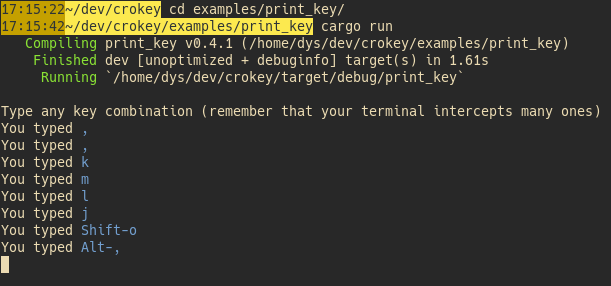
Thanks for your help. I will change any other key.
But,I have any trouble. what requirement key for change panel?
Ctrl-u : run Ctrl-i : not run (cursor down) Ctrl-n : run Ctrl-m : not run (open stay) Ctrl-[ : not run (move to up?) Ctrl-] : not run (open directory?) ctrl-shift-* : not run (no reaction) ctrl-tab : not run (no reaction)
what requirement key for change panel?
You mean how to map it ? The internals are :panel_left and :panel_right, which means you can do for example
    {
        key: "ctrl-F9"
        internal: "panel_right"
    }
key param instead.
for example,below. but "ctrl-i"(panel_right) did not fire.
Move panel left
[[verbs]] invocation = "panel_left" key = "ctrl-u" internal = "panel_left" Move panel right
[[verbs]]
invocation = "panel_right" key = "ctrl-i" internal = "panel_right"
I setting up "Shift-Left" and "Shift-Right" good for me. I wonder that some key bind do not fire but close this issue. Thank you for your help.