

 Canner
Add the ability to configure LLMs via the web interface
Is your feature request related to a problem? Please describe. No
Describe the solution you'd like
"I've encountered quite a bit of trouble when configuring different LLMs. I frequently see 'invalid API key' errors in the Docker logs, but I've double and triple-checked that the GEMINI/DEEPSEEK/OPENAI API keys I have in my ~/.wrenai/.env file are correct.
I'd like to suggest simplifying these configurations as much as possible, adopting a program setting method similar to Chatbox/AnythingLLM, where there's a web interface to select which LLM to connect to, allowing users to input their API keys or API URLs, and then have a dropdown menu for model selection, similar to this:"

let me put this as good first issue. We welcome the community to contribute to this idea. You could discuss with us how you would like to design the solution first. Thank you

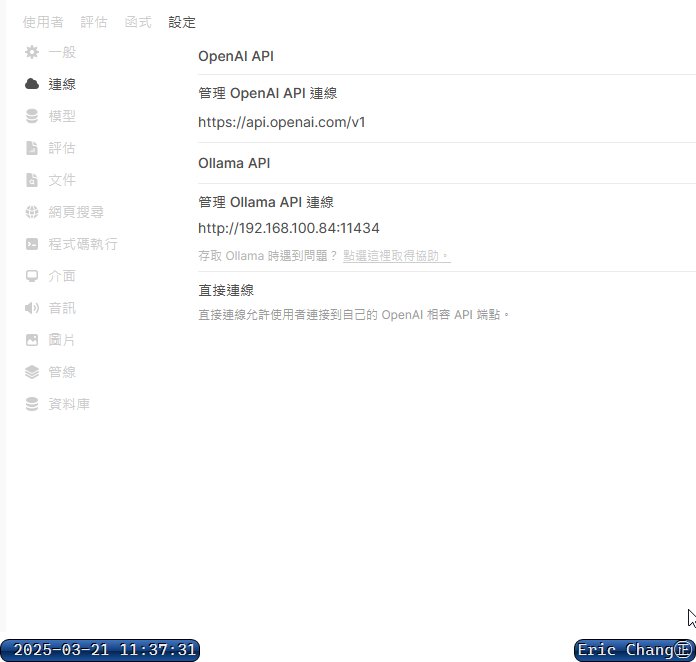
This is the interface of Open Web UI. I think it's clean and powerful, which makes it a pretty solid design. Users can choose which services to enable on their own. After enabling, they can manually input an API URL (or use the system default?) and an API Key. When saving, the system will verify if the entries are correct. In the future, the official team might even consider offering their own database analysis models for lease or commercial use.
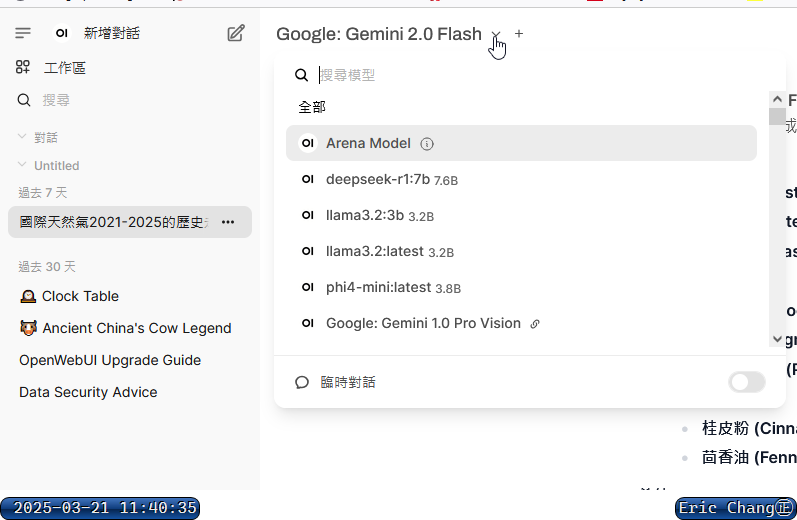
During conversations, users can freely select different models.
I think it's a good suggestion to input the API key and select the model using web interface
One thing I would add to my suggestion is to first test it after specifying the API key or model, and then storing it Use the input values to perform a simple test call, analyze the response, and then store it

@changchichung @coderprovider currently @yichieh-lu is working on it, and you can check this issue: https://github.com/Canner/WrenAI/issues/1555
He is working on an implementation based on Streamlit that users can configure their LLMs and embedding models and also test them first to check if they are configured correctly. Welcome to share your thoughts on this in the issue link above.