

 CadQuery
scaling shapes
There is Workplane.rotate and Workplane.translate but not Workplane.scale.
There doesn't seem to be an easy way to scale shapes so I came up with this. Perhaps it should be part of the core API?
def scale(workplane: cq.Workplane, x: float, y: Optional[float] = None, z: Optional[float] = None) -> cq.Workplane:
    y = y if y is not None else x
    z = z if z is not None else x
    t = cq.Matrix([
        [x, 0, 0, 0],
        [0, y, 0, 0],
        [0, 0, z, 0],
        [0, 0, 0, 1]
    ])
    return workplane.newObject([
        o.transformGeometry(t) if isinstance(o, cq.Shape) else o
        for o in workplane.objects
    ])
perhaps a generic Workplane.transform(cq.Matrix) would also be useful?

You can do it via cq.Shape.transformGeometry. It is not a good idea to expose it in the fluent API - general transformations will change the underlying geometries which will make things confusing for regular user.
Also note that the "mindset" of CQ is BRep not CSG - instead of scaling you can easily construct a new object/feature.

I couldn't figure out how else to do a revolution with a non-constant radius so instead I revolved like normal and scaled afterwards, so that is my use case. Fair enough if it doesn't fit the goals of the high level API though.
Another potential use case is adding clearance between parts by scaling one part then cutting away from the other. I can't see any way of performing a 'buffer' operation other than perhaps using shell() but that doesn't seem to work well with complex geometry (like the groove from #619).
Revolution with a non-constant radius sounds like a sweep. Just use sweep for that.
If you insist on using it, just use the method I mentioned above. Note that shell and scaling will have a different effects.
I like the idea of using a sweep. I hadn't thought of that. Unfortunately it either causes self-intersections at the top of a hole down the middle depending on how close to the center you go (because of the non-constant radius), then I want to turn it into a shell so I have to fill the hole in the center which was quite challenging and the best I could come up with was doing:
edges = shape.faces('<Z').edges('<Y').vals()
center = cq.Workplane('XY').newObject(edges).toPending().wire().toPending().extrude(60, combine=False)
shape = shape.union(center)
because just selecting the inner edge was extruded in the wrong direction (I think the plane orientation is the same as the sweep, so +z is tangent to the sweep rather than pointing up). There is probably a better way to do this though.
and after all that the shell failed anyway with
Traceback (most recent call last):
    hollow = shape.faces('<Z').shell(wall_thickness)
  File "/home/matthew/anaconda3/envs/cadquery/lib/python3.8/site-packages/cadquery/cq.py", line 1139, in shell
    s = solidRef.shell(faces, thickness, kind=kind)
  File "/home/matthew/anaconda3/envs/cadquery/lib/python3.8/site-packages/cadquery/occ_impl/shapes.py", line 2005, in shell
    rv = shell_builder.Shape()
OCP.StdFail.StdFail_NotDone: BRep_API: command not done
I've put together a simple example but in this example I'm not even able to create the center column because it fails to convert the edges to wires:
import cadquery as cq

base = cq.Workplane('XY').ellipse(5, 7)

base_path = base.val()
sweep_plane = cq.Plane(
    base_path.positionAt(0),
    xDir=cq.Vector(1, 0, 0),
    normal=-base_path.tangentAt(0),
)

center_x = -2.5
height = 10
shape2d = cq.Workplane(sweep_plane).spline([(0, 0), (5, 7), (center_x, height)]).lineTo(center_x, 0).close()

shape = shape2d.sweep(base)

show_object(base, 'base')
show_object(shape2d, 'shape2d')
show_object(shape, 'shape')


inner_edges = shape.faces('<Z').edges('<Y').vals()
show_object(inner_edges)
# center = cq.Workplane('XY').newObject(inner_edges).toPending().wire().toPending().extrude(height, combine=False)

# show_object(center, 'center')
    center = cq.Workplane('XY').newObject(inner_edges).toPending().wire().toPending().extrude(height, combine=False)
  File "/home/matthew/anaconda3/envs/cadquery/lib/python3.8/site-packages/cadquery/cq.py", line 2109, in wire
    w = Wire.assembleEdges(edges)
  File "/home/matthew/anaconda3/envs/cadquery/lib/python3.8/site-packages/cadquery/occ_impl/shapes.py", line 1541, in assembleEdges
    return cls(wire_builder.Wire())
OCP.StdFail.StdFail_NotDone: BRep_API: command not done
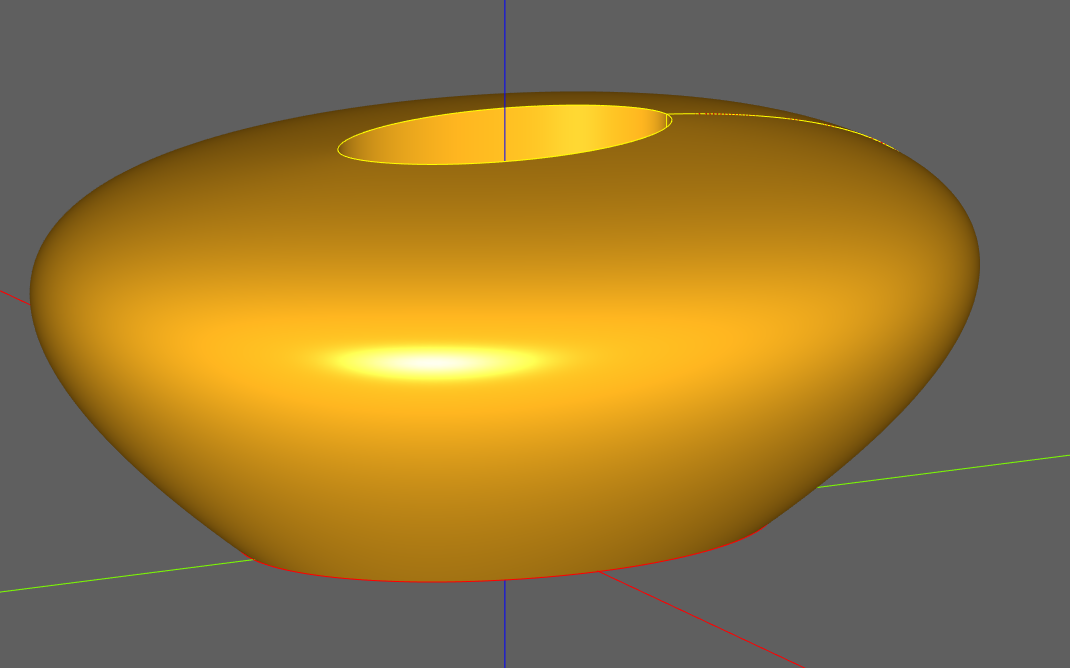
it turns out that if you apply scale (even if the scale is 1, 1, 1) it prevents shell() from working entirely, so that was never an option. How can I create a similar shape without scaling?
def scale(workplane: cq.Workplane, x: float, y: Optional[float] = None, z: Optional[float] = None) -> cq.Workplane:
    y = y if y is not None else x
    z = z if z is not None else x
    t = cq.Matrix([
        [x, 0, 0, 0],
        [0, y, 0, 0],
        [0, 0, z, 0],
        [0, 0, 0, 1]
    ])
    return workplane.newObject([
        o.transformGeometry(t) if isinstance(o, cq.Shape) else o
        for o in workplane.objects
    ])

spline = cq.Workplane('XZ').spline([(10, 0), (15, 5), (0, 10)]).lineTo(0, 0).close()
shape = spline.revolve(axisStart=cq.Vector(0, 0, 0), axisEnd=cq.Vector(0, 1, 0))

shape = scale(shape, 1, 1, 1)   # commenting this line will make it work

shape = shape.faces('<Z').shell(1)

show_object(spline)
show_object(shape)
Traceback (most recent call last):
    shape = shape.faces('<Z').shell(1)
  File "/home/matthew/anaconda3/envs/cadquery/lib/python3.8/site-packages/cadquery/cq.py", line 1139, in shell
    s = solidRef.shell(faces, thickness, kind=kind)
  File "/home/matthew/anaconda3/envs/cadquery/lib/python3.8/site-packages/cadquery/occ_impl/shapes.py", line 2005, in shell
    rv = shell_builder.Shape()
OCP.StdFail.StdFail_NotDone: BRep_API: command not done
I think you should try changing from transformGeometry to transformShape. Testing shelling a solid after a transform, I can only get a result with transformShape:
from OCP.StdFail import StdFail_NotDone

unit_matrix = cq.Matrix()

box = cq.Solid.makeBox(1, 1, 1, pnt=cq.Vector((-0.5, -0.5, -0.5)))
box_shape = box.transformShape(unit_matrix)
box_geom = box.transformGeometry(unit_matrix)
for name, box in zip(["shape", "geom"], [box_shape, box_geom]):
    faces = box.Faces()
    try:
        box = box.shell(
            faceList=faces[0:1],
            thickness=0.1,
            kind="intersection",
        )
        show_object(box, name)
        log(name + " worked.")
    except StdFail_NotDone as e:
        log(name + " produced " + str(e))
produces:
INFO: Generic: shape worked.
INFO: Generic: geom produced BRep_API: command not done
Regarding this:
import cadquery as cq

base = cq.Workplane('XY').ellipse(5, 7)

base_path = base.val()
sweep_plane = cq.Plane(
    base_path.positionAt(0),
    xDir=cq.Vector(1, 0, 0),
    normal=-base_path.tangentAt(0),
)

center_x = -2.5
height = 10
shape2d = cq.Workplane(sweep_plane).spline([(0, 0), (5, 7), (center_x, height)]).lineTo(center_x, 0).close()

shape = shape2d.sweep(base)

show_object(base, 'base')
show_object(shape2d, 'shape2d')
show_object(shape, 'shape')


inner_edges = shape.faces('<Z').edges('<Y').vals()
show_object(inner_edges)
# center = cq.Workplane('XY').newObject(inner_edges).toPending().wire().toPending().extrude(height, combine=False)

# show_object(center, 'center')
Your final selector is isn't doing what you intend.
inner_edges = shape.faces('<Z') does select the bottom face, which is two concentric ellipses. But .edges('<Y') filters edges using a DirectionMinMaxSelector, which works off Shape.Center(). Being concetric, both edges have the same center and the selector returns both.
B-splines are tricky to filter, I think you'll have to use BoxSelector and the option boundingbox=True.

transformShape in your example fails for me with non-orthogonal GTrsf if the matrix is constructed with elements rather than using the default constructor (which is obviously required to do anything with the matrix)
unit_matrix = cq.Matrix([[1, 0, 0, 0], [0, 1, 0, 0], [0, 0, 1, 0], [0, 0, 0, 1]])
unit_matrix.wrapped.Trsf()  # Traceback: non-orthogonal GTrsf
Traceback (most recent call last):
    box_shape = box.transformShape(unit_matrix)
  File "/home/matthew/anaconda3/envs/cadquery/lib/python3.8/site-packages/cadquery/occ_impl/shapes.py", line 793, in transformShape
    BRepBuilderAPI_Transform(self.wrapped, tMatrix.wrapped.Trsf()).Shape()
OCP.Standard.Standard_ConstructionError: gp_GTrsf::Trsf() - non-orthogonal GTrsf
Also, looking at the documentation for transformGeometry it says:
WARNING: transformGeometry will sometimes convert lines and circles to
splines, but it also has the ability to handle skew and stretching
transformations.

If your transformation is only translation and rotation, it is safer to
use :py:meth:`transformShape`, which doesnt change the underlying type
of the geometry, but cannot handle skew transformations.
So surely transformGeometry is the correct function to use for scaling?
after seeing your suggestion in #646 I used the length selection approach to extract the edge that I wanted and it worked great :). I think I would still slightly prefer the scaling approach if it didn't crash because it doesn't require a flat top, but I'm happy with this result.
I had a look at the cq-kit implementation but edge_length() uses the start and end point which obviously won't work for these edges. The paramak implementation simply uses obj.Length() though which works. I had to also exclude a straight line caused by the sweep. So here is what I came up with:
base = cq.Workplane('XY').ellipse(5, 7)

base_path = base.val()
sweep_plane = cq.Plane(
    base_path.positionAt(0),
    xDir=cq.Vector(1, 0, 0),
    normal=-base_path.tangentAt(0),
)

center_x = -2.5
height = 10
shape2d = cq.Workplane(sweep_plane).spline([(0, 0), (5, 7), (center_x, height)]).lineTo(center_x, 0).close()

shape = shape2d.sweep(base, combine=False)

edges = shape.faces('<Z').edges()
inner_edge = min((e for e in edges.objects if e.IsClosed()), key=lambda o: o.Length())
inner_edge = cq.Workplane('XY').newObject([inner_edge])

center = inner_edge.toPending().wire().toPending().extrude(height, combine=False)

shape = shape.union(center)

hollow_shape = shape.faces('<Z').shell(0.5)
show_object(hollow_shape, 'hollow_shape', options={'alpha': 0.8})

I don't particularly like the toPending().wire().toPending(), that seems incredibly confusing. Is there a better way to go about that? I could of course go below the cadquery api and write to pendingWires directly but shouldn't there be an idiomatic option?
So surely
transformGeometryis the correct function to use for scaling?
Yeah, I was expecting the Shape.transformGeometry -> Workplane.shell technique to work. I don't understand why it doesn't and I was just hoping transformShape could be used as a workaround.
I also don't understand the non-orthogonal error.
I've noticed CQ is using a deprecated OCCT method in shell, I'll raise a new issue about that, perhaps only the new method can handle the b-spline faces that transformGeometry produces?
toPending().wire().toPending() ... Is there a better way to go about that?
You don't need the final toPending, Workplane.wire adds it's results to pending wires.
Are you finding sufficient documentation on how to use toPending? It was only added to CQ 9 months ago in https://github.com/CadQuery/cadquery/commit/3b1c5a1465851bb721b113140b9c7bfcc2992dde, and I've certainly been surprised at how much use the .edges().toPending() technique is getting in both other's code and my own.
ok. I missed that .wire() adds to pending wires by default. To be honest for things like toPending I'm having to read the source code for cadquery rather than rely on the documentation. I think I heard about toPending from an issue on the repo and took a look. The only use of toPending in the examples is to cut holes and it's not obvious why it's necessary or how it works with forConstruction. Both these things send things to the list of pending objects but they have different names which is confusing, and surely everything you do in cad query is 'for construction' so the naming isn't clear to me either.
Overall I think the examples are good and the API documentation is OK. I think the main thing that is missing is a bigger library of varied examples so that when a user is stuck on something they can browse the examples and find the thing most similar to what they are trying to make. So far most of the things I've tried to create haven't been similar to any of the examples. I think part of the problem is that I have no traditional CAD experience and I think if I did then a lot of techniques would carry over. If I ever make anything interesting I'll be sure to offer it to cadquery-contrib. It would be nice if there were pictures or interactive renderings of the objects in cadquery-contrib though like the examples have in the documentation.
This seems to work (but is only C0 AFAIK):
import OCP

bldr = OCP.BRepOffsetAPI.BRepOffsetAPI_ThruSections(True, False)

w1 = cq.Workplane().ellipse(5,10).val()
w2 = cq.Workplane(origin=(0,0,10)).ellipse(12,25).val()
v1 = cq.Vertex.makeVertex(0,0,15.5)

bldr.AddWire(w1.wrapped)
bldr.AddWire(w2.wrapped)
bldr.AddVertex(v1.wrapped)

res = bldr.Shape()

s = cq.Workplane(obj=cq.Shape.cast(res)).faces('<Z').shell(-1,'intersection')
show_object(s)

