

 Cacti
Cacti
[1.2.22] Automated Graph Rules not working for SNMP Queried Indexes
Describe the bug
We recently upgraded to Cacti-1.2.22 from an old 0.8.8a version. We noticed that the automated graph rules are not working for snmp query indexed items. The automated graph rules are returning no objects for SNMP Query indexes. The automated device graph rules are working but not for the ones that require snmp queries with indexes such as interfaces.
To Reproduce
Steps to reproduce the behavior:
-
Go to 'Automation->Graph Rules'
-
Click on 'Show Matching Objects'
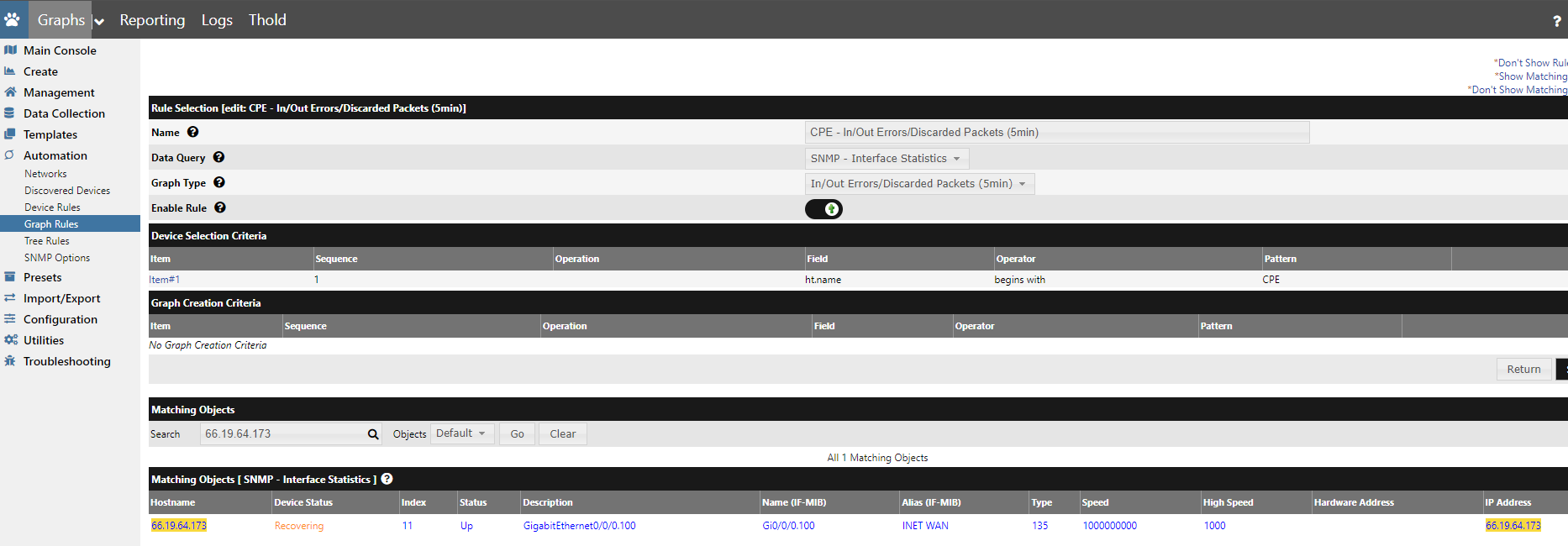
Once we do that we do not see the expected results for matching objects for snmp queried interfaces. We have removed all of the Graph Creation Criteria and still do not see the expected interfaces showing.
We have put the application in DEVEL debug mode and captured the query that it is running behind the scenes and do see the items in the database but they do not return back to automation_graph_rules.php page from the api_automation page.
See attached file for output from DB and from the cacti.log file.
Expected behavior
We would expect all of those objects to render in the automation_graph_rules.php page but it is only showing one interface as well as the graphs would be automatically created by the rules on device creation within the application
Screenshots
Desktop (please complete the following information)
-
OS: Windows 10
-
Browser: Chrome
-
Version: Version 105.0.5195.127 (Official Build) (64-bit)
Additional context
Add any other context about the problem here. cacti-1.2.22-snmp-graph-rules-issue.txt


Even when i add a simple one like this still don't see the expected results. This should return 13 interfaces on that device matching ifOperStatus = 'Up'

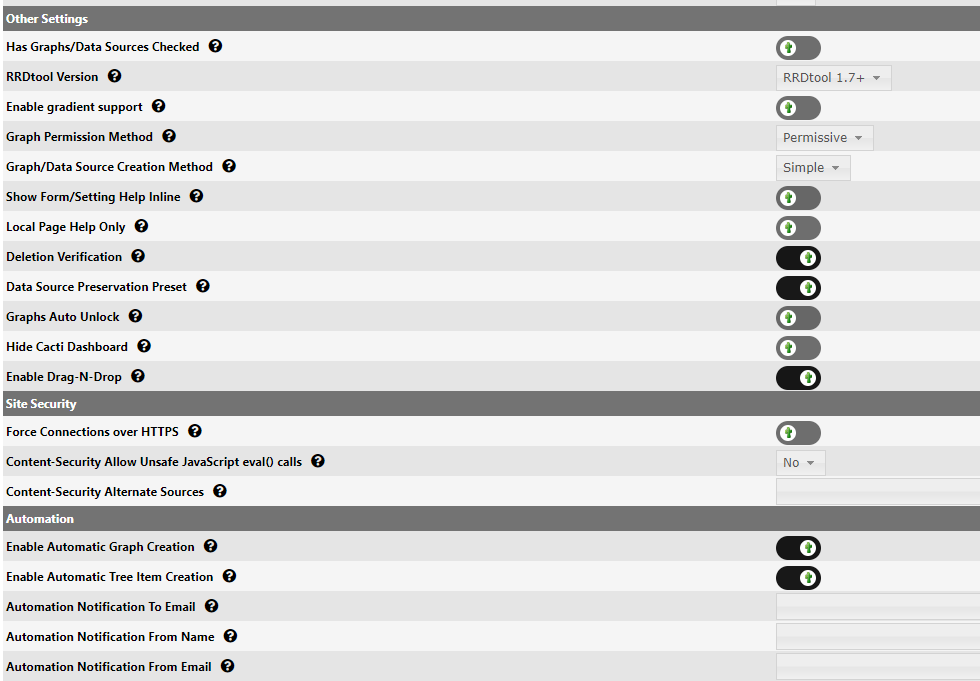
Make sure graph automation is enabled and the rerun the rules for the device. Setting is in Setting > General.
From device management select the device and then select rerun automation. See if it's created then.
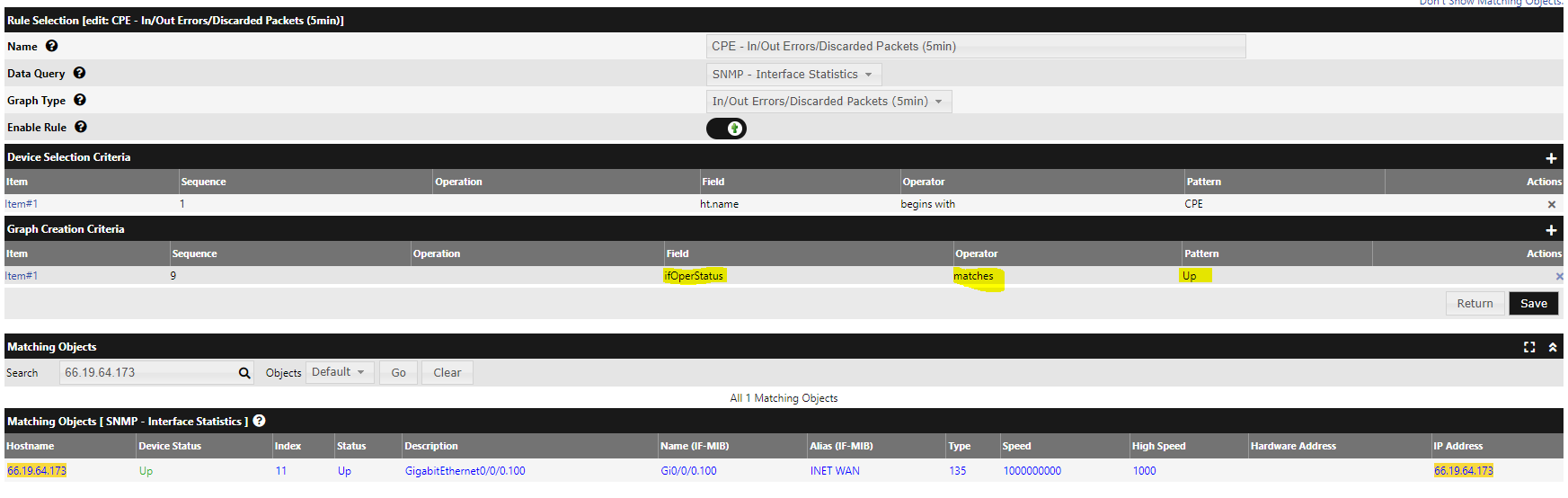
So it will automatically create the graphs with this in the criteria for Graph Creation Criteria.
But will not with a simple AND statement that should match
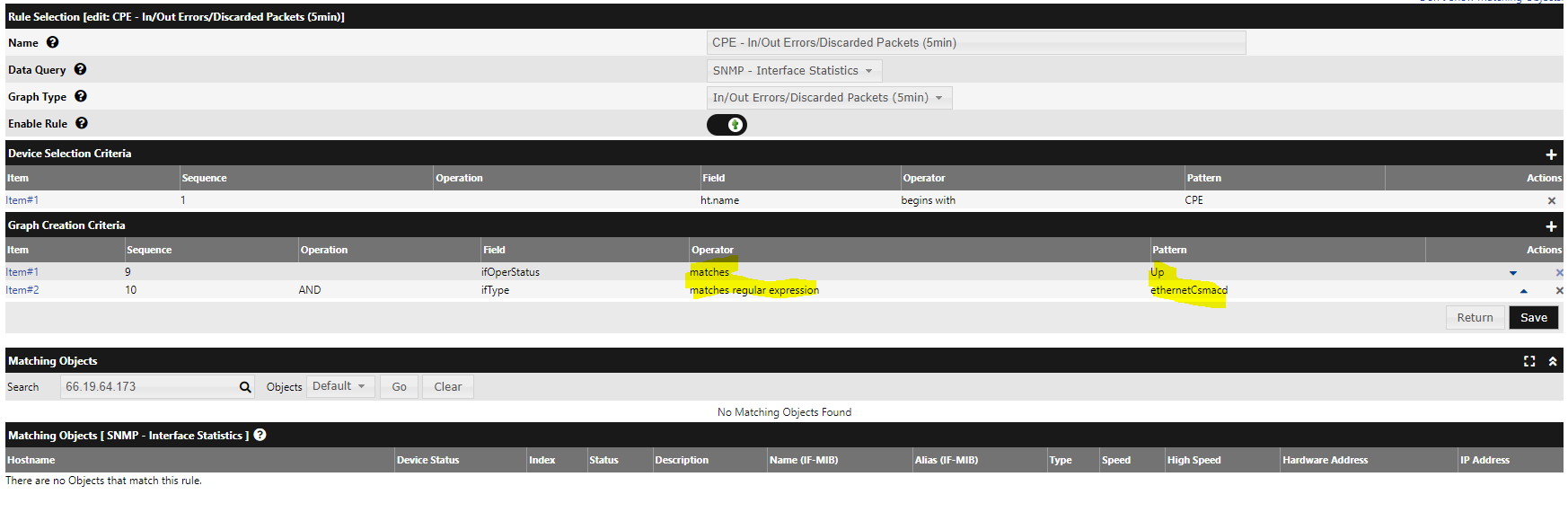
Ok. Think I am on to something. Looks like there maybe a change in how the criteria is now read into the backend. In the older versions of Cacti, we could use a filter with the regular expression of the line that was returned for the index for the ifType ( ethernetCsmacd ). Looks like now it is needing the ifType (6) and it will create the graph.
NOTE: The interfaces still do not show correctly on the matching on objects in the automation_graph_rules.php page like it should.
This worked:

Did throw this error in the cacti.log, but it did create the graph with the above criteria through automation.
2022-09-29 17:37:31 - ERROR PHP NOTICE: Undefined index: id in file: /opt/cacti-1.2.22/lib/functions.php on line: 2965
2022-09-29 17:37:31 - CMDPHP PHP ERROR NOTICE Backtrace: (/host.php[72]:form_actions(), /host.php[349]:automation_update_device(), /lib/api_automation.php[3990]:automation_execute_data_query(), /lib/api_automation.php[2236]:create_dq_graphs(), /lib/api_automation.php[2663]:push_out_host(), /lib/utility.php[794]:update_poller_cache(), /lib/utility.php[361]:api_poller_cache_item_add(), /lib/api_poller.php[97]:get_data_source_path(), /lib/functions.php[2634]:generate_data_source_path(), /lib/functions.php[2965]:CactiErrorHandler())
2022-09-29 17:37:31 - AUTOM8 NOTE: Graph Added - Device[8857], Graph[151307], DS[167419, 167419], Rule[5]
The logged error can be fixed by pulling the latest lib/functions.php
I have not noticed a changed in automation rules let me try and re-create what your seeing
On Thu., Sep. 29, 2022, 1:44 p.m. salt-is-good, @.***> wrote:
Ok. Think I am on to something. Looks like there maybe a change in how the criteria is now read into the backend. In the older versions of Cacti, we could use a filter with the regular expression of the line that was returned for the index ( ethernetCsmacd ). Looks like now it is needing the ifType (6) and it will create the graph.
NOTE: The interfaces still do not show correctly on the matching on objects in the automation_graph_rules.php page like it should.
This worked: [image: image] https://user-images.githubusercontent.com/114668976/193104555-0793d736-4927-4899-88cb-3492fc519e84.png
Did throw this error in the cacti.log, but it did create the graph with the above criteria through automation. 2022-09-29 17:37:31 - ERROR PHP NOTICE: Undefined index: id in file: /opt/cacti-1.2.22/lib/functions.php on line: 2965 2022-09-29 17:37:31 - CMDPHP PHP ERROR NOTICE Backtrace: (/host.php[72]:form_actions(), /host.php[349]:automation_update_device(), /lib/api_automation.php[3990]:automation_execute_data_query(), /lib/api_automation.php[2236]:create_dq_graphs(), /lib/api_automation.php[2663]:push_out_host(), /lib/utility.php[794]:update_poller_cache(), /lib/utility.php[361]:api_poller_cache_item_add(), /lib/api_poller.php[97]:get_data_source_path(), /lib/functions.php[2634]:generate_data_source_path(), /lib/functions.php[2965]:CactiErrorHandler()) 2022-09-29 17:37:31 - AUTOM8 NOTE: Graph Added - Device[8857], Graph[151307], DS[167419, 167419], Rule[5]
— Reply to this email directly, view it on GitHub https://github.com/Cacti/cacti/issues/4937#issuecomment-1262605913, or unsubscribe https://github.com/notifications/unsubscribe-auth/ADGEXTDLWQHQKA6UE4CWO6LWAXIRBANCNFSM6AAAAAAQYYDPZM . You are receiving this because you are subscribed to this thread.Message ID: @.***>

Have a workaround in place with the graph rules to make them work by using the ifType number (6|18|30|94|107|37|32|23|108) in the rules such as a regular expression match. I used to use the same regular expression match but just used the translation of the ifType name for the number such as this: ^(adsl|atm|atmIma|ds1|ds3|frameRelay|frf16MfrBundle|ppp|pppMultilinkBundle|ethernetCsmacd)
It still is not rendering correctly to show matching objects in the automation_graph_rules.php page, but it is actually building the graphs using the modified ruleset even though it is not showing any matches on the page when testing the rule. Here is a sample:

It sounds like we are not storing the text value and that the numeric value needs to be converted to the text value and that is likely not happening. I guess we need to confirm that. Up/Down is tricky as we do some string conversions there.
One this you can do is run this query, and let me know what comes back for you:
SELECT * FROM host_snmp_cache
WHERE host_id = host_in_question
AND field_name="ifOperStatus";
Comes back like this for me. Odd, it's right...
+---------+---------------+--------------+-------------+------------+-------------------------+---------+---------------------+
| host_id | snmp_query_id | field_name   | field_value | snmp_index | oid                     | present | last_updated        |
+---------+---------------+--------------+-------------+------------+-------------------------+---------+---------------------+
|      13 |             4 | ifOperStatus | Up          | 1          | .1.3.6.1.2.1.2.2.1.8.1  |       1 | 2022-10-05 01:32:52 |
|      13 |             4 | ifOperStatus | Down        | 2          | .1.3.6.1.2.1.2.2.1.8.2  |       1 | 2022-10-05 01:32:52 |
|      13 |             4 | ifOperStatus | Up          | 3          | .1.3.6.1.2.1.2.2.1.8.3  |       1 | 2022-10-05 01:32:52 |
|      13 |             4 | ifOperStatus | Down        | 4          | .1.3.6.1.2.1.2.2.1.8.4  |       1 | 2022-10-05 01:32:52 |
|      13 |             4 | ifOperStatus | Down        | 5          | .1.3.6.1.2.1.2.2.1.8.5  |       1 | 2022-10-05 01:32:52 |
|      13 |             4 | ifOperStatus | Down        | 6          | .1.3.6.1.2.1.2.2.1.8.6  |       1 | 2022-10-05 01:32:52 |
Here is the return for the host:
MariaDB [cacti]> SELECT * FROM host_snmp_cache WHERE host_id = 8863 AND field_name="ifOperStatus"; +---------+---------------+--------------+-------------+------------+-------------------------+---------+---------------------+ | host_id | snmp_query_id | field_name | field_value | snmp_index | oid | present | last_updated | +---------+---------------+--------------+-------------+------------+-------------------------+---------+---------------------+ | 8863 | 16 | ifOperStatus | Up | 1 | .1.3.6.1.2.1.2.2.1.8.1 | 1 | 2022-10-05 21:43:21 | | 8863 | 16 | ifOperStatus | Testing | 10 | .1.3.6.1.2.1.2.2.1.8.10 | 1 | 2022-10-05 21:43:21 | | 8863 | 16 | ifOperStatus | Up | 11 | .1.3.6.1.2.1.2.2.1.8.11 | 1 | 2022-10-05 21:43:21 | | 8863 | 16 | ifOperStatus | Up | 12 | .1.3.6.1.2.1.2.2.1.8.12 | 1 | 2022-10-05 21:43:21 | | 8863 | 16 | ifOperStatus | Up | 13 | .1.3.6.1.2.1.2.2.1.8.13 | 1 | 2022-10-05 21:43:21 | | 8863 | 16 | ifOperStatus | Up | 14 | .1.3.6.1.2.1.2.2.1.8.14 | 1 | 2022-10-05 21:43:21 | | 8863 | 16 | ifOperStatus | Up | 15 | .1.3.6.1.2.1.2.2.1.8.15 | 1 | 2022-10-05 21:43:21 | | 8863 | 16 | ifOperStatus | Up | 16 | .1.3.6.1.2.1.2.2.1.8.16 | 1 | 2022-10-05 21:43:21 | | 8863 | 16 | ifOperStatus | Up | 17 | .1.3.6.1.2.1.2.2.1.8.17 | 1 | 2022-10-05 21:43:21 | | 8863 | 16 | ifOperStatus | Up | 19 | .1.3.6.1.2.1.2.2.1.8.19 | 1 | 2022-10-05 21:43:21 | | 8863 | 16 | ifOperStatus | Down | 2 | .1.3.6.1.2.1.2.2.1.8.2 | 1 | 2022-10-05 21:43:21 | | 8863 | 16 | ifOperStatus | Up | 3 | .1.3.6.1.2.1.2.2.1.8.3 | 1 | 2022-10-05 21:43:21 | | 8863 | 16 | ifOperStatus | Down | 4 | .1.3.6.1.2.1.2.2.1.8.4 | 1 | 2022-10-05 21:43:21 | | 8863 | 16 | ifOperStatus | Up | 5 | .1.3.6.1.2.1.2.2.1.8.5 | 1 | 2022-10-05 21:43:21 | | 8863 | 16 | ifOperStatus | Up | 6 | .1.3.6.1.2.1.2.2.1.8.6 | 1 | 2022-10-05 21:43:21 | | 8863 | 16 | ifOperStatus | Testing | 7 | .1.3.6.1.2.1.2.2.1.8.7 | 1 | 2022-10-05 21:43:21 | | 8863 | 16 | ifOperStatus | Testing | 8 | .1.3.6.1.2.1.2.2.1.8.8 | 1 | 2022-10-05 21:43:21 | | 8863 | 16 | ifOperStatus | Testing | 9 | .1.3.6.1.2.1.2.2.1.8.9 | 1 | 2022-10-05 21:43:21 | +---------+---------------+--------------+-------------+------------+-------------------------+---------+---------------------+
@TheWitness, any updates on this one? As you can see there should have been several interfaces to show up in the matching objects in the automation_graph_rules.php filter.
I'd like to defer the Diagnosis to @bmfmancini as he uses this feature regularly. Once he provides feedback, I can take action.
@TheWitness By looking at this I am thinking that this is related to https://github.com/Cacti/cacti/issues/4712 In that case the device takes a bit longer than most to respond to SNMP so autom8 looks for oper status that is not fully populated yet my guess is because the data query is still running
If you run apply automation rules a few mins later the rules will run fine
@salt-is-good what device is this ?
The sample device I provided is Cisco ISR 4321. It does not have that many interfaces on it.
Yes. The apply automation rules seem to run fine and builds the graphs using the graph rules. There is no way to test the graph rules since the automation_graph_rules.php pages does not show the matching objects correctly.
Then yes this is what I have seen but only on devices with slow snmp agents either devices with alot of interfaces or older devices with slow snmp agents
It's also more noticible in my testing on v3 than v2
On Tue, Oct 18, 2022 at 3:56 PM salt-is-good @.***> wrote:
The sample device I provided is Cisco ISR 4321. It does not have that many interfaces on it.
Yes. The apply automation rules seem to run fine and builds the graphs using the graph rules. There is no way to test the graph rules since the automation_graph_rules.php pages does not show the matching objects correctly.
— Reply to this email directly, view it on GitHub https://github.com/Cacti/cacti/issues/4937#issuecomment-1282930561, or unsubscribe https://github.com/notifications/unsubscribe-auth/ADGEXTFYJ4L4CZAGEEZDGLTWD36GNANCNFSM6AAAAAAQYYDPZM . You are receiving this because you were mentioned.Message ID: @.***>
This device is very responsive to the snmp request and returns OID request data very quickly. Also note, it responds and displays correctly in our previous version of cacti which was 0.8.8a (i know - very old) but it was working then.
I'll have to allocate time, but it's going to take a few weeks, going on vacation shortly.
@salt-is-good, one last thing to try. You say that 0.8.8a is working good. Great, then set the max bulk walk size from 'Auto' to 10 and see if it speeds up. Even make it 20. See below.

You should NOT install PHP-snmp BTW. If it's installed and you uninstall, make sure you restart httpd and php-fpm if you are using it.
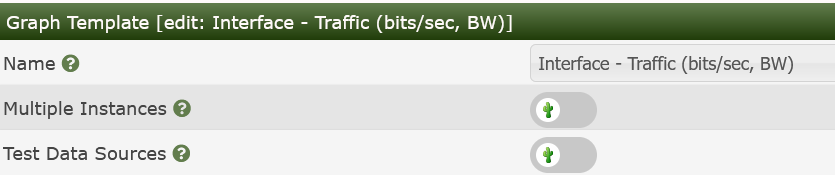
Also, if it's the whole 'AutoM8' process that is running long, you can disable Data Source verification on the Graph Templates for Interface Graphs. That will slow down the Graph Creation if your Devices are out on the edge.
This issue has been automatically marked as stale because it has not had recent activity. It will be closed if no further activity occurs. Thank you for your contributions.
![github-actions[bot] avatar](https://avatars.githubusercontent.com/in/15368?v=4 "Published by a pub.dev verified publisher")