

 CGCookie
MacOS Drawing Glitch
PLEASE READ THE FOLLOWING AND USE THE TEMPLATE TO POST YOUR ISSUE
Questions not directly related to the RetopoFlow project are considered general and should be posted elsewhere (e.g. git, blender, python, etc).
Before raising the issue, please check the following first:
- [ ] Read through the README.md file in the branch used to assure the process taken is correct
- [ ] Check the existing issues and pull requests to make sure the issue has not already been reported and/or fixed.
- [ ] You can replicate the bug and will provide as much info as possible with blend files, screenshots, logfiles, as well as show the expected result and actual result.
Issue Template
Please prefix your issue name with one of the following: [BUG] [PROPOSAL] [QUESTION]
Retopoflow Version: 3.0 RC1
Blender Version/Hash: 2.90.1 3e85bb34d0d7
Platform Version/Distribution: macOS Mojave 10.14.6
Issue:
Retopoflow interface draws with glitches and tools don't work
{add any screenshots of the issue here}
How to Reproduce:
- Install 3.0 RC1 and enter retopoflow session

{attach any files needed to replicate the issue}

Thanks for the report2 @mdxvfx. This looks like the same problem as #753. Unfortunately, I have not been able to reproduce this bug on any machine that I have access to, so I'm having trouble troubleshooting this problem.
A couple of notes...
As far as I can tell, this is strictly a visual bug, so your tools should still work just fine. Use CTRL+LMB to create geometry (read the help documents (F1, F2) for more details.
Did you get this version from the Blender Market or from GitHub? If from GH, how did you install it?
It seems that your version is between RF 3.0.0 RC 1 and RC 2 (the Contours icon is from RC 2, but everything else is RC 1). If you installed this from GH, can you try the latest version (RC 2). I'm highly confident that it won't fix the problem, but there are changes in RC 2 that might provide clues for debugging.
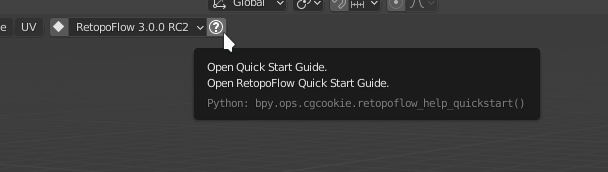
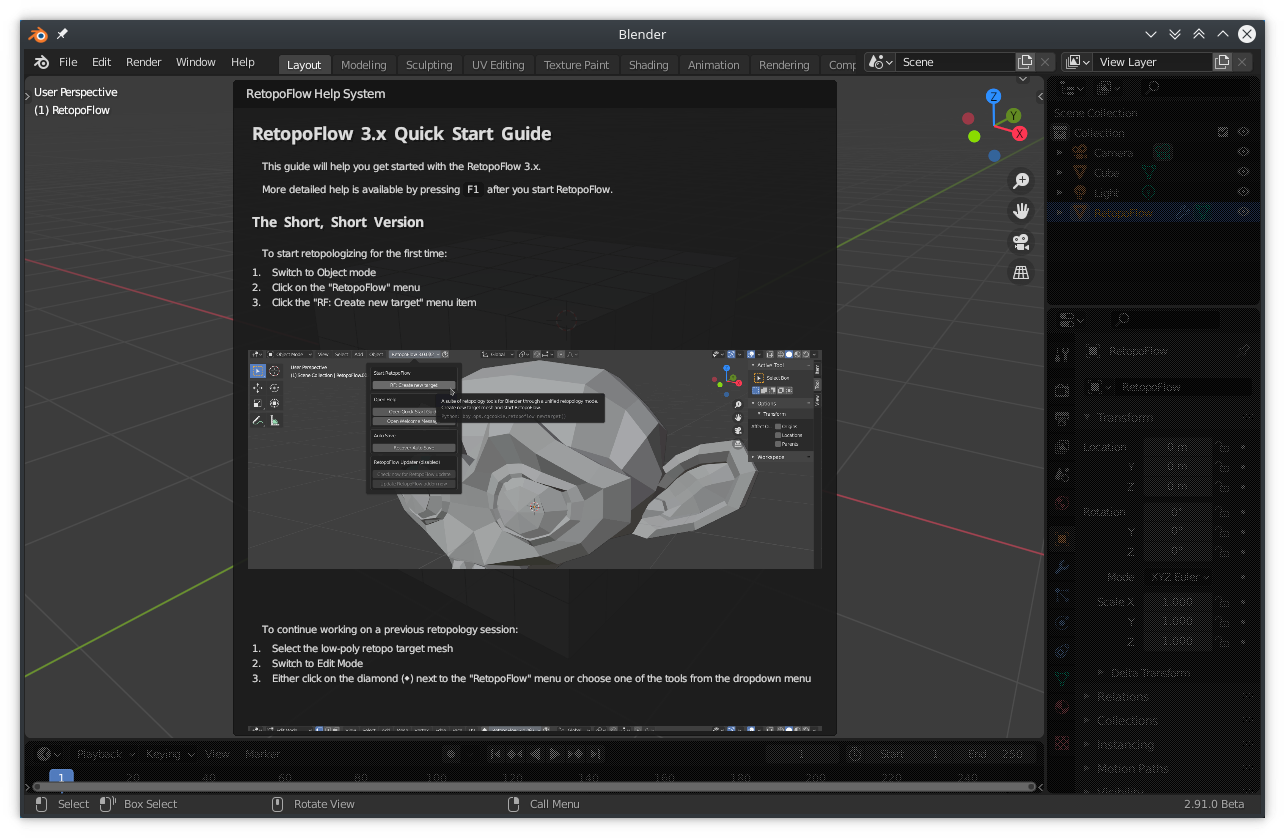
Can you do one more thing... open up the quick start guide by clicking the (?) button to the right of the RetopoFlow dropdown (see first image below), and post up a screenshot of Blender (second image below).
Thank you for your help in debugging this!

ok, @mdxvfx . I have a possible workaround for this bug worked into commit a4a7657. If you get a chance, can you try using the very latest version of RF, and let me know whether it worked or did not? Thank you for your patience on this perplexing bug!


Hi! I also have the same problem. Retopoflow 3.0.1 installed in blender 2.91 and also in other previous versions until 2.80 and nothing is working. I'm on a mac os catalina Version 10.15.7. The tools doesn't work. I decimated my model to 20k faces. The tweak and relax tools can detect the model but not the other tools. All the frames are all jagged.
Funny thing! On my PC, windows are not jagged but the tools doesn't work either.

Hi @cestunchopi , in RF you need to hold Ctrl to draw geometry with the other tools, otherwise it conflicts with the left click select keymap. Does that solve the tools problem? All commands are listed in the in-app docs. The jagged edges visualization issue should be a separate issue that we still need to track down.

@cestunchopi, were you able to use CTRL+LMB to create new geometry using the RF tools?


for those with this issue, can you please try the v3.2.1 branch to see whether the committed changes improve this visual bug? see link for details.
also, if possible, can someone post a video capture of using RetopoFlow with this visual issue? I have a few other hypotheses that I think a video might provide the right evidence.
in particular, can you capture the following in the video:
- start with default cube
- start RF
- move the main/poly count/options windows around the screen slowly
- try minimizing / restoring each of the windows
- create new geometry using one of the tools
- rotate the view around just a bit
- open the help menu
- slowly scroll through the help
- try resizing the entire blender window very slowly
i think doing the items above might expose what the issue might be. thank you!!
Hi all!
I think I might have found the cause of this issue (and other similar issues), and now we have a solution!
Please, if you're still having this issue with RetopoFlow v3.2.2, follow the steps on using the RetopoFlow Updater System to try out commit c1d4f0f.
IMPORTANT: be sure to start with v3.2.2 before updating to the commit! the previous updater system had a bug that was fixed in v3.2.2.
Please let me know here if you
- continue having this issue even after checking out commit c1d4f0f, or
- no longer experience this issue after checkout out commit c1d4f0f, or
- were experiencing this issue before but it stopped being an issue even before checking out commit c1d4f0f.
If no comments are posted to this issue by the beginning of Oct 2021, I plan to close this issue.
Thanks!
Hi all! I have made progress on another (related?) issue #915 that might affect this issue.
Can you try using the updater system (doc) to checkout branch v3.2.4 to see if this change fixes this bug on your machine, and then report what happened / didn't happen here?
Thanks!
We have a new report of this happening, even in RF 3.3.

Here are the system specs:
- macOS Catalina 10.15.7
- MacBook Pro (13-inch, Mid 2012)
- 2.5 GHz, Intel Core i5
- 8GB 1600 MHz DDR3
- Intel HD Graphics 4000 1536MB
@jaebird1 reported a similar issue with Intel graphics card on issue #1252 (link)
backend: OPENGL
device: INTEL
vendor: Intel
renderer: Intel(R) HD Graphics 5500
version: 4.4.0 - Build 20.19.15.5058,
compute_shader_support_get: True
max_batch_indices_get: 1048576
max_batch_vertices_get: 1048576
max_texture_layers_get: 2048
max_texture_size_get: 16384
max_textures_frag_get: 32
max_textures_geom_get: 32
max_textures_get: 192
max_textures_vert_get: 32
max_uniforms_frag_get: 4096
max_uniforms_vert_get: 4096
max_varying_floats_get: 64
max_vertex_attribs_get: 16
shader_image_load_store_support_get: True
shader_storage_buffer_objects_support_get: True