

 CAMeL-Lab
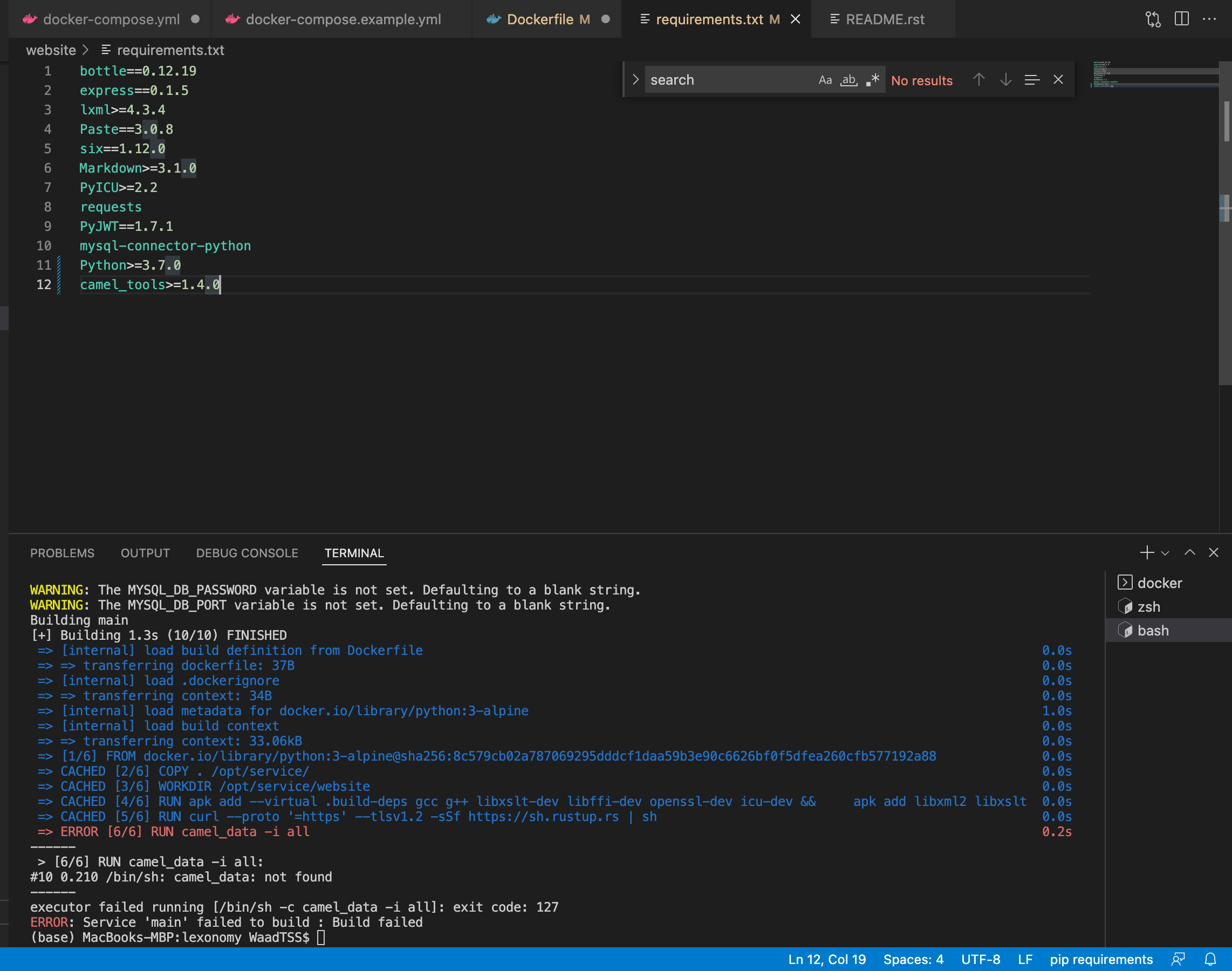
[BUG] ERROR [6/6] RUN camel_data -i all #10 0.210 /bin/sh: camel_data: not found 0.2s
Describe the bug => ERROR [6/6] RUN camel_data -i all 0.2s
[6/6] RUN camel_data -i all: #10 0.210 /bin/sh: camel_data: not found
executor failed running [/bin/sh -c camel_data -i all]: exit code: 127 ERROR: Service 'main' failed to build : Build failed
To Reproduce Steps to reproduce the behavior. Provide any Python/Shell scripts as code blocks.
Expected behavior A clear and concise description of what you expected to happen.
Screenshots
WARNING: The MYSQL_DB_HOST variable is not set. Defaulting to a blank string.
WARNING: The MYSQL_DB_USER variable is not set. Defaulting to a blank string.
WARNING: The MYSQL_DB_PASSWORD variable is not set. Defaulting to a blank string.
WARNING: The MYSQL_DB_PORT variable is not set. Defaulting to a blank string.
Building main
[+] Building 1.3s (10/10) FINISHED
=> [internal] load build definition from Dockerfile 0.0s
=> => transferring dockerfile: 37B 0.0s
=> [internal] load .dockerignore 0.0s
=> => transferring context: 34B 0.0s
=> [internal] load metadata for docker.io/library/python:3-alpine 1.0s
=> [internal] load build context 0.0s
=> => transferring context: 33.06kB 0.0s
=> [1/6] FROM docker.io/library/python:3-alpine@sha256:8c579cb02a787069295dddcf1daa59b3e90c6626bf0f5dfea260cfb577192a88 0.0s
=> CACHED [2/6] COPY . /opt/service/ 0.0s
=> CACHED [3/6] WORKDIR /opt/service/website 0.0s
=> CACHED [4/6] RUN apk add --virtual .build-deps gcc g++ libxslt-dev libffi-dev openssl-dev icu-dev && apk add libxml2 libxslt 0.0s
=> CACHED [5/6] RUN curl --proto '=https' --tlsv1.2 -sSf https://sh.rustup.rs | sh 0.0s
=> ERROR [6/6] RUN camel_data -i all 0.2s
[6/6] RUN camel_data -i all: #10 0.210 /bin/sh: camel_data: not found
executor failed running [/bin/sh -c camel_data -i all]: exit code: 127 ERROR: Service 'main' failed to build : Build failed
Desktop (please complete the following information):
- macOS, 11.3.1
- Python>=3.7.0
- camel_tools>=1.4.0 (pip)
Additional context

the comment camel_data: not found, is appeared when use RUN camel_data -I all in the docker file

Hi @Waadtss
You have to add Python's bin directory to your PATH environment variable.
On Ubuntu it's /usr/local/bin I believe (and it might be the same on Alpine), so you'll need to add ENV PATH="/usr/local/bin:${PATH}" before calling camel_data.
I would also suggest pre-downloading camel tools data outside your docker image, copying files over in your Dockerfile, and setting the CAMELTOOLS_DATA environment variable (see here). That way your docker builds don't have to download the data every time.
