

 BrowserWorks
Many URLs don't open at all
What happened?
Many URLs don't open at all
These URLs don't open at all in waterfox, whereas in firefox or any other browser they open straight away :
https://fr.shopping.rakuten.com/nav/Informatique_Ordinateur-de-bureau#ft=n&s=1&f10=gaming&f11=AMD+Ryzen+7
https://fr.shopping.rakuten.com/search/iphone#ft=n&nav=Tel-PDA_Telephones-mobiles&s=1&f10=Apple+iPhone+16+Pro
Reproducible?
- [x] I have checked that this issue cannot be reproduced on Mozilla Firefox.
Version
G6
What platform are you seeing the problem on?
Windows
Relevant log output

I can open the links, you have provided, freely in my Waterfox v.6.5.6.
Try to disable DNS over Oblivious HTTP and configure DNS over HTTPS using https://dns.quad9.net/dns-query provider. You can read more about this DOH provider here: https://quad9.net/ It is very secure, does not collect any personal data and protects your computer against malware, spyware etc. https://quad9.net/support/faq#data_collection

@Auronius Thank you for your reply . But I just did exactly what you told me and put quad9 but unfortunately nothing changes : I still have several urls including those I mentioned in 1st post that are still not displayed!
And I've just realized one thing : The bugs in these URLs only occur when I open them via my bookmarks in the waterfox side panel! Like here :
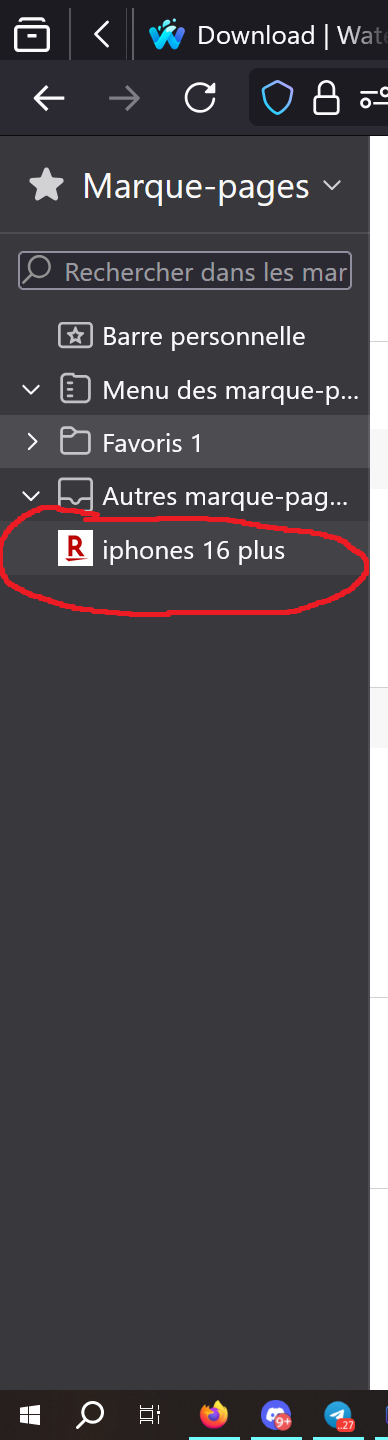
If I copy these URLs from my favorites, paste them and open them as a new tab in waterfox, they open perfectly well and immediately!
But if I open these same URLs via my favorites in the side panel, nothing happens... these URLs don't open at all! big bug, so please fix it, developers!
In my Waterfox installation, thosw URLs open correctly even from the side bookmarks. Please watch video: https://drive.google.com/file/d/1LbXF6lP57gYy2n6wwr5Eqn4w2I_QgIsJ/view?usp=sharing
In my Waterfox installation, thosw URLs open correctly even from the side bookmarks. Please watch video: https://drive.google.com/file/d/1LbXF6lP57gYy2n6wwr5Eqn4w2I_QgIsJ/view?usp=sharing
ok I saw your video thanks. They do open nicely.
But the difference is that I have 70 rakuten favorites in my side panel! And I have a total of 3500 non-rakuten favorites in my side panel. And maybe it's this large number that's causing the problem I'm having! I'm sure of it 🙁
For what I indicated in my previous post, this:
" But if i open these same URLs via my favorites in the side panel, nothing happens " Please note: I have configured waterfox so that every time i click on one of my bookmarks, they open in the same current tab and not in a new tab. My rakuten bookmarks don't open when I open them in the current tab. It's a waterfox bug.
And i just checked and i was wrong i apologize: There's exactly the same problem on firefox with my rakuten bookmarks
I'm adding all those that don't open in waterfox or firefox in the current tab ! 😕 :
https://fr.shopping.rakuten.com/nav/Tel-PDA_Telephones-mobiles#ft=n&s=1&f10=Apple+iPhone+15+Plus
https://fr.shopping.rakuten.com/search/iphone#ft=n&nav=Tel-PDA_Telephones-mobiles&s=1&f10=Apple+iPhone+13+Pro+Max
https://fr.shopping.rakuten.com/search/iphone#ft=n&nav=Tel-PDA_Telephones-mobiles&s=1&f10=Apple+iPhone+16
https://fr.shopping.rakuten.com/search/iphone#ft=n&nav=Tel-PDA_Telephones-mobiles&s=1&f10=Apple+iPhone+16+Plus
https://fr.shopping.rakuten.com/search/iphone#ft=n&nav=Tel-PDA_Telephones-mobiles&s=1&f10=Apple+iPhone+16+Pro+Max
https://fr.shopping.rakuten.com/search/lave+vaisselle#ft=n&nav=Electromenager_lave-vaisselle&s=1&f2=lave-vaisselle-45-cm
https://fr.shopping.rakuten.com/search/lave+vaisselle#ft=n&nav=Electromenager_lave-vaisselle&s=1&f2=lave-vaisselle-55-cm
https://fr.shopping.rakuten.com/search/lave+vaisselle#ft=n&nav=Electromenager_lave-vaisselle&s=1&f2=lave-vaisselle-60-cm
https://fr.shopping.rakuten.com/search/lave+vaisselle#ft=n&nav=Electromenager_lave-vaisselle&s=1&f2=lave-vaisselle-encastrable
https://fr.shopping.rakuten.com/nav/Informatique_Ordinateur-de-bureau#ft=n&s=1&f10=gaming&f11=AMD+Ryzen+9
https://fr.shopping.rakuten.com/nav/Informatique_Ordinateur-de-bureau#ft=n&s=1&f10=gaming&f11=Intel+Core+i3
https://fr.shopping.rakuten.com/nav/Informatique_Ordinateur-de-bureau#ft=n&s=1&f10=gaming&f11=Intel+Core+i5
https://fr.shopping.rakuten.com/nav/Informatique_Ordinateur-de-bureau#ft=n&s=1&f10=gaming&f11=Intel+Core+i7
https://fr.shopping.rakuten.com/nav/Informatique_Ordinateur-de-bureau#ft=n&s=1&f10=gaming&f11=Intel+Core+i9
https://fr.shopping.rakuten.com/search/rtx+3060#ft=n&nav=Informatique_composants_carte-graphique&s=1&f2=nvidia+geforce&f7=autres+bus&f9=NVIDIA+GeForce+RTX+3060
https://fr.shopping.rakuten.com/search/rtx+3060#ft=n&nav=Informatique_composants_carte-graphique&s=1&f2=nvidia+geforce&f7=pci+e&f9=NVIDIA+GeForce+RTX+3060
https://fr.shopping.rakuten.com/nav/Tel-PDA_Telephones-mobiles#ft=n&s=1&f10=Samsung+Galaxy+S22+Ultra
https://fr.shopping.rakuten.com/nav/Tel-PDA_Telephones-mobiles#ft=n&s=1&f10=Samsung+Galaxy+S24
https://fr.shopping.rakuten.com/nav/Tel-PDA_Telephones-mobiles#ft=n&s=1&f10=Samsung+Galaxy+S24+Plus
https://fr.shopping.rakuten.com/nav/Tel-PDA_Telephones-mobiles#ft=n&s=1&f10=Samsung+Galaxy+S24+Ultra
https://fr.shopping.rakuten.com/nav/Tel-PDA_Telephones-mobiles#ft=n&s=1&f10=Samsung+Galaxy+Z+Fold4
https://fr.shopping.rakuten.com/nav/Tel-PDA_Telephones-mobiles#ft=n&s=1&f10=Samsung+Galaxy+Z+Fold5
https://fr.shopping.rakuten.com/nav/Hifi_Television#ft=n&s=1&f2=oled&f3=55
https://fr.shopping.rakuten.com/nav/Hifi_Television#ft=n&s=1&f2=oled&f3=65
https://fr.shopping.rakuten.com/nav/Hifi_Television#ft=n&s=1&f2=oled&f3=77
https://fr.shopping.rakuten.com/nav/Hifi_Television#ft=n&s=1&f2=oled&f3=83
https://fr.shopping.rakuten.com/nav/Tel-PDA_Telephones-mobiles#ft=n&s=1&f10=Apple+iPhone+14+Plus
https://fr.shopping.rakuten.com/nav/Tel-PDA_Telephones-mobiles#ft=n&s=1&f10=Apple+iPhone+14+Pro+Max
I noticed one thing: The problem occurs I feel when my favorites are named by categories together.
Try to put my favorites by name categories for example like on my screenshot ,you put in name : iphones 14 iphones 15 iphones 16 dishwashers desktop computers graphic cards galaxy S24 smartphones samsung galaxy z fold oled TVs
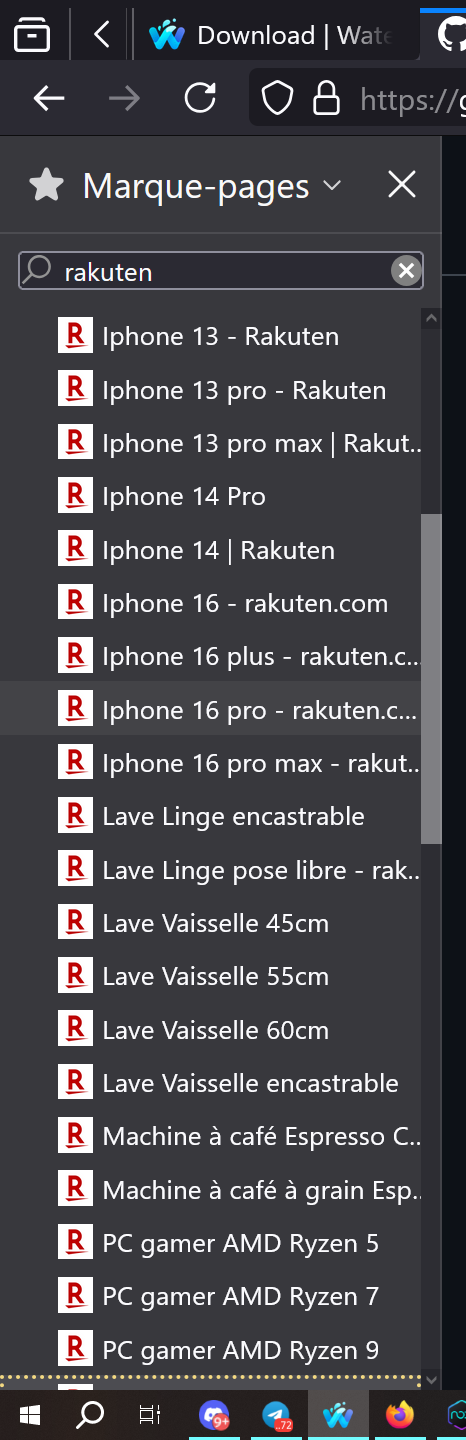
and then type “rakuten” in the search field of the sidebar. Then you click on the rakuten bookmarks, starting from the top one and working your way down one by one. The bug should occur exactly as I did
and I also noticed one thing: Once I've clicked on one of my bookmarks that didn't open at all : If I refresh the page with the “circle” I circled in red :

the favorite that never opened, this time it opens perfectly! And the same with all my favorites that didn't open, they only open when I refresh the page.

does it still happens in a new waterfox profile?
well I didn't understand your question... I looked and I only have one profile it's at this path : C:\Users***\AppData\Roaming\Waterfox\Profiles\3znrtuii.default-default
I was suggesting to test in a brand new waterfox profile. Load this page:
about:profiles
and create a new profile, then launch it and see if you still have issues with URLs.
NOTE: DON'T DELETE YOUR CURRENT PROFILE!
I was suggesting to test in a brand new waterfox profile. Load this page:
about:profiles
and create a new profile, then launch it and see if you still have issues with URLs.
NOTE: DON'T DELETE YOUR CURRENT PROFILE!
thank you . I created a new profile by going to about:profiles . Then I imported my bookmarks.html and tested my rakuten bookmarks again. And the problem is still there, nothing has changed, exactly the same rakuten urls don't open