Bl4Cc4t
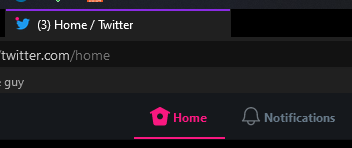
Notifications on top doesn't show actual count
Please check the following before you continue
- [*] Bug happens with the newest version of GT2 (see the changelog)
- [*] Checked FAQ
- [*] Checked if the issue has not been reported before
Describe the bug The notifications navigation item doesn't show the real count (which in this case is 3).
Screenshots
Your configuration
- Browser: Firefox 78.15.0 ESR
- Userscript Manager: Tampermonkey v4.17.6161

I'm getting the exact same issue.
Browser: 103.0.2 (64-bit) Userscript Manager: Tampermonkey 4.17.6161


This (and the related issues) started for me today. Twitter rolling out breaking changes I'd assume


for everyone here having this issue, please check if the following script works for you: test script
I hope this does not create #455 again...
Hi, I was having the same problem with the notification count not working. I had the #455 freeze before, and now that I have installed the test script, I have the #455 problem again. (Sorry, this text is using Deepl translation)

Hi, I was having the same problem with the notification count not working. I had the #455 freeze before, and now that I have installed the test script, I have the #455 problem again. (Sorry, this text is using Deepl translation)
that's not very good... thanks for checking. gotta come up with something...
Hi, I was having the same problem with the notification count not working. I had the #455 freeze before, and now that I have installed the test script, I have the #455 problem again. (Sorry, this text is using Deepl translation)
Same thing here :/

@liseronberry @LaurentChemla okay, how about this one then? test script
again, I cannot test this myself since I do not have this freezing bug... makes things a lot more complicated to fix :/

@liseronberry @LaurentChemla okay, how about this one then?
Same for me : freeze (maybe a little more).
@liseronberry @LaurentChemla okay, how about this one then?
I also tried this script but it did not solve the freezing problem. Thanks for trying to fix the problem.
@liseronberry @LaurentChemla I appreciate you two helping me out here :) Tried something different this time, I think it should work now. Please try testing it once more. It worked for me, but just to be sure... test script
@liseronberry @LaurentChemla I appreciate you two helping me out here :) Tried something different this time, I think it should work now. Please try testing it once more. It worked for me, but just to be sure...
YES ! Excellent work thank you. No more freezing and notifications restored for me.
@liseronberry @LaurentChemla I appreciate you two helping me out here :) Tried something different this time, I think it should work now. Please try testing it once more. It worked for me, but just to be sure...
After applying the script, the notifications are working fine and no longer freeze. Thanks for the great job!