

 Bioruebe
VueScan Installer unpacking
It would be great to unpack VueScan using Universal Extractor. https://www.hamrick.com/alternate-versions.html
How I unpacked the VueScan Installer
VueScan Installer (vueXXX-X.X.XX.exe) contains an overlay - a ZIP archive encrypted using the Single-Byte XOR method. The decrypted and unpacked overlay is the vuescan.exe file. In turn, VueScan.exe also contains an XOR-ZIP overlay (localization files, color profiles, drivers, Photoshop plugins, etc.).
The process of unpacking the VueScan Installer (besides the actual unpacking of ZIP archives) consists, strictly speaking, of two parts: extracting the overlay and decrypting it. Full unpacking of VueScan Installer is:
- Extracting the overlay from vueXXX-X.X.XX.exe_exe, decrypting it into ZIP, unpacking the ZIP, the output is the executable file vuescan.exe
- Extracting the overlay from vuescan.exe, decrypting it into ZIP, unpacking the ZIP, output files listed above.
1. Extracting the overlay.
If the executable file is not obfuscated to protect the installation script (vueXXX-X.X.XX.exe - no), then the overlay is simply copied by the ArcLite plugin of FAR manager, name of the overlay - [0].
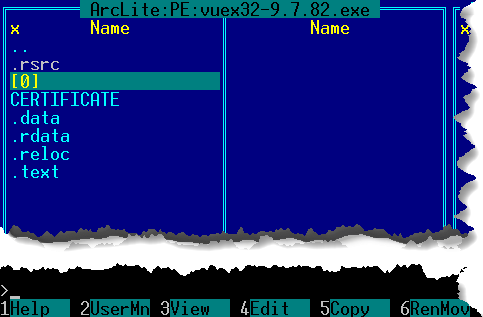
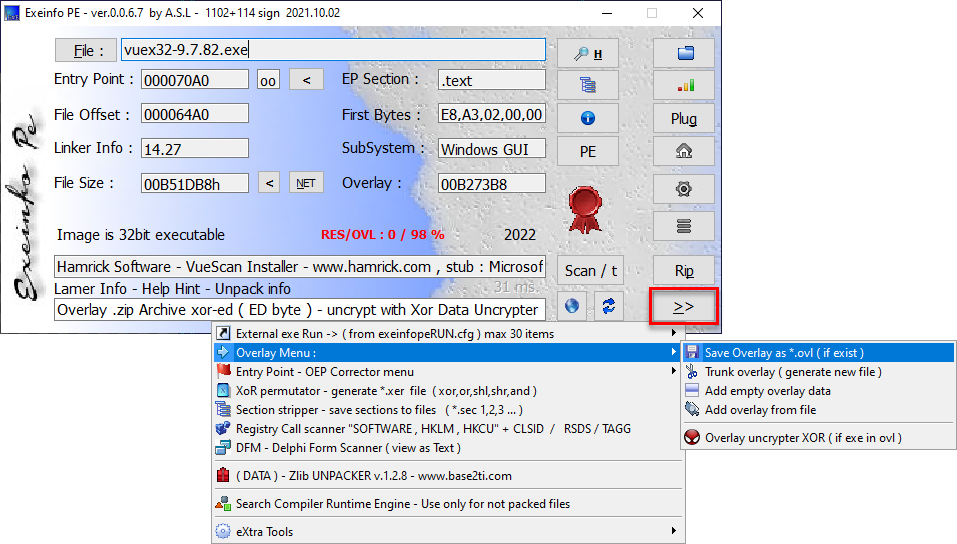
If ArcLite does not see the overlay, then we use, for example, Exeinfo PE, the script for AutoIt PE File Overlay Extraction, or the command line tools.exe from PEKIT. There are many ways.
a) Exeinfo PE -> ">>" -> Overlay Menu -> Save Overlay as *.ovl ( if exist ) =-> vueXXX-X.X.XX.exe-ovl
b) tools.exe /overe < filename_containing_the_overlay> <filename_of_the_overlay_to_extract>
с) With the AutoIt script, everything is simple, because the GUI.
2. Overlay decryption.
a) Open the detected overlay in в XOR Data Uncrypter, then the "Xor & Rip" button until the message "I found a signature [ sign 03: ZIP Archive ] - found at offset: 0000 - XOR byte : EDh. Abort Mission?".
If the message contains the offset "EDh", we interrupt the process with the "Yes" button.
Save the decrypted overlay -> "Save" button.
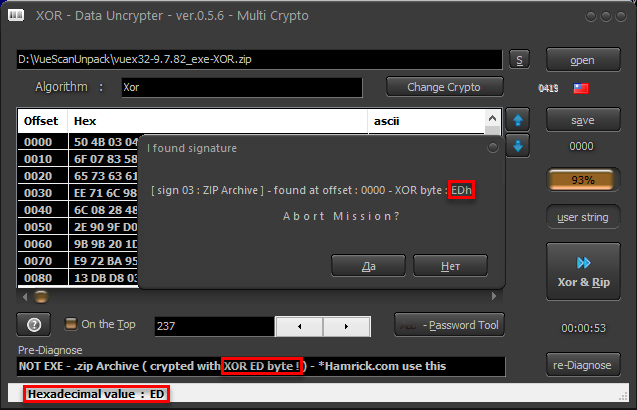
If the offset in the message is not "EDh", but some other, then do not interrupt the search, "No" button, until the result "...XOR byte : EDh".
 When "EDh" is found, interrupt the process with the "Yes" button.
Save the decrypted overlay -> "Save" button.
Get the decrypted file with the suffix
When "EDh" is found, interrupt the process with the "Yes" button.
Save the decrypted overlay -> "Save" button.
Get the decrypted file with the suffix !_unXOR_ED.
b) xor.exe <encrypted_file_name> <decrypted_file_name> 0xED
Decrypted overlays are ZIP archives, with a small amount of garbage at the end of the file. It does not affect the integrity of the contents of the archives. The contents are unpacked correctly, but for greater importance, you can fix the archive, for example, with Info-Zip:
zip.exe -FF <filename_of_the_decrypted_file> --out <filename_of_the_fixed_decrypted_file.zip>.
Why offset is EDh? If open the VueScan Installer in Exeinfo PE it defines the as: "NOT EXE - .zip Archive ( crypted with XOR ED byte ! ) - *Hamrick.com use this"
Detect It Easy (DiE) defines VueScan Installer and encrypted overlays from it as: "Data: Hamrick Software XOR-ed ZIP"
If open encrypted overlays from VueScan Installer in Exeinfo PE or XOR Data Uncrypter, then how: "Overlay .zip Archive xor-ed ( ED byte ) - uncrypt with Xor Data Uncrypter - www.asl-soft.xn.pl"
The offset and encryption type of the VueScan Installer have not changed for 10 last years. Exeinfo and DiE determine the file type by signature.
I made a BAT file to unpack the VueScan Installer. Archive attached to this Issue: VueScanUnpack.zip
Put the VueScan Installer in the folder with Unpack_VueScan.cmd (and the BIN folder), run with the parameter <filename_of_VueScan_Installer_with_extension>
at the output we get two folders with vuescan.exe and the contents of the vuescan.exe overlay.
Using vuex32-9.7.82.exe as an example:
vuex32-9.7.82_exe folder contains the VueScan.exe executable
vuex32-9.7.82_exe_Unpacked folder contains the unpacked overlay from VueScan.exe
Links to mentioned programs:
Exeinfo PE 0.0.6.7 http://exeinfo.booomhost.com/ https://github.com/ExeinfoASL/ASL
XOR Data Uncrypter 0.5.6 (XOR Data Uncrypter и Exeinfo PE - programs of the same author and use the signature database - Ext_detector.dll). XOR Data Uncrypter has a newer Ext_detector.dll than Exeinfo PE. http://asl.epizy.com/ http://asl.epizy.com/XorDataUncrypter.zip
Detect It Easy (DiE) 3.04 https://horsicq.github.io/ https://github.com/horsicq/DIE-engine/releases
tools.exe - PEKIT (yzPELib 0.5) 1.0 The site is in Russian and does not support direct download links, so I am attaching the archive to this Issue: PEKIT.1.0.zip https://www.manhunter.ru/underground/511_programmi_dlya_redaktirovaniya_resursov_pe_faylov.html https://www.manhunter.ru/download/9185/PEKIT.1.0.zip
PE File Overlay Extraction - AutoIt Script https://www.autoitscript.com/forum/topic/153277-pe-file-overlay-extraction/ https://www.autoitscript.com/
xor.exe - Xor 0.2 by Luigi Auriemma https://aluigi.altervista.org/mytoolz.htm https://aluigi.altervista.org/mytoolz/xor.zip
zip.exe - Zip 3.1, unzip.exe - Unzip 6.0.0.0 https://www.willus.com/archive/zip64/ https://www.willus.com/archive/zip64/infozip_binaries_win32.zip https://www.willus.com/archive/zip64/unzip.exe
