

 BiglySoftware
biglybt crashing pretty regularly, lots of errors in logfiles, tags disappearing, and unable to restart biglybt
I'm using BiglyBT 3.0.0.0 on Ubuntu 18.04.6 LTS (Gnome).
I always have a tmux session running and Biglybt is running over vnc inside an encrypted /home, and for some reason that I haven't worked out yet, sometimes all programs running inside the vnc session lose write access to the /home folder until I reconnect to my tmux session.
When this happens, I see file access errors in utorrent as well, and vnc will not allow me to login until after I have logged into the tmux session - gives error "no password configured for vnc auth" until then.
After this happened today, the biglybt GUI became unclickable, as seems to happen fairly regularly even when there are no file access problems.
When the biglybt GUI becomes unresponsive, often the Android app can still connect and control biglybt, but on this occasion it was locked up and I could only right-click on the biglybt taskbar entry and choose "close", then click on "force close" or whatever it is.
When I restarted biglybt, the torrents were still all there but all the tags were empty:
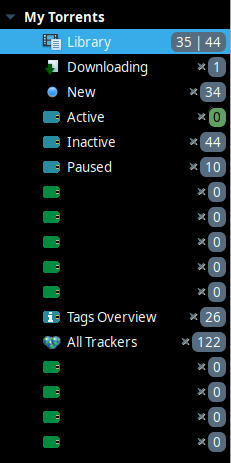
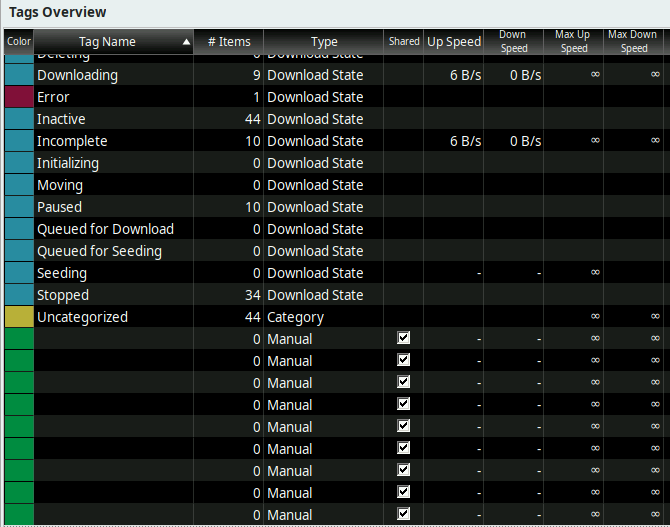
Even when I restore the settings from backups taken well before yesterday, the tags do not return.
All the empty tags do not have anything but what looks like default settings (every tag had a "move on complete" folder set, which is now empty in all those blank tags).
I have noticed that there are hs_err_pidXXXXX files inside ~/biglybt/ that have core dumps that I have no chance of understanding, and coincidentally the dates of those files do seem to coincide with today's error and also from other dates when I also lost biglybt settings.
So I think on the "bad days" it is throwing those errors and also losing the biglybt settings. Kinda difficult to troubleshoot when it only seems to happen about once a month though.
I have also noticed that biglybt cannot restart itself.
It always ends with:
WARNING: Illegal reflective access by com.biglybt.core.util.spi.AENameServiceJava9 (file:/home/redacted/biglybt/BiglyBT.jar) to field java.net.InetAddress.impl
WARNING: Please consider reporting this to the maintainers of com.biglybt.core.util.spi.AENameServiceJava9
WARNING: Use --illegal-access=warn to enable warnings of further illegal reflective access operations
WARNING: All illegal access operations will be denied in a future release
No shutdown tasks to do
BiglyBT TERMINATED.
, and never restarts.
Edit: installed the beta and now it can restart from "File->Restart Biglybt", but still gives the error and doesn't restart after a settings backup restore. Edit2: spoke too soon. Most of the time it can restart from "File->Restart Biglybt", but not always.
It does this both when you choose "file->restart biglybt" and also after restoring from backup when the message says it will now restart. In both cases I need to restart it manually by running ~/biglybt/biglybt.
I don't really have a great grasp of how biglybt works, where its logs are and where its settings are saved, so I'm really just randomly looking through logfiles looking for errors:
So I think I have multiple problems and questions:
- The random file access problems which I think are some kind of
vncor encrypted home timing out problem, which I don't think are a biglybt problem but I don't think biglybt should trash its settings even if the folder is not writable. - I have
biglybtinstalled in~/biglybt/and run it using the script at~/biglybt/biglybt- is this the correct way to run it? - When the GUI becomes unresponsive, is there any way I can cleanly shut down
biglybtfrom the commandline?kill <pid>doesn't seem to work in those instances. - ~~Where are the tag settings saved, if they are not contained in the settings backup?~~
Edit: I was able to restore the tag settings by manually copying the backup tag.config file into the ~/.biglybt/ folder, so my real problem is that it does not restore successfully when I try to use the "restore" button in settings.
Probably the failing to restore is also causing biglybt to not be able to restart either.
- How can I stop the "illegal reflective access operation" errors and let
biglybtbe able to restart like it should?
I really do like biglybt though, especially the tag options available (when they're working!), so I'm very keen to get this all working reliably so I can finally move away from utorrent.
Thanks for coming to my TED talk...

Hi, sorry for the delay in replying!
Firstly please ignore the "illegal reflective access" error, it is a known issue caused by newer versions of Java warning about/preventing certain hacks that we've had to employ over the years - it isn't anything to do with the restart issue.
There's some stuff about diagnosing BiglyBT hangs in the wiki - https://github.com/BiglySoftware/BiglyBT/wiki/Diagnostics
Unfortunately there are some issues on various linux flavours regarding the GTK libraries that we indirectly use - you might be hitting one of these which is hard for us to do anything about. Hopefully you might be hitting something else that we can, such as JVM memory limits.
There are various log files in the "logs" directly under ~/.biglybt - check the debug_1/2.log files to see if there are any restart related messages.
Hopefully this will get you started on resolving some of your issues!

OK thanks a lot for the reply, @parg. Appreciate all you do.
I'll check out that diagnostics page for the hangs, I've resolved my problem #1.
When the GUI becomes unresponsive, is there any way I can cleanly shut down
biglybtfrom the commandline?kill <pid>doesn't seem to work in those instances.
Yeah, that's the problem. Normally, when BiglyBT is functioning normally, kill <pid> will trigger a quick, orderly shutdown — you can try it on a running, non-hung instance, and you should see it quickly stop all of the active torrents and then exit. (Assuming you have Options > Display > Various > "Wait for BiglyBT to close tidily on exit/restart and display progress" checked; if you don't, I'd recommend it.) It skips the confirmation dialog (even if enabled at Options > Interface > Show confirmation dialog on exit) and tracker signoffs, but it otherwise closes itself down in an orderly fashion.
But if the GUI is hung, that orderly shutdown is going to hang as well. If killing the process has no effect, then I wouldn't expect any other termination method (like a shutdown command) to be any more effective. Even though the web remote plugin may still be responding (hence the Android client being able to interact with the BiglyBT instance), the web remote plugin isn't running in the main thread, and the main thread is permanently out to lunch.
I always have a
tmuxsession running and Biglybt is running overvncinside an encrypted /home,
Hm. The tmux session / VNC server are running on the local machine, not a remote one? Or is this on a remote machine you've ssh'd into? (The latter, minus the tmux session, would exactly describe my own setup — BiglyBT runs on a headless system I have set up as a fileserver, inside an lxqt desktop session running in a vncserver instance, and I use a port-mapped connection to the remote port 5900 (tunneled over SSH) to interact with it.)
and for some reason that I haven't worked out yet, sometimes all programs running inside the
vncsession lose write access to the /home folder until I reconnect to mytmuxsession.
Hmmm. That's not ideal, because BiglyBT frequently updates the files in its configuration directory ($HOME/.biglybt/ by default) when active, and really doesn't like being cut off from those updates for any reason. The whole reason I have my own setup configured to retain 14 days of daily settings autobackups is, at one point I had some power-supply issues with the machine that would completely hang the system entirely, and power-cycling it would mean a corrupted filesystem journal, an fsck run at startup, and (more often than not) corrupted settings in BiglyBT that meant I had to restore the most recent backup.
So, even if it happens relatively infrequently, if you're in a situation where writes to the config space will start failing, the best advice is to keep lots of backups, frequently. (I mean, it's even possible to set the backup frequency in hours, instead of days, if you really want to minimize data loss.) Definitely turn off "Include plugins in backup" to make them a lot smaller, since plugins aren't the issue in terms of corrupted configuration.
I'm also a little concerned that the tmux session may be working against you, especially when it comes to shutdowns/restarts. BiglyBT attempts to relaunch itself after shutting down. Even under normal circumstances, that will occasionally fail. (As will updates, harmlessly, causing BiglyBT to relaunch still running the previous version. Repeating the upgrade then succeeds.) But most of the time, restarts should succeed.
If it's failing too frequently, or more often than not, then my concern is that there may be some aspect of how BiglyBT is running when started by hand that isn't re-created during the automatic relaunch. (Like, maybe the relaunched instance fails because it isn't running under control of the tmux server, or because there's no desktop session manager for it. OTOH, you say you can force-quit a hung BiglyBT, which implies some sort of session management.)
But between shutdown and restart, part of what happens is the execution of the utility class com.biglybt.platform.unix.ScriptAfterShutdown, which is run by the old launch script following an exit of the java process the GUI is running in. (You can see it at ~ line 230 of the launch script.) If the main process is forcibly terminated, or terminates into a session that's already in a bad state, ScriptAfterShutdown either doesn't run, or inherits that same bad state when it's run.
I realize that if you're running with an encrypted /home/, it's likely very much the point that you want BiglyBT's configuration encrypted, so this suggestion likely won't be of much use, but: Moving the BiglyBT working directory out of $HOME/.biglybt/ and into a location with more stable write access could be one way of addressing the corruption issues and hangs. Assuming you have root on the machine, you might even consider carving out a space in /var/db/biglybt/, owned and writable by your user account, and keeping its state there instead. Avoiding any "hiccups" in its access to the config dir, if at all possible, is definitely a path to a more stable and reliable BiglyBT.

Normally, when BiglyBT is functioning normally
Redundantly, when I make statements redundantly... 🙄
But between shutdown and restart, part of what happens is the execution of the utility class
com.biglybt.platform.unix.ScriptAfterShutdown, which is run by the old launch script following an exit of thejavaprocess the GUI is running in.
What I meant by that was, the triggering of ScriptAfterShutdown is a continuation of the same script run that launched the GUI. There's only one launch script, so it doesn't make sense to talk about an "old" script. I was referring to an execution of the script inside a shell process.
Hi, thanks so much for reading my issue and replying in such a detailed fashion.
Firstly, I'm now on BiglyBT beta (3.1.0.1_B05 at the time of posting).
Although it does seem to be more stable than it was, it is still becoming unresponsive maybe every day or two. I have a suspicion that sometimes it's because the beta has auto-updated, but I don't think that's what has caused it every time.
I have also discovered that I can reliably lockup the GUI and make it unresponsive by trying to shift-select multiple downloading items in my Library view.
When I run java --version, it's openjdk 11.0.15 2022-04-19. I wonder if that could be a problem?
I'm not sure how to install a different jre simultaneously and specify biglybt to use that.
I always have a
tmuxsession running and Biglybt is running overvncinside an encrypted /home,Hm. The
tmuxsession / VNC server are running on the local machine, not a remote one? Or is this on a remote machine you'vessh'd into? (The latter, minus thetmuxsession, would exactly describe my own setup — BiglyBT runs on a headless system I have set up as a fileserver, inside anlxqtdesktop session running in avncserverinstance, and I use a port-mapped connection to the remote port 5900 (tunneled over SSH) to interact with it.)
My HTPC is the one that runs tmux and biglybt inside a vncserver (it has x-terminal-emulator, x-window-manager and metacity in the .vnc/xstartup file). The vncserver does seem to have some problems though - there are no maximize/minimize buttons in the titlebars (I can double click on the titlebar to maximize/restore windows though). I haven't worried too much about it because the programs still seem to run ok in the vncserver though (except biglybt :-( ), and I don't want to cause more problems. Basically I would just like the simplest possible interface in the vncserver so I can have reliable long-running programs such as biglybt and connect to them remotely.
I connect to that vncserver by using ssh with port-mapping, I believe that's the same as you do.
and for some reason that I haven't worked out yet, sometimes all programs running inside the
vncsession lose write access to the /home folder until I reconnect to mytmuxsession.Hmmm. That's not ideal, because BiglyBT frequently updates the files in its configuration directory (
$HOME/.biglybt/by default) when active, and really doesn't like being cut off from those updates for any reason. The whole reason I have my own setup configured to retain 14 days of daily settings autobackups is, at one point I had some power-supply issues with the machine that would completely hang the system entirely, and power-cycling it would mean a corrupted filesystem journal, anfsckrun at startup, and (more often than not) corrupted settings in BiglyBT that meant I had to restore the most recent backup.So, even if it happens relatively infrequently, if you're in a situation where writes to the config space will start failing, the best advice is to keep lots of backups, frequently. (I mean, it's even possible to set the backup frequency in hours, instead of days, if you really want to minimize data loss.) Definitely turn off "Include plugins in backup" to make them a lot smaller, since plugins aren't the issue in terms of corrupted configuration.
I've worked out the unmounting problem now. Had to delete the ~/.ecryptfs/auto_umount file and now it doesn't lose access.
I'm also a little concerned that the
tmuxsession may be working against you, especially when it comes to shutdowns/restarts. BiglyBT attempts to relaunch itself after shutting down. Even under normal circumstances, that will occasionally fail. (As will updates, harmlessly, causing BiglyBT to relaunch still running the previous version. Repeating the upgrade then succeeds.) But most of the time, restarts should succeed.If it's failing too frequently, or more often than not, then my concern is that there may be some aspect of how BiglyBT is running when started by hand that isn't re-created during the automatic relaunch. (Like, maybe the relaunched instance fails because it isn't running under control of the
tmuxserver, or because there's no desktop session manager for it. OTOH, you say you can force-quit a hung BiglyBT, which implies some sort of session management.)
For what it's worth, File-Restart in biglybt seems to reliably work now when performed manually.
But between shutdown and restart, part of what happens is the execution of the utility class
com.biglybt.platform.unix.ScriptAfterShutdown, which is run by the old launch script following an exit of thejavaprocess the GUI is running in. (You can see it at ~ line 230 of the launch script.) If the main process is forcibly terminated, or terminates into a session that's already in a bad state,ScriptAfterShutdowneither doesn't run, or inherits that same bad state when it's run.I realize that if you're running with an encrypted
/home/, it's likely very much the point that you want BiglyBT's configuration encrypted, so this suggestion likely won't be of much use, but: Moving the BiglyBT working directory out of$HOME/.biglybt/and into a location with more stable write access could be one way of addressing the corruption issues and hangs. Assuming you have root on the machine, you might even consider carving out a space in/var/db/biglybt/, owned and writable by your user account, and keeping its state there instead. Avoiding any "hiccups" in its access to the config dir, if at all possible, is definitely a path to a more stable and reliable BiglyBT.
I still need to take the time to look at the Diagnostics link that @parg mentioned, maybe there are some hints in those logfiles.
Very often when the GUI freezes, there's messages about URL Group map changed on the console like this:
DEBUG::Mon Aug 01 23:34:19 AEST 2022 URL Group map changed for REDACTED TORRENT NAME: old=, new=http://tracker.opentrackr.org:1337=1, udp://tracker.opentrackr.org:1337=1
Unlikely to be related unfortunately, that is just a report about a downloads tracker set being updated and isn't a sign of anything bad going on.
How about this one?
(BiglyBT:29723): Gtk-CRITICAL **: 23:09:13.552: gtk_box_gadget_distribute: assertion 'size >= 0' failed in GtkScrollbar
It almost always freezes when I shift-select multiple items and try to do anything.
@parg Might you have any comment about the above? It happens very very regularly if I'm interacting with the GUI.
It's so frustrating because, other than the becoming unresponsive every day, I love the customizability and features of biglybt and would be happy to switch to it completely. As it is I'm still mostly stuck with old utorrent.
The crashes are in the SWT library we use, not code we write or support unfortunately. If you join the Beta program and run with a Java version >= 11 then you will be updated with the latest SWT library. Possibly they've fixed things, worth a try.
After updating to Ubuntu 20.04.6 LTS, it seems to be working perfectly now. No crashes for the last day, and I've been doing all the "dangerous" things like selecting multiple torrents, scrolling a lot, and filtering lists...
Excellent!