

 BestImageViewer
geeqie tries to generate thumbnails from partial images
ISSUE TYPE
- Bug Report
GEEQIE VERSION
Version 1:1.6-8 from Debian testing, which uses GTK3:
(geeqie:24062): dbind-WARNING **: 18:27:13.727: Couldn't connect to accessibility bus: Failed to connect to socket /tmp/dbus-0ff877MbWD: Connection refused
Geeqie 1.6
OS / DISTRIBUTION
Debian. Mostly stable, with bits of testing (geeqie is one of those bits).
SUMMARY
geeqie tries to generate thumbnails before the generating application has finished writing out the image, resulting in bad thumbnails:
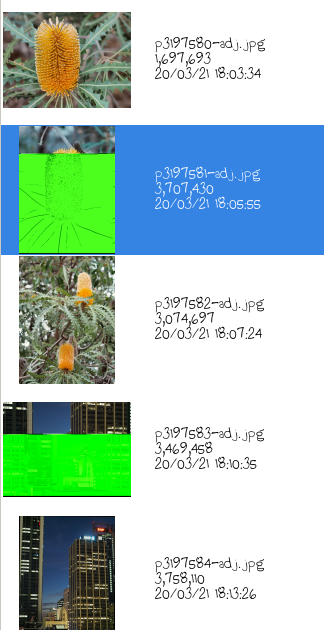
Though maybe the real bug is that geeqie doesn't notice that the file has changed between it creating the thumb from the partial file, and Darktable finishing writing out the image.
STEPS TO REPRODUCE
If it matters, I have thumbnail caching set to ./.thumbnails/ Images generated by Darktable, writing to (and geeqie reading from) an NFS-mounted filesystem, across a not terribly fast LAN (limited by a Homeplug AV (ethernet over power) connection).
If only there was an easy way to tell geeqie to force rebuilding of an individual thumbnail without having to wade through the filesystem (or nuking every thumbnail in the directory)... 😅


If, on the command line, you execute touch <filename> does the thumbnail get updated?
I can't replicate this exact scenario, so I am a bit reluctant to create new code until I can.
It is not necessary to delete all the thumbnails in the folder. You may create a plug-in containing:
Exec=<script file> %F
and in the script file:
for file in "$@"
do
file_name=$(basename "$file")
dir_name=$(dirname "$file")
rm "$dir_name/.thumbnails/$file_name.png"
done
Select the thumbs that need to be recreated and run the plug-in. Maybe also will need a Refresh.
I'll see if I can create a reliable test case (possibly involving pv -L).
Is geeqie comparing the mtime or ctime? If the latter then that might explain what I'm experiencing. Here is an example where the thumbnail's mtime is older (and therefore the thumbnail should have been rebuilt) but the ctime is newer.
  Size: 8302968   	Blocks: 16224      IO Block: 1048576 regular file
Device: 32h/50d	Inode: 1335896     Links: 1
Access: (0644/-rw-r--r--)  Uid: ( 1000/ michael)   Gid: ( 1002/   space)
Access: 2021-11-11 20:37:26.385854908 +0800
Modify: 2021-11-11 14:04:06.725809317 +0800
Change: 2021-11-11 14:04:06.725809317 +0800
 Birth: -
  File: .thumbnails/pb023257-adj.jpg.png
  Size: 10653     	Blocks: 24         IO Block: 1048576 regular file
Device: 32h/50d	Inode: 1335897     Links: 1
Access: (0644/-rw-r--r--)  Uid: ( 1000/ michael)   Gid: ( 1002/   space)
Access: 2021-11-11 20:37:16.897710537 +0800
Modify: 2021-11-11 14:04:06.000000000 +0800
Change: 2021-11-11 14:04:06.777810111 +0800
 Birth: -
My guess at possible race condition is:
- application starts writing new image
- geeqie notices new (and possibly incomplete) image, reads it and starts generating thumbnail
- application finishes writing image
- geeqie writes thumbnail
I can reproduce the issue with this modestly contrived script:
#!/bin/sh

input=input.jpg

rm -fv output*.jpg .thumbnails/*
sleep 5
size=$(stat $input |awk '/Size:/ {print $2}')
half=$(($size/2))
for n in $(seq 0 9); do
        output=output$n.jpg
        echo "----- $input -> $output -----"
        dd if=$input of=$output bs=$half count=1    # write first half of the image
        dd if=$input of=$output                     # write other half of image
        touch --reference=$input $output            # it is reasonable for real world apps to do this
done
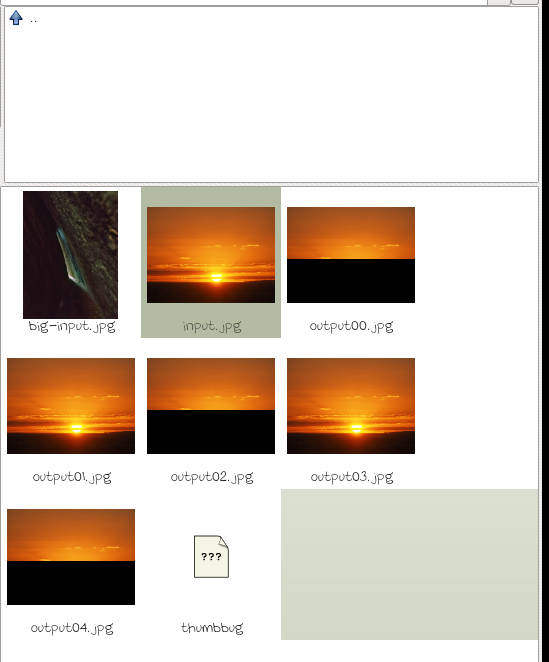
Output of stat --printf="atime:%x mtime:%y ctime:%z %n\n" output??.jpg .thumbnails/output??.jpg.png:
atime:2021-11-11 20:36:29.836994492 +0800 mtime:2021-11-11 16:47:50.907987370 +0800 ctime:2021-11-11 22:05:13.818022303 +0800 output00.jpg
atime:2021-11-11 20:36:29.836994492 +0800 mtime:2021-11-11 16:47:50.907987370 +0800 ctime:2021-11-11 22:05:16.290059955 +0800 output01.jpg
atime:2021-11-11 20:36:29.836994492 +0800 mtime:2021-11-11 16:47:50.907987370 +0800 ctime:2021-11-11 22:05:18.810098339 +0800 output02.jpg
atime:2021-11-11 20:36:29.836994492 +0800 mtime:2021-11-11 16:47:50.907987370 +0800 ctime:2021-11-11 22:05:21.318136540 +0800 output03.jpg
atime:2021-11-11 20:36:29.836994492 +0800 mtime:2021-11-11 16:47:50.907987370 +0800 ctime:2021-11-11 22:05:23.842174984 +0800 output04.jpg
atime:2021-11-11 16:47:50.000000000 +0800 mtime:2021-11-11 16:47:50.000000000 +0800 ctime:2021-11-11 22:05:12.670004818 +0800 .thumbnails/output00.jpg.png
atime:2021-11-11 16:47:50.000000000 +0800 mtime:2021-11-11 16:47:50.000000000 +0800 ctime:2021-11-11 22:05:17.722081767 +0800 .thumbnails/output01.jpg.png
atime:2021-11-11 16:47:50.000000000 +0800 mtime:2021-11-11 16:47:50.000000000 +0800 ctime:2021-11-11 22:05:17.830083412 +0800 .thumbnails/output02.jpg.png
atime:2021-11-11 16:47:50.000000000 +0800 mtime:2021-11-11 16:47:50.000000000 +0800 ctime:2021-11-11 22:05:22.770158657 +0800 .thumbnails/output03.jpg.png
atime:2021-11-11 16:47:50.000000000 +0800 mtime:2021-11-11 16:47:50.000000000 +0800 ctime:2021-11-11 22:05:22.834159631 +0800 .thumbnails/output04.jpg.png
And now I'm wondering if it has anything to do with the truncated timestamps (no fractional seconds) of the thumbnails. :thinking:
Hope this helps?