

 BestImageViewer
Sort by Date isn't correct & doesn't match Thunar: sort by Date Modified
ISSUE TYPE
- Bug Report
GEEQIE VERSION
Geeqie 1.7+git20220801-6c783e87 GTK3
OS / DISTRIBUTION
Xubuntu 22.10
SUMMARY
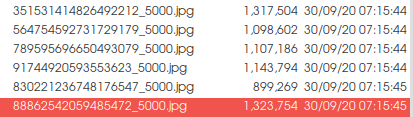
Geeqie, sort by date (according to help = date modified): last 6 files. FWIW the order of images isn't correct (based on visual inspection of sequence progression):
Thunar, sort by date modified, last 6 files are different. Order of images is correct:
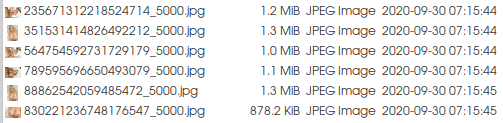
(I realise this isn't obvious from the files names. But I promise you).
Per the help, Sort by Date is based on file modification date. Does Geeqie do this some other way than Thunar, perhaps a wrong way? Thanks!
Edit: could it be that Thunar uses sub-second ordering or something? Possibly both Thunar & Geeqie are correct to the second?

I don't see the problem, unfortunately.
Is the problem in both Geeqie's icon and list view? Do you have another File Manager installed to cross-check against?
ls -clt --full-time and stat %y will show time to milli-second. Is the time difference in the milli-sec. level?
Can you set up a /tmp/<tmpx> folder and isolate two files that are incorrectly ordered, and upload them? - (But that will not help if the problem is due to milli-sec difference)

I'll see if I can recreate it, though will need another folder, because my diagnostics yesterday potentially revealed a different bug (which I can file separately if it's real). In Thunar, in the folder with those images, I created a subfolder "tmp", copied & pasted all the images there, sorted by date modified, selected all, hit F2 to access Thunar's mass rename program, and renamed them sequentially. This worked, confirming a workaround to the (possible) Geeqie bug.
However when I then opened the first image in Geeqie, it loads fine, but there are no other files listed in the folder, and I can't mousewheel scroll to the next. Hitting refresh and power cycling made no difference. I deleted the original images and moved the copied & renamed images up to the parent folder & deleted the now-empty tmp subfolder. Same problem with Geeqie.
On a hunch I checked the images' permissions and changed group & others from Read to Read & Write but this made no difference. Be interested whether you can replicate this, and/or have any ideas what might cause it or how it can be fixed? For reference, in the folder view, I can click neighbouring folders and their files all load, and come back to the culprit folder and the one image I clicked on in Thunar to spawn Geeqie will display, but there are no files in the file list.
ls -clt --full-time
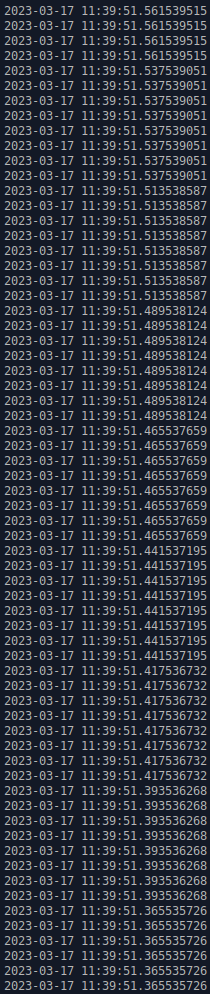
Looks like blocks of 8 with the same milisecond. This might relate to DownThemAll, a Firefox extension which has a setting for how many images you want to download simultaneously. Conceptually it creates the containers in blocks of 8 and then fills them as they download. But I'm now unable to see if Geeqie is randomly (or using some system) ordering within the milisecond blocks, whereas Thunar is ordeering within milisecond blocks using a different system...
stat %y
stat: cannot statx '%y': No such file or directory
I have given this very little thought so far, but...
Geeqie is using the standard st_ctime, which is milli-secs.
On entry to a folder, Geeqie forms an internal list of the files. That list is the one operated on for all re-sort actions - the file list is not retrieved again from the disk (unless there are file changes).
Each time the user changes the sort method, that list gets reordered. If two items are identical (in that sort method), the order is not changed from the order that exists at that time.
Therefore (it seems to me) that if you order on size, then order on date, the results shown may not be the same as if you order on class and then order on date.
Thanks for the thought Col, seems sensible.
Sadly I can't test it on these files due to this other bug. Do you know if there's a way to force Geeqie to reindex a folder? I've tried the refresh button to no avail. If I doubleclick an image in the offending folder in Thunar, it opens in Geeqie but no files are visible in the file list. If I go to another folder in Geeqie it's file, then go back to the offending folder and the single image is displayed but nothing in the file list still.
If I close Geeqie and reopen it by doubleclicking an image in another folder, then go to the offending folder, the previous image I clicked it shown, again with nothing in the file list.