
flutter_cached_network_image
 flutter_cached_network_image copied to clipboard
 Baseflow
Images inside listview reloads when top page pops
🔙 Regression
Images inside a listview of screen-1 reload(displaying placeholder and showing image) when screen-2 pops from the navigation stack.
Screen 1 is the main page that shows when the app opens. The user navigates to screen 2 by clicking on a button and comes back to screen 1 by clicking the back button. At that time the images show blurhash and then show the actual image.
PS: I'm using this package along with OctoImage package.
Old (and correct) behavior
Image Should be displayed as it's already loaded.
Current behavior
Image shows placeholder and reloads image like it did on the first load.
Reproduction steps
Using a CachedNetworkImage widget on screen 1 and open screen2 and remove screen2 from the view.
OctoImage(
             image: CachedNetworkImageProvider(Url),
             placeholderBuilder: OctoPlaceholder.blurHash(
                   'LJH1#:Nz#MMgxdIV-nRrIaxVr_XA',
             ),
             errorBuilder: OctoError.blurHash('LJH1#:Nz#MMgxdIV-nRrIaxVr_XA',
                 icon: Icons.warning_amber_rounded),
             fit: BoxFit.cover,
             height: double.infinity,
             width: double.infinity,
           );
Configuration
Version: 2.5.0
Platform:
- [X] :iphone: iOS
- [X] :robot: Android


+1
I'm having this problem with ListViews inside ListViews. Not all the images reload with the placeholder appearing first, but it seems to happen randomly. Also it seems to happen more frequently if there are more images in the ListViews.

I have found the cause of the problem. My picture file is too large. flutter.dev @harshapulikollu @snaeji
I have found the cause of the problem. My picture file is too large. flutter.dev @harshapulikollu @snaeji
Thank you for letting us know @refcoding, I'll try to compress the size of the image and test it.
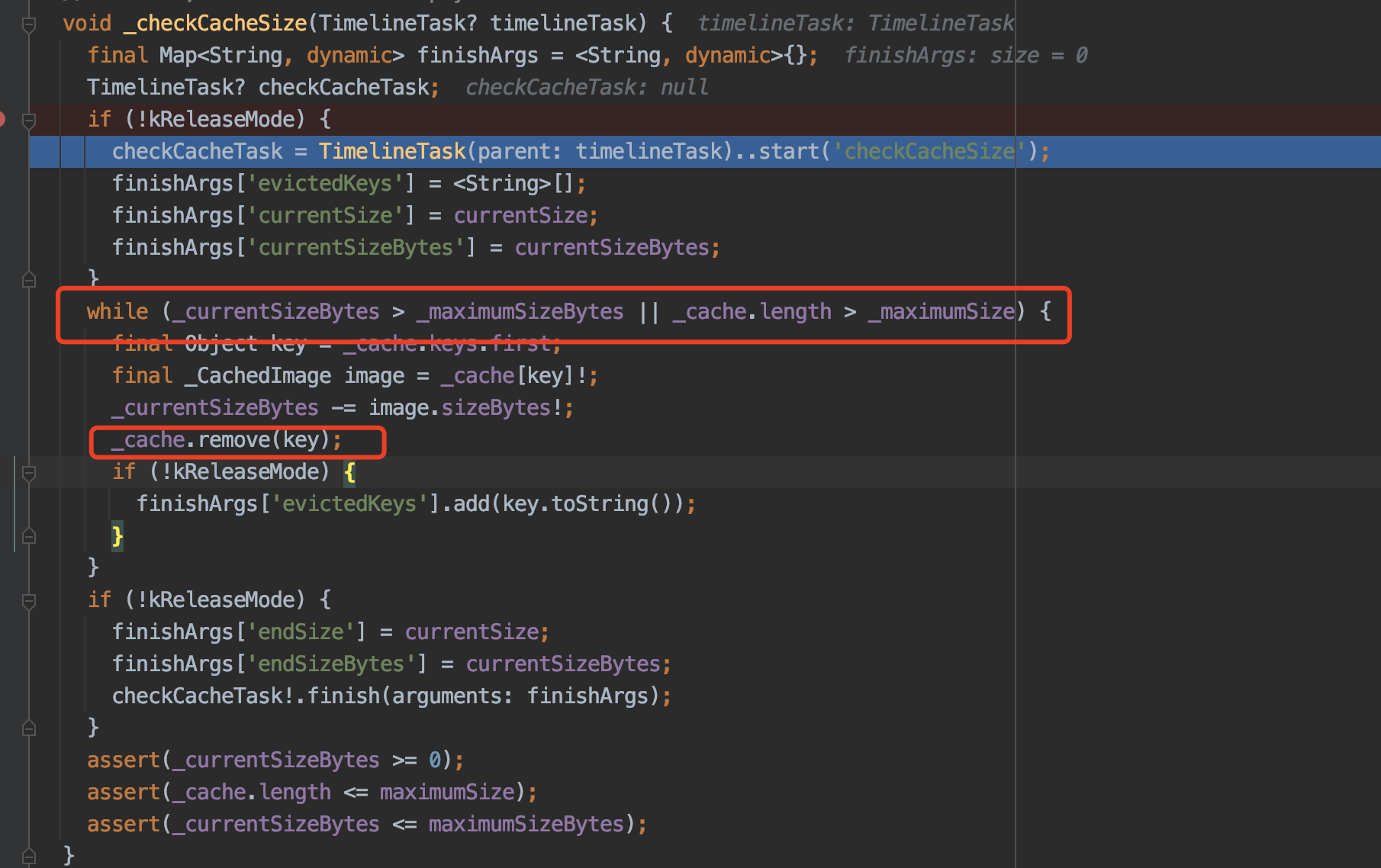 是这里的问题,flutter缓存框架imageCache最大100M,1000张图片,超出就remove,设置更改一下最大值
I have bumped the maximumSizeBytes const _kDefaultSizeBytes value from 100 << 20 to 1000 << 20 in ImageCache file, and images are not reloading any more. But I donno how effective that solution is and I think, I have to manually update it every time I update the flutter version.
我将文件中的maximumSizeBytes常
_kDefaultSizeBytes量值从100 << 20更改1000 << 20为ImageCache,并且图像不再重新加载。但是我不知道该解决方案的有效性,我认为,每次更新Flutter版本时,我都必须手动对其进行更新。
PaintingBinding.instance.imageCache.maximumSizeBytes = 1000<<20; //1000M
我将文件中的maximumSizeBytes常
_kDefaultSizeBytes量值从100 << 20更改1000 << 20为ImageCache,并且图像不再重新加载。但是我不知道该解决方案的有效性,我认为,每次更新Flutter版本时,我都必须手动对其进行更新。PaintingBinding.instance.imageCache.maximumSizeBytes = 1000<<20; //1000M
thanks,It works

我将文件中的maximumSizeBytes常
_kDefaultSizeBytes量值从100 << 20更改1000 << 20为ImageCache,并且图像不再重新加载。但是我不知道该解决方案的有效性,我认为,每次更新Flutter版本时,我都必须手动对其进行更新。PaintingBinding.instance.imageCache.maximumSizeBytes = 1000<<20; //1000M
thanks,It works
In which file are you making the change?

@Alusio You can make the change on any page. I did it on my home_page.dart file

The solution here on StackOverflow worked for me!
https://stackoverflow.com/q/54377133/4254290
class CustomImageCache extends WidgetsFlutterBinding {
  @override
  ImageCache createImageCache() {
    ImageCache imageCache = super.createImageCache();
    // Set your image cache size
    imageCache.maximumSizeBytes = 1024 * 1024 * 100; // 100 MB, make this bigger if needed
    return imageCache;
  }
}

void main() async {
  WidgetsFlutterBinding.ensureInitialized();
  if (kReleaseMode) {
     CustomImageCache();
  }
  runApp(MyApp());
}
Hi,
I print PaintingBinding.instance.imageCache.maximumSizeBytes // 100MB Here, I go to settings -> iphone memory and see Documents and Data cache> 100MB. This is why the image is reloaded. Solution: I would set PaintingBinding.instance.imageCache.maximumSizeBytes 1000<< 20; //1000MB Problem solved
