

 BabylonJS
Add up/down arrow control to NME search results
When using the new "spacebar to search" functionality, with each key press the results query updates to any nodes that match the input term. A user may see the node they want in a position other than the first. For example, typing "col" will return Color3 first and Color4 second. If the user wants a Color4, they need to continue typing the rest of "color4" to get Color4 return first to press enter and place the node. The other way is to grab the mouse and hover Color4 and click. This feature would speed up the process. Consider the following flow:
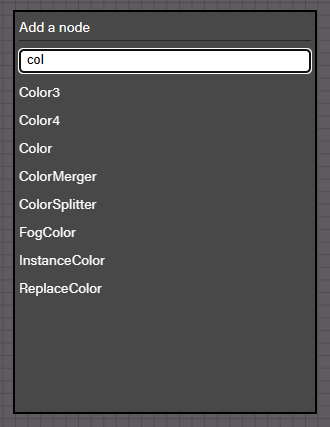
- The user presses spacebar and types "col"
- The results show
Color3first, highlighted the same as if it were hovered with the mouse. It showsColor4as the second return. - Since the
Color3is highlighted, pressing enter will place theColor3node. - If the user wants to place a
Color4instead, pressing the down arrow once will move the highlight down one space in the returned list to highlight theColor4node. - With the
Color4node highlighted, pressing enter will place theColor4node - If the user had the
Color4node highlighted, but decided instead to place aColor3node, pressing the up arrow once will move the highlight up one space in the returned list to highlight theColor3node. - Repeated presses of the up or down arrow will move the highlight up or down by one item with each press.
For this to work as we have the initial feature working, we always need to highlight the first node in the returned list so that the user knows that pressing enter without using the mouse will return the first node. Currently we don't highlight anything until the mouse hovers a returned node in the list. Using the arrow keys to modify what is selected by moving the highlight on arrow press will often result in fewer key presses and no lost time reaching for the mouse.
