
boinc
 boinc copied to clipboard
 BOINC
BOINC
CPU scheduling with Intel Performance (P)-cores and Efficiency (E)-cores incorrect
Describe the bug Windows detects BOINC as background task and schedules only to Ecores
Steps To Reproduce
- Launch Boinc connected to LHC @ home but only running sixtrack (I guess it would be same for rosetta etc)
- Ensure no other programs are running and boinc is in tray on windows
- remotely monitor CPU load should be about 30-40% on 12900 with 8 P and 8 E cores
- launch task manager, CPU load is now 100 %
Expected behavior Work scheduled to all cores
Screenshots If applicable, add screenshots to help explain your problem.
System Information
- OS: Windows11
- BOINC Version: 7.16.20
Additional context Add any other context about the problem here.

Thank you for the report. Could you please change Windows setting to optimize background tasks instead of GUI applications?
https://www.tenforums.com/tutorials/89429-adjust-processor-resources-best-performance-windows-10-a.html

Yes seems to fix it, however I'm not sure this is obvious for beginner BOINC users, I leave it the the product owner to prioritize.
@Toby-Broom, yes, let's keep it open for a while, but to determine headless Windows machine might be not an easy task
however I'm not sure this is obvious for beginner BOINC users
Not sure any beginner BOINC user runs headless Windows server :)
I would change the title to "Incorrect CPU scheduling with 12th Gen Intel" because it is affecting on every system, not only "headless computers". Windows is assigning BOINC's task to E-Cores instead of P-Cores, even prioritising background services.
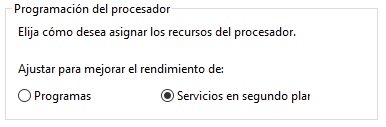
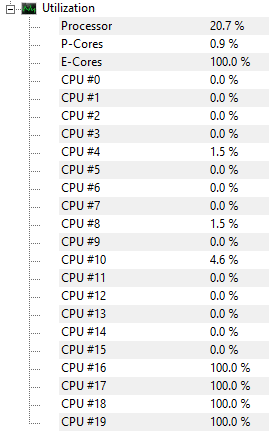
Intel i7 12700F Windows 10 Pro 21H2 (19044.1645) BOINC 7.16.20

It fixed it for me changing the settings, I just put headless as for me it seemed to work fine when I was logged in
This seems to have come back, I had set windows to favour background tasks but it does not work anymore. Only Opening BOINC will make it go at full speed. I now have 13th Gen
Edition Windows 11 Pro Version 23H2 Installed on 6 Nov 2022 OS build 22631.3155 Experience Windows Feature Experience Pack 1000.22684.1000.0
I make a bug to Microsoft referencing this, I'm not sure the issue is with BOINC, windows/CPU does not recognise that BOINC needs all the CPU
We're not planning currently to add any CPU pinning or whatever, and we rely on the OS to schedule processes correctly on available CPU cores. Closing this without any action for now.
