

 BOINC
BOINC
Tasks requiring more disk space despite over 300GB free on a dedicated drive
Describe the bug A clear and concise description of what the bug is.
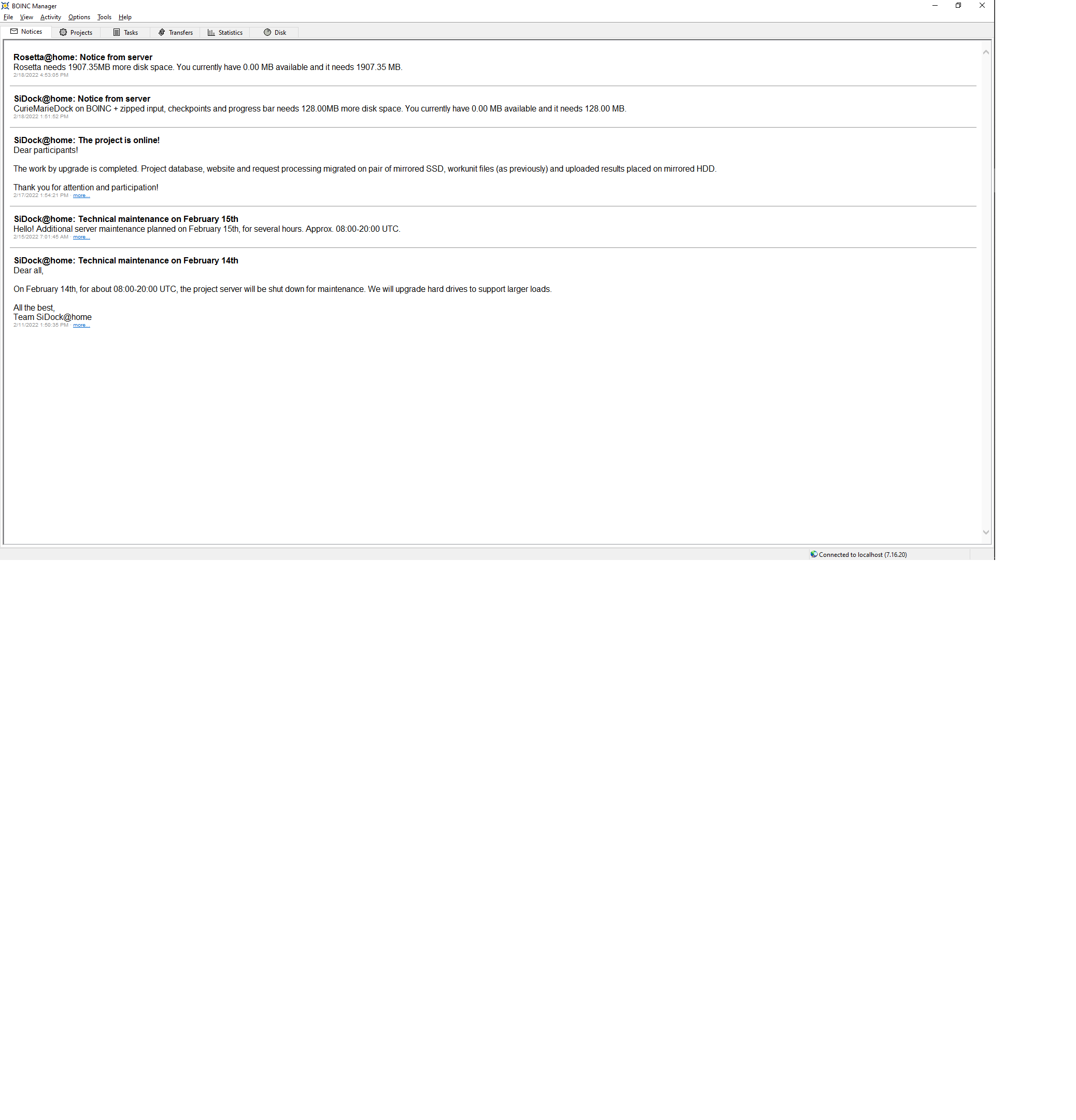
Rosetta@home: Notice from serve Rosetta needs 1907.35MB more disk space. You currently have 0.00 MB available and it needs 1907.35 MB.
SiDock@home: Notice from server CurieMarieDock on BOINC + zipped input, checkpoints and progress bar needs 128.00MB more disk space. You currently have 0.00 MB available and it needs 128.00 MB.
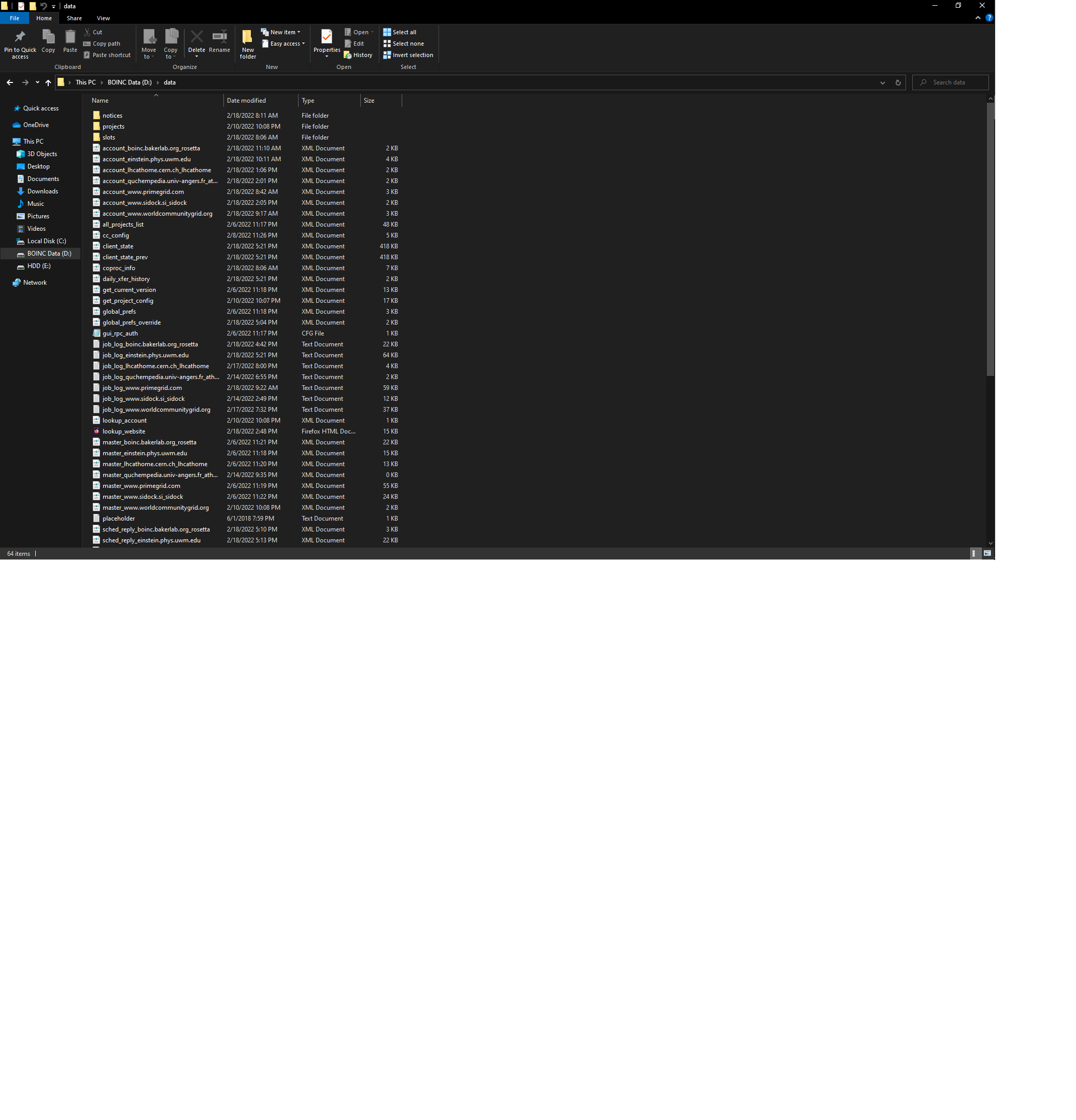
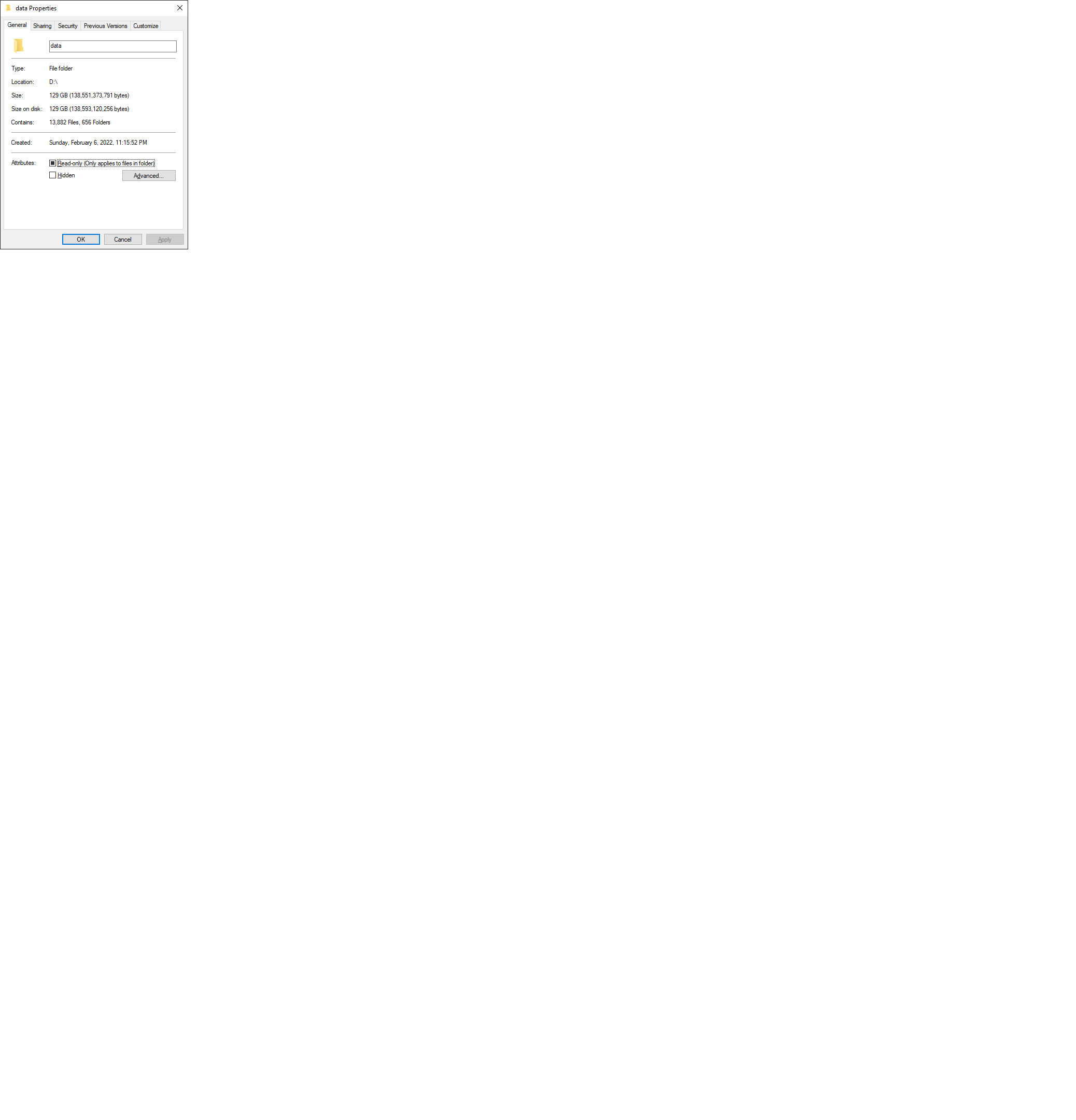
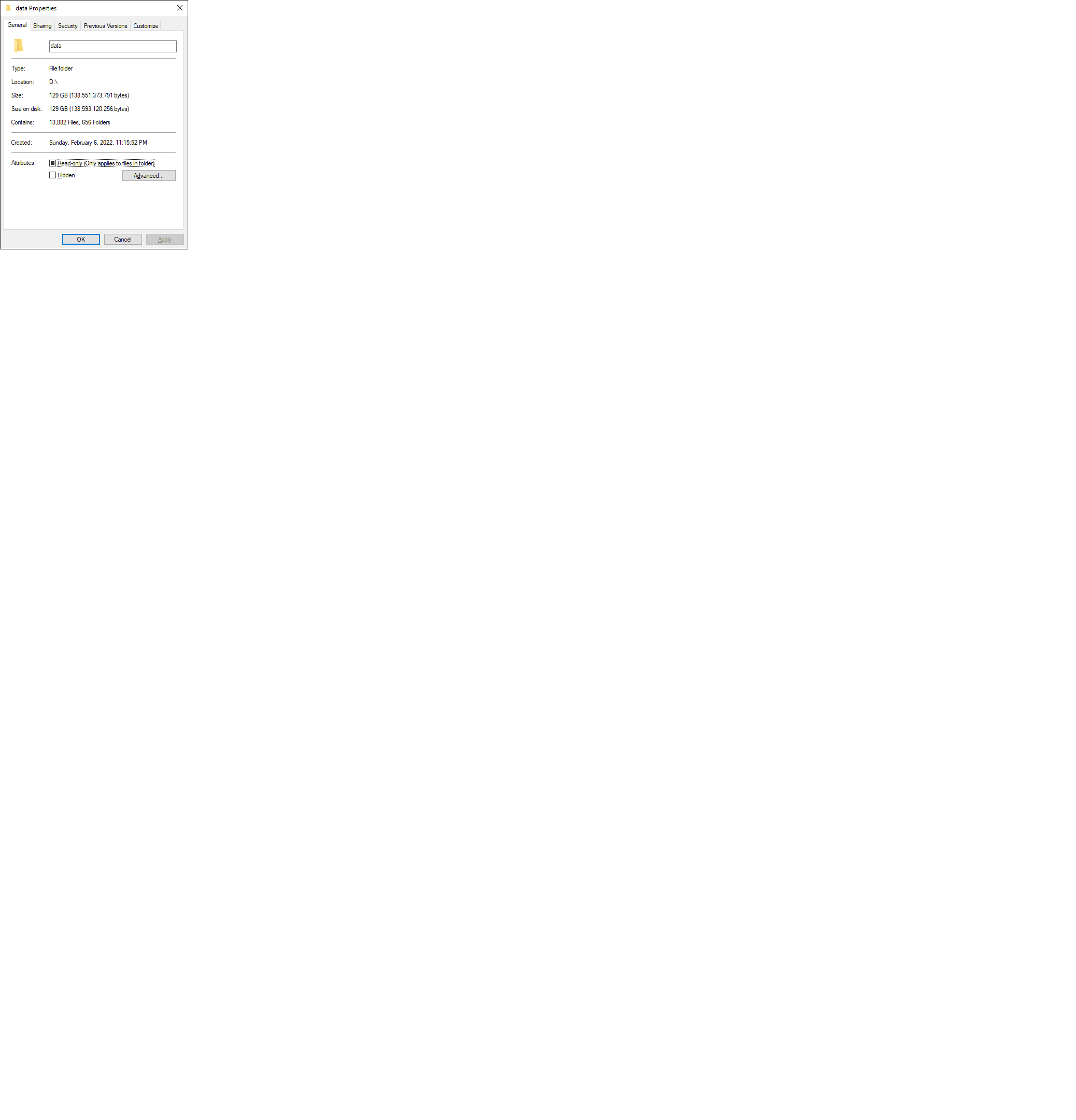
This can not be possible. BOINC is on a dedicated 500GB drive (465 partition) of which only 129 is being used and there is 336 free.
Memory usage is 62% of 49,078MB
Rosetta is running 14 Python Vbox tasks and one standard 4.2 task Prior to that SiDock was running 15 tasks
Steps To Reproduce
- unknown
Expected behavior A clear and concise description of what you expected to happen.
This problem should not happen
Screenshots If applicable, add screenshots to help explain your problem.
System Information
- OS: Win10
- BOINC Version: 7.16.20 Vbox 6.1.30
Additional context Add any other context about the problem here.
RAH is Vbox and SiDock is non Vbox so hard to pin down if it is Vbox related or not.


Already eliminated that when it first happened after installing the new drive.

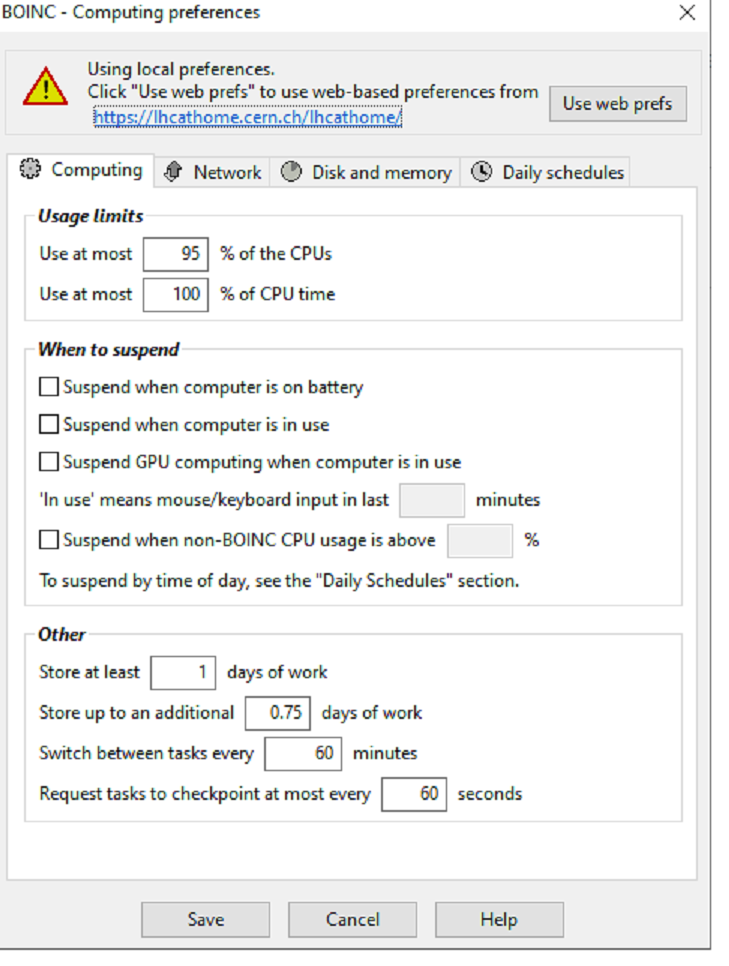
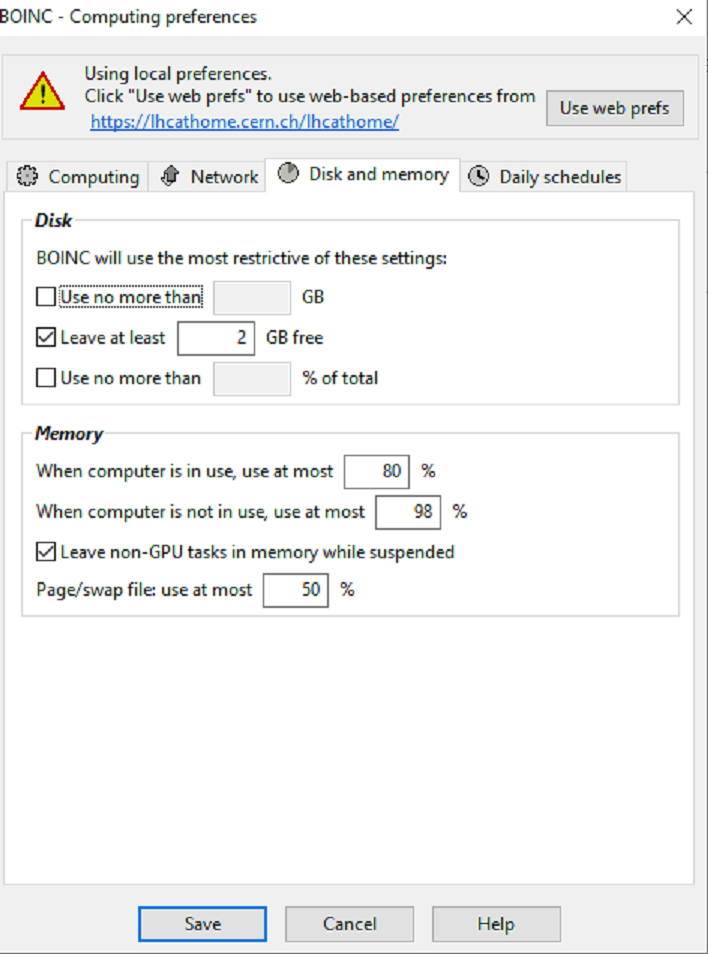
Hm, are you sure you still have space left on that device? Settings looks fine for me
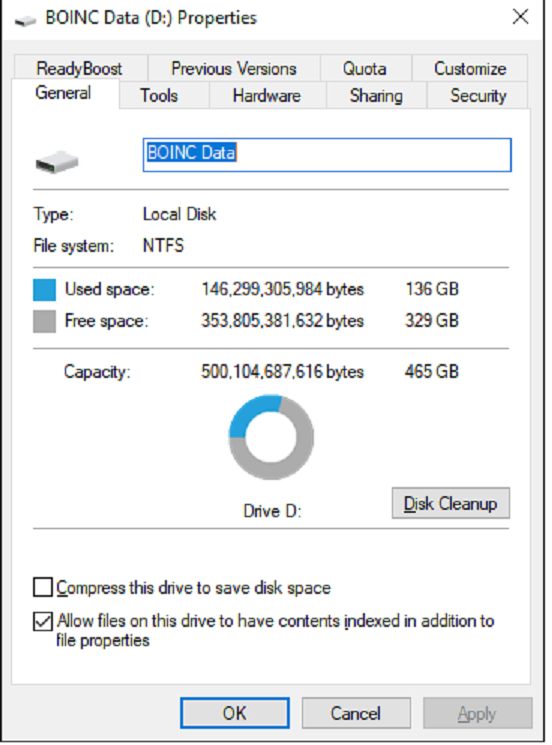
No other ideas? Is it a bug with BOINC or the projects or what? It is not the first time this has happened. Leave it in your hands now....
Yeah, that looks like a bug. I'll check it out and reach to you either with solution or to ask for more information. Thanks for the report.
Thanks alot! Hear from you in the future.
On Fri, Feb 18, 2022, 20:40 Vitalii Koshura @.***> wrote:
Yeah, that looks like a bug. I'll check it out and reach to you either with solution or to ask for more information. Thanks for the report.
— Reply to this email directly, view it on GitHub https://github.com/BOINC/boinc/issues/4643#issuecomment-1045076122, or unsubscribe https://github.com/notifications/unsubscribe-auth/AXVFKRFRWUBAFT5VA3FGZYLU32ODLANCNFSM5OYNQOVA . Triage notifications on the go with GitHub Mobile for iOS https://apps.apple.com/app/apple-store/id1477376905?ct=notification-email&mt=8&pt=524675 or Android https://play.google.com/store/apps/details?id=com.github.android&referrer=utm_campaign%3Dnotification-email%26utm_medium%3Demail%26utm_source%3Dgithub.
You are receiving this because you authored the thread.Message ID: @.***>
New project new error of the same kind:
2/23/2022 1:56:01 PM | GPUGRID | Message from server: New version of ACEMD needs 3814.70MB more disk space. You currently have 0.00 MB available and it needs 3814.70 MB.
No settings have changed since I introduced this problem to you.
25.1 GB used 440 free out of 465 (6.5 hrs later since I was at work when this happened) but still no way all the projects can consume 465 GB!!
Could you please post the contents of your global_prefs.xml and global_prefs_override.xml files from the BOINC Data directory?

<global_preferences>
<source_project>https://lhcathome.cern.ch/lhcathome/</source_project>
<source_scheduler>https://lhcathome.cern.ch/lhcathome_cgi/cgi
</source_scheduler>
<mod_time>1637344257</mod_time>
<max_ncpus_pct>100</max_ncpus_pct>
<cpu_usage_limit>100</cpu_usage_limit>
<run_on_batteries>1</run_on_batteries>
<run_if_user_active>1</run_if_user_active>
<run_gpu_if_user_active>1</run_gpu_if_user_active>
<idle_time_to_run>3</idle_time_to_run>
<suspend_if_no_recent_input>0</suspend_if_no_recent_input>
<suspend_cpu_usage>0</suspend_cpu_usage>
<work_buf_min_days>0.1</work_buf_min_days>
<work_buf_additional_days>0.75</work_buf_additional_days>
<cpu_scheduling_period_minutes>60</cpu_scheduling_period_minutes>
<disk_interval>60</disk_interval>
<disk_max_used_gb>100</disk_max_used_gb>
<disk_min_free_gb>2</disk_min_free_gb>
<disk_max_used_pct>100</disk_max_used_pct>
<ram_max_used_busy_pct>80</ram_max_used_busy_pct>
<ram_max_used_idle_pct>90</ram_max_used_idle_pct>
<leave_apps_in_memory>1</leave_apps_in_memory>
<vm_max_used_pct>50</vm_max_used_pct>
<max_bytes_sec_down>0</max_bytes_sec_down>
<max_bytes_sec_up>0</max_bytes_sec_up>
<daily_xfer_limit_mb>0</daily_xfer_limit_mb>
<daily_xfer_period_days>0</daily_xfer_period_days>
<dont_verify_images>0</dont_verify_images>
<confirm_before_connecting>0</confirm_before_connecting>
<hangup_if_dialed>0</hangup_if_dialed>
<global_preferences> <run_on_batteries>1</run_on_batteries> <run_if_user_active>1</run_if_user_active> <run_gpu_if_user_active>1</run_gpu_if_user_active> <suspend_cpu_usage>0.000000</suspend_cpu_usage> <start_hour>0.000000</start_hour> <end_hour>0.000000</end_hour> <net_start_hour>0.000000</net_start_hour> <net_end_hour>0.000000</net_end_hour> <leave_apps_in_memory>1</leave_apps_in_memory> <confirm_before_connecting>0</confirm_before_connecting> <hangup_if_dialed>0</hangup_if_dialed> <dont_verify_images>0</dont_verify_images> <work_buf_min_days>1.000000</work_buf_min_days> <work_buf_additional_days>0.750000</work_buf_additional_days> <max_ncpus_pct>95.000000</max_ncpus_pct> <cpu_scheduling_period_minutes>60.000000</cpu_scheduling_period_minutes> <disk_interval>60.000000</disk_interval> <disk_max_used_gb>0.000000</disk_max_used_gb> <disk_max_used_pct>100.000000</disk_max_used_pct> <disk_min_free_gb>2.000000</disk_min_free_gb> <vm_max_used_pct>70.000000</vm_max_used_pct> <ram_max_used_busy_pct>90.000000</ram_max_used_busy_pct> <ram_max_used_idle_pct>98.000000</ram_max_used_idle_pct> <max_bytes_sec_up>0.000000</max_bytes_sec_up> <max_bytes_sec_down>0.000000</max_bytes_sec_down> <cpu_usage_limit>100.000000</cpu_usage_limit> <daily_xfer_limit_mb>0.000000</daily_xfer_limit_mb> <daily_xfer_period_days>0</daily_xfer_period_days> </global_preferences>
On Wed, Feb 23, 2022 at 10:15 PM Jord van der Elst @.***> wrote:
Could you please post the contents of your global_prefs.xml and global_prefs_override.xml files from the BOINC Data directory?
— Reply to this email directly, view it on GitHub https://github.com/BOINC/boinc/issues/4643#issuecomment-1049222661, or unsubscribe https://github.com/notifications/unsubscribe-auth/AXVFKRGHZHR27JVQZYWGMNLU4VE6JANCNFSM5OYNQOVA . Triage notifications on the go with GitHub Mobile for iOS https://apps.apple.com/app/apple-store/id1477376905?ct=notification-email&mt=8&pt=524675 or Android https://play.google.com/store/apps/details?id=com.github.android&referrer=utm_campaign%3Dnotification-email%26utm_medium%3Demail%26utm_source%3Dgithub.
You are receiving this because you authored the thread.Message ID: @.***>
I have the feeling that the <disk_max_used_gb>0.000000</disk_max_used_gb> here is literally Use at maximum 0GB, not "unlimited". What happens when you insert a value here? Say 50GB?
Don't know. These errors pop up at random. In the program I have it set for leave 2GB free and use the rest.
I have never messed with anything on this level!
Have a look further up at the screen shots of the settings and then tell me what to change where.
On Wed, Feb 23, 2022, 23:04 Jord van der Elst @.***> wrote:
I have the feeling that the <disk_max_used_gb>0.000000</disk_max_used_gb> here is literally Use at maximum 0GB, not "unlimited". What happens when you insert a value here? Say 50GB?
— Reply to this email directly, view it on GitHub https://github.com/BOINC/boinc/issues/4643#issuecomment-1049259112, or unsubscribe https://github.com/notifications/unsubscribe-auth/AXVFKRCVDIS5EIXWZ63ZFZLU4VKX7ANCNFSM5OYNQOVA . Triage notifications on the go with GitHub Mobile for iOS https://apps.apple.com/app/apple-store/id1477376905?ct=notification-email&mt=8&pt=524675 or Android https://play.google.com/store/apps/details?id=com.github.android&referrer=utm_campaign%3Dnotification-email%26utm_medium%3Demail%26utm_source%3Dgithub.
You are receiving this because you authored the thread.Message ID: @.***>
In the Disk and Memory tab set "Disk: Use no more than N" to a value bigger than 0. Size is in gigabytes. Like I opted, what happens when you set it to 50 and then save?
You will have to give me about 20 hours to get back to you. I'm shutting down for the night and when I'm up, I'll let it run while I'm at work.
I set it for 300 which leaves 65GB free. If it complains at this level, then its nuts! I'll let you know thursday night after work if anything shows in the log.
On Wed, Feb 23, 2022, 23:10 Jord van der Elst @.***> wrote:
In the Disk and Memory tab set "Disk: Use no more than N" to a value bigger than 0. Size is in gigabytes. Like I opted, what happens when you set it to 50 and then save?
— Reply to this email directly, view it on GitHub https://github.com/BOINC/boinc/issues/4643#issuecomment-1049263506, or unsubscribe https://github.com/notifications/unsubscribe-auth/AXVFKRGU6XFDVFDMG7EGKB3U4VLOPANCNFSM5OYNQOVA . Triage notifications on the go with GitHub Mobile for iOS https://apps.apple.com/app/apple-store/id1477376905?ct=notification-email&mt=8&pt=524675 or Android https://play.google.com/store/apps/details?id=com.github.android&referrer=utm_campaign%3Dnotification-email%26utm_medium%3Demail%26utm_source%3Dgithub.
You are receiving this because you authored the thread.Message ID: @.***>
I suspect the error is in function max_allowable_disk here: https://github.com/BOINC/boinc/blob/master/sched/sched_send.cpp#L348
While disk_max_used_gb=0 is thought to be interpreted "unlimited" L360 sets a default limit of 100GB. If hit this results in x1 (L377-L381) being the limiting "x".
Same can happen to x2 if the client is installed on small disks since L363 sets prefs.disk_max_used_pct to a default of 50.
Workaround for older clients: Don't leave disk_max_used_gb and disk_max_used_pct at "0". Instead use higher limits.
[computezrmle] - seems you were onto something. No errors since I turned on the system and 8am this morning.
You mentioned older builds, but I am using the latest release, so I guess this issue carried over. Something to correct for next release I guess.
Anyway, thanks all of you who posted. If it pops up again, I'll say something, but based on what your linked to and your solution, I don't think it will show up again.
Can you show the disk tab? Also this notification can remain even if you have the space for the project and everything is fine.

Can you show the disk tab? Also this notification can remain even if you have the space for the project and everything is fine.
The issue was already found: https://github.com/BOINC/boinc/issues/4643#issuecomment-1049738451
If the issue was discovered what appears to be 2 years or so ago, why does this bug persist? Or am I reading the dates wrong on that post?
On Fri, Feb 25, 2022, 09:23 Vitalii Koshura @.***> wrote:
Can you show the disk tab? Also this notification can remain even if you have the space for the project and everything is fine.
The issue was already found: #4643 (comment) https://github.com/BOINC/boinc/issues/4643#issuecomment-1049738451
— Reply to this email directly, view it on GitHub https://github.com/BOINC/boinc/issues/4643#issuecomment-1050636125, or unsubscribe https://github.com/notifications/unsubscribe-auth/AXVFKRGXSGYL5AM64M5QM2TU444AJANCNFSM5OYNQOVA . Triage notifications on the go with GitHub Mobile for iOS https://apps.apple.com/app/apple-store/id1477376905?ct=notification-email&mt=8&pt=524675 or Android https://play.google.com/store/apps/details?id=com.github.android&referrer=utm_campaign%3Dnotification-email%26utm_medium%3Demail%26utm_source%3Dgithub.
You are receiving this because you authored the thread.Message ID: @.***>
@photohac, maybe it's already fixed but just not yet released. I had no time to look at it, sorry.
Oh no problem.
Just putting a value in the use ___ GB is easy enough. It works for me and other Rosetta crunchers have found other solutions.
It would be nice to have this fixed in the next release.
On Fri, Feb 25, 2022, 10:59 Vitalii Koshura @.***> wrote:
@photohac https://github.com/photohac, maybe it's already fixed but just not yet released. I had no time to look at it, sorry.
— Reply to this email directly, view it on GitHub https://github.com/BOINC/boinc/issues/4643#issuecomment-1050707341, or unsubscribe https://github.com/notifications/unsubscribe-auth/AXVFKRCNWDGYVHHAG747QPTU45HHJANCNFSM5OYNQOVA . Triage notifications on the go with GitHub Mobile for iOS https://apps.apple.com/app/apple-store/id1477376905?ct=notification-email&mt=8&pt=524675 or Android https://play.google.com/store/apps/details?id=com.github.android&referrer=utm_campaign%3Dnotification-email%26utm_medium%3Demail%26utm_source%3Dgithub.
You are receiving this because you were mentioned.Message ID: @.***>
Ok, so this is basically an issue with interpretation of '0' on client side and on server side.
- on client side '0' means no limits
- on server side '0' means no data, using 100GB by default Even if this will be fixed, that doesn't mean that this will be automatically resolved for all projects because they still could use older version for quite a long time. @davidpanderson, what do you think, show this issue be fixed, and if yes - in which way?
If you don't fix it, can it be published in some FAQ?
When you web search for this problem, short of this discussion or someone in a project user group that knows this problem, there is no information available.
On Tue, Mar 29, 2022, 09:21 Vitalii Koshura @.***> wrote:
Ok, so this is basically an issue with interpretation of '0' on client side and on server side.
- on client side '0' means no limits
- on server side '0' means no data, using 100GB by default Even if this will be fixed, that doesn't mean that this will be automatically resolved for all projects because they still could use older version for quite a long time. @davidpanderson https://github.com/davidpanderson, what do you think, show this issue be fixed, and if yes - in which way?
— Reply to this email directly, view it on GitHub https://github.com/BOINC/boinc/issues/4643#issuecomment-1081507271, or unsubscribe https://github.com/notifications/unsubscribe-auth/AXVFKRGKHBO5HCAEIDQUXZ3VCKVPXANCNFSM5OYNQOVA . You are receiving this because you were mentioned.Message ID: @.***>