

 BOINC
BOINC
BOINC Manager interface shouldn't fully block user interaction when in communicating with client dialog
At the very least the close/minimize/maximize buttons at the top of the window should be clickable.
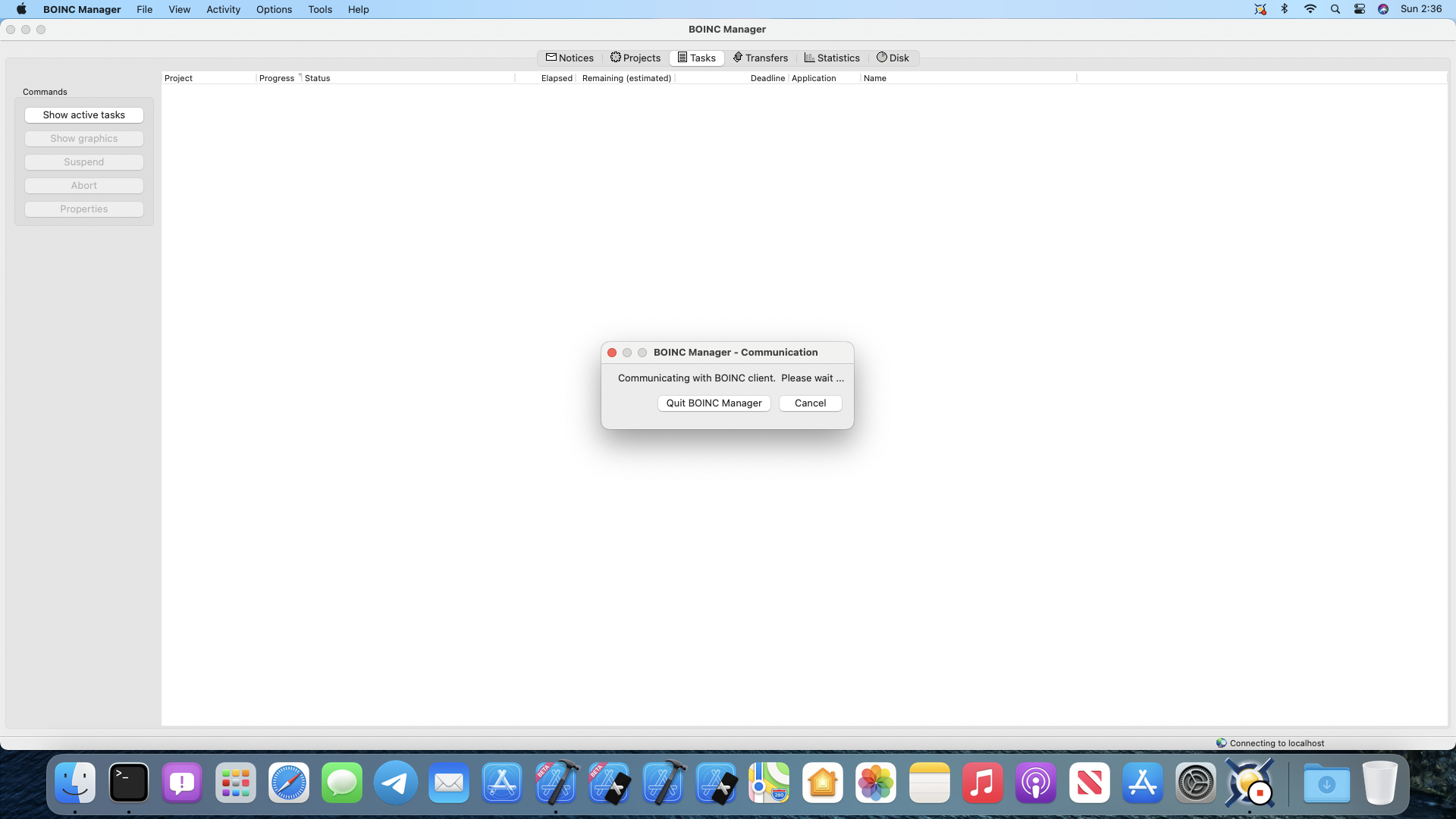

Just to clarify, the "Communicating with client" alert is different from "Connecting to client." If you see that alert, the Manager is already connected to the client, but has been waiting over 1.5 seconds for the client to respond to a Demand RPC request. A Demand RPC is one in which the Manager cannot proceed until it receives the response from the client, and so the Manager's event processing must be suspended.
I have edited the title of this PR accordingly.
It might be possible to implement this RPC by adding those menu items to CBOINCGUIApp::FilterEvent(wxEvent &event), but I don't think so since that is a modal dialog. See this documentation.
Since the Manager's event processing must be suspended, I think it might require a major rewrite of the Manager logic to allow handling of any menu items, which is why I implemented this as a modal dialog. Ideally, this dialog should never appear, but we know from experience that is not the reality.
I retrofitted the Manager years ago to allow for asynchronous RPCs to minimize the situations in which the manager becomes unresponsive to the user, but due to the Manager's basic design I could not find a way to allow the Manager to remain responsive while waiting for certainRPCs to complete.
The best I could come up with for that situation is to display the dreaded "Communicating with client" dialog to let the user know why the Manager was not responding, and to allow bailing out by providing the "Exit BOINC Manager" button ("Quit BOINC Manager" on Macs) and "Cancel" button on the dialog. The Cancel option cancels that one RPC, which sometimes resolves the problem but can produce unpredictable results. Unfortunately, the same situation quickly occurs again with another RPC after the cancel.
I called these Demand RPCs or synchronous RPCs; the others I called asynchronous. You can see these definitions in enum ASYNC_RPC_TYPE in clientgui/AsyncRPC.h.
The logic to retrofit the Manager for asynchronous RPCs was quite complex and tricky to prevent problems from race conditions, etc. Changing the "Communicating with client" dialog to a modeless dialog to enable menu items might be possible, but would require extra code to disable all other events and would need to be done very carefully to avoid accidentally breaking things.

One could argue that the issue is really caused by the client, which is not asynchronous. If the client is waiting for an operation to complete, such as a file operation or an RPC with a project server, it blocks and can't process an RPC from the Manager.
Not a real solution, but here is a workaround when running on MacOS: control-click on the BOINC Manager icon in the Dock, then select Hide from the popup menu.
This feature request in nice to have and looks interesting but it requires a huge work to make both client and Manager asynchronous.

Could our Mac friends identify exactly what (in the commonest cases) is causing the client to become unresponsive? My guess might be that it's waiting for a delayed response from a project server? That could be checked from the Event Log, when it comes back to life.

My guess might be that it's waiting for a delayed response from a project server?
@RichardHaselgrove: That is one likely scenario, as I wrote in this comment above, but there are probably other situations in which the client is busy for more than 1.5 seconds and so hasn't gotten around to responding to an RPC from the Manager.
:crystal_ball: I became curious on further improvements also in this software area.
:thought_balloon: Can any issues be better explained around the message “Communicating with BOINC client”?

BTW, the client continues to process GUI RPCs
- while waiting for scheduler and account manager RPC responses
- while doing large file copies or unzip/verify In other words, it's as asynchronous as it can be given the single-thread/select() design.
Things that might trigger 'communicating with client': starting a huge program with CreateProcess() writing a big client_state.xml when the disk is busy ... what else? I may be able to fix some things

what else? I may be able to fix some things
When it communicates with project servers, does it do so asynchronously? Are there any situations where it might hang waiting for external communication (i.e., over the Internet)?
Could a very large computer (perhaps with a very large number of CPU cores) have so many tasks that some of the RPCs take a long time to transfer (such as get_results, get_state)?
... what else? …
:thought_balloon: I wonder since a few days (also with the current BOINC software version) which circumstances hinder to present my BOINC project selection so that I can contribute some data processing resources on demand.
:crystal_ball: Can it be determined what the “BOINC client” is trying to achieve while it should respond also to a “Demand RPC” from the BOINC manager user interface?
Can it be determined what the “BOINC client” is trying to achieve while it should respond also to a “Demand RPC” from the BOINC manager user interface?
No. Since the client is not responding, there is no way to get information from the client. The "Communicating with client" alert is the best we can do because that is all the information the GUI (i.e. the BOINC Manager) has.
Since the client is not responding, there is no way to get information from the client.
:crystal_ball: Will any other software debugging approaches become relevant then?
The "Communicating with client" alert is the best we can do because that is all the information the GUI (i.e. the BOINC Manager) has.
:thought_balloon: Can additional information be displayed for the “Demand RPC” which should get a response anyhow?
Since the client is not responding, there is no way to get information from the client.
:crystal_ball: Will any other software debugging approaches become relevant then?
The "Communicating with client" alert is the best we can do because that is all the information the GUI (i.e. the BOINC Manager) has.
:thought_balloon: Can additional information be displayed for the “Demand RPC” which should get a response anyhow?
Why this information should be shown to the user? This is a low-level information that is clear for developers only, and will be just a set of random words for an average user.
Why this information should be shown to the user?
I hope that confusion can be reduced further about undesirable software behaviour. :thinking:
This is a low-level information that is clear for developers only, and will be just a set of random words for an average user.
:thought_balloon: I imagine that additional information would help to find solutions in easier ways.
Why this information should be shown to the user?
The volunteer community - project 'Help desk experts' - can guide other users in the relevance, use, and interpretation of the specialist debug Event Log flags, as and when the need arises.
Of course, if the client is unresponsive, new RPC events can't be added without a client restart - but if a user suffers these events repeatedly, monitoring can be set up in advance.
Ok. Looks like currently this discussion goes in the wrong direction. To clarify this a little bit. We have two types of RPCs: blocking and non-blocking. We (maintainers) should identify what RPC are blocking and are there any ways to make them non-blocking and make the UI more responsive. We have an 'RPC debug' flag that will show all of the in the log. If blocking RPC is sent - then the user has no way to check the log (at least from the GUI) and understand what is going on. Probably we should find a better way of handling such cases and handle all of the RPCs in the background thread instead of the GUI thread. But definitely showing debug information on the GUI window is not a good solution.
There are two approaches. One is to make the Manager responsive even when GUI RPCs are taking a long time. This led to the blocking/non-blocking distinction. We spent a lot of time on this and I'm not sure much else can be done.
The 2nd is to make GUI RPCs fast, regardless of what else the client is doing. This may be possible, but I need to understand why some RPCs are slow. Windows developers can help. Run the client under the debugger. When you get a "communicating with client" message, quickly break the client, see where the main thread is, and send me the stack trace (or post it here).
But definitely showing debug information on the GUI window is not a good solution.
:thought_balloon: What does hinder to present further helpful information about blocking RPCs?
The 2nd is to make GUI RPCs fast, regardless of what else the client is doing.
Are such remote procedure calls put into work queues for background execution?
Windows developers can help.
Developers with other operating systems can eventually also help more.
Run the client under the debugger.
:thought_balloon: Can the BOINC client still react to data requests by other commands?
…, but I need to understand why some RPCs are slow.
:thought_balloon: Would you get into the mood to take another look at data processing and corresponding function execution statistics?
@elfring As @davidpanderson wrote, we already spent a great deal of time to minimize the times this happens.
Please explain why you are so concerned about this. For most people, this occurs very rarely and for only a very short duration; are you seeing the "Communicating with client" alert frequently? Is it blocking the Manager for more than a short time? If the answer to these questions is yes, then please give us details about your BOINC configuration, including the OS, your hardware and which projects you are running, so we have a way to try to reproduce it.
We have very few volunteer developers working on BOINC. Please explain why we should prioritize this over the many other tasks that need our attention.
…; are you seeing the "Communicating with client" alert frequently?
Yes. ‒ “Permanently” for a while on my openSUSE Tumbleweed system.
:eyes: I determined by extending the constructor of the class “AsyncRPCDlg” that I stumbled on difficulties according to the enumeration element “RPC_AUTHORIZE” once more.
:crystal_ball: How can authorisation issues with BOINC projects be resolved better in my case?
@elfring, please enable these event log flags, wait for the next hang, go to the BOINC Data directory, locate stdoutdae.txt file and post its content here
This will help us to determine what exactly if going wrong with your client
please enable these event log flags, …
I can construct the file “cc_config.xml” as requested.
wait for the next hang,
Markus_Elfring@Sonne:/var/lib/boinc> boincmgr
- I can take another look at information in my extended “AsyncRPCDlg”.
- I can press also the exit button there.
- But I observe that the program “boincmgr” is not stopped so far. Thus I stop it explicitly by the application “system monitor”.
…, locate stdoutdae.txt file
This suggestion should be reconsidered.
and post its content here
Where would you like to see standard output data on a Linux execution environment here? :thinking:
@elfring, I don't need to see the standard output data. I need the logs from the file I mentioned above. You can play with your extended class as much as you want, but this doesn't help us. I'm asking you for the logs from your client. Please provide them. You can either put them as a text in the reply or just attach that file, both ways are ok to me.
I don't need to see the standard output data.
Your suggestion could be interpreted in other ways according to published information. :eyes: https://boinc.berkeley.edu/wiki/Client_configuration
I need the logs from the file I mentioned above.
I got the impression that the desired log file is not written during my tests here so far.
You can play with your extended class as much as you want, but this doesn't help us.
I can display additional data (which can be passed as constructor parameters for my needs) in the mentioned message box.
I got the impression that the desired log file is not written during my tests here so far.
Please be sure to enable debug flags I mentioned above. If you have everything disabled - you'll definitely see very few information in that file
I would appreciate if I could offer more information also according to the following file content.
Sonne:/var/lib/boinc # ls -l cc_config.xml && cat cc_config.xml
-rw-r--r-- 1 boinc boinc 213 Sep 20 15:35 cc_config.xml
<cc_config>
<log_flags>
<file_xfer>1</file_xfer>
<gui_rpc_debug>1</gui_rpc_debug>
<http_debug>1</http_debug>
<http_xfer_debug>1</http_xfer_debug>
<sched_ops>1</sched_ops>
<task>1</task>
</log_flags>
</cc_config>
:thought_balloon: Unfortunately, it seems that some parts of the discussed software are still not working as expected at the moment.
I got the impression that the desired log file is not written during my tests here so far.
stdoutdae.txt is only one possible location for BOINC's permanent record of previous Event Logs. It depends how you start the client under your particular OS. Most modern Linux implementations launch the client as a systemd service, and in those cases, the event log is held in the system Journal. You mentioned "openSUSE Tumbleweed" a little while ago: I'm not familiar with that, but some boinc documentation suggests the use of a -redirectio switch if starting the client from the command line - e.g. https://github.com/BOINC/boinc/wiki/CoreClient